

The full answer
Settings › Notifications in the Fold’em app has, under From your people, a Requests row that reads Always and has no switch, then a switch for Milestones and one for Protection ending, set once for everyone you stand with. Turned off, that kind is not sent to your phone, and what it was about still shows in the app. Requests covers an ask for support and every request: to end protection, to end a Lockdown sooner, and a handover that offers you their key. Those, and the alerts that protection went off or their phone went quiet, reach you whatever you set, because they never depend on a switch to reach you. A handover that asks you to pass the key on never rings: it waits on their row. What is shared with you in the first place is not yours to set. That is set on their side, once, for everyone in their circle, and if they turn their run off you are shown that it is off.
Two settings, and only one of them is yours
What is shared belongs to the person you hold for. It is one page in their Settings, What your people see, and it is set once for everyone in their circle: there is no version of it for you in particular, and no control on your side that could reach it. Whether their protection is on, any request to end protection they open and an ask for support are always shown. The one thing they can switch is their gambling free run, and when it is off their row shows no count and their page says Not shared.
What rings on your phone is yours, in Settings › Notifications in your own app. Under From your people, the first row is Requests, Asks for support and end requests, which reads Always and has no switch. Under it sit the switches for what the people you support send you: Milestones, Someone made it through, or changed what they share, and Protection ending, For someone you support. If you also have protection of your own, two more switches cover what your own supporters send you: Encouragement and Reminders.
Milestones covers a milestone day they reached, word that they made it through after an ask for support, a change to what they share, the news that their protection has ended, and news about your own place in their circle, such as an answer to your ask. Protection ending covers the notice that their protection will end unless it is restored. Turned off, that kind is not sent to your phone, and what it was about still shows in the app. Nothing about a switch reaches the person you stand with, and nothing about it changes what you are shown when you look.
A request never depends on a switch
An ask for support, a request to end protection, a request to end a Lockdown sooner and a handover that offers you their key reach you whatever you switch, and so do the alerts that their protection went off, that their phone has gone quiet, and that it is back on. A request also waits for you on their row in the app, red and first under You support. Under the master switch, Settings says the one thing that matters: requests from your people still arrive.
Where to look, and what to do
-
Read their row
It is the standing answer to what is happening: their protection state, a request that needs you, an ask for support. A switch you turned off changes nothing here.
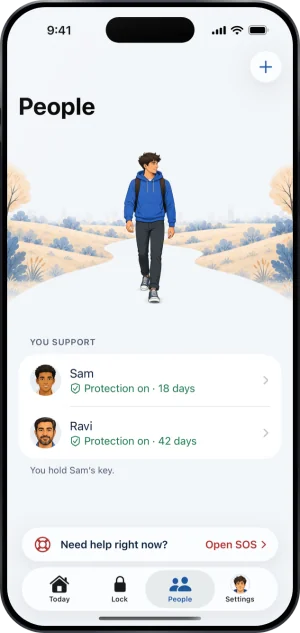
Their row, on People
-
Open Settings › Notifications
Turn off Milestones or Protection ending if you do not want them to ring. Requests has no switch: an ask for support and a request to end protection or a Lockdown ring either way. The switches cover everyone you stand with at once, and they are private to you.
-
If it is what they share that bothers you, say so to them
The route to sharing less runs through the person you hold for, in their own Settings. There is nothing to unsubscribe from on our side.
-
If it is still too much, step away
Handing the key back is a supported act and is better than holding it and not answering. Their protection continues, and from that moment they are somebody with no keyholder: seven days from a request before it is ready.
How much actually reaches you
The floor is narrow on purpose. In a commitment where nothing goes wrong, what a keyholder hears is the milestone days they reach. Everything else is an exception rather than a routine: a request that needs you, an ask for support, protection that went off or is ending.
What to do when one of these does arrive is not a settings question, and someone you love is gambling is where it is answered.
What this does not do
None of this gives you a way to receive more than the standard set either. There is no digest, no weekly summary, and no subscription that would widen what you are sent, because what is sent is decided by what is happening rather than by what you asked for.
A switch never widens or narrows what you can see. The list a keyholder is shown is fixed, and a switch removes a notification rather than changing the list.
Write to us and a person reads it. We answer within two working days, and we would rather hear the question twice than not at all.