

The full answer
If you hold the key, they keep their protection and carry on without one, and the path for somebody with no keyholder opens the moment you are gone. Stepping away is written by the account you are signed in to and takes one confirmation, so nobody else can hand your key back for you. If you are a supporter without the key you simply stop being listed, and nothing about their protection changes.
Two different events with one name
Stepping away means one thing for a keyholder and a much smaller thing for a supporter without the key, and the app says which one you are holding before you ever look for the door.
If you hold the key, your leaving changes how their protection behaves. Their protection carries on exactly as it was, none of their blocks move, and none of their days are lost. What changes is that there is no longer anybody to ask. Their account carries on without a keyholder, and the path for somebody with no keyholder opens at that instant: seven days from a request before it is ready. Nothing is held back and nothing is penalised.
If you are a supporter without the key, your leaving removes the connection and nothing else. No mode changes, no flag is written and nothing about their way to end protection moves, which is exactly what a role that holds no key implies. They keep their lock and their protection either way.
Neither version is something you can undo from your side. Once you have stepped away, the only route back is for them to invite you again.
Why it takes a confirmation
Reading about somebody you support is harmless. Resigning is not, because a resignation lowers the protection standing behind somebody's protection, so it is not an act to leave one stray tap away.
The authority is your account rather than any link. Stepping away is written by the account you are signed in to, on the same principle as every other decision a keyholder makes, and the app asks you to confirm it once before it goes. Nothing that was forwarded to somebody else can resign for you, because there is nothing to forward.
What that does not cover is worth stating as plainly. A phone that is already signed in as you is, to the server, you: the trust rests on the account, exactly as it does for every other authenticated act in Fold’em.
Three moments it will refuse
The server checks three things before it lets a keyholder go, and all three refusals protect the person you hold for from being left mid process with nobody answering. For the first two, their page greys out the step away row and says why under it; the third is refused when you try.
It refuses while a request to end protection is open, its wait included. Leaving at that instant would abandon a live decision, so the answer is to let it finish or close first, and to step away after.
It refuses while a handover is running. A change already has a designated successor and a clock; stepping out of the middle of one is a cancellation rather than a resignation, so the change is the thing to resolve.
It refuses while a request to end a Lockdown sooner is waiting for your answer. Say yes or say no first, and then you can go.
Stepping away
-
Open their page in the app
Step away, in red with their name, sits at the foot of the page of the person you hold for, beside everything else you can do about them, rather than on a page of its own somewhere else.
-
Read the consequence before you confirm
The confirmation says what changes: you stop seeing their updates, you stop holding their key, and they have no keyholder until someone accepts. What that opens for them is the path for somebody without a keyholder, and you cannot take it back from your side.
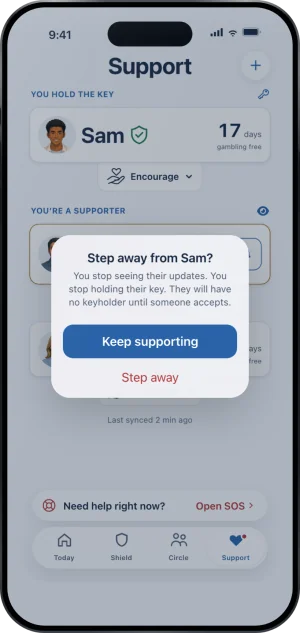
The step away confirm
-
Keep supporting is the easy answer
Keep supporting is the prominent first control, and Step away, in red, is the second. The order is deliberate: the ending act is the smaller, later one, and nothing here is arranged to hurry you out.
-
They are told, and nobody else is
The person you held for learns that you stepped away. Nobody else in their circle is told, and the only route back is for them to invite you again.
What this does not do
Stepping away does not end their protection, open their apps or shorten anything. Their apps and their sites stay blocked and their day count carries on unbroken. It is not a way out for them either: with no keyholder the wait before a request is ready is seven days, where an approval from you would have started a wait of 48 hours, so your leaving is the slower road rather than a shortcut.
It also does not delete anything you have already seen or been told, and it does not notify anyone but the person you held for. There is no handing the key to a person of your choosing either: once you have stepped away, they invite whoever they want next.
Write to us and a person reads it. We answer within two working days, and we would rather hear the question twice than not at all.