

Before you accept: it is a link, a code or a QR
An invite is a link the person shares from the invite sheet in their app, with a QR code and their own code beside it. A lost link is not a lost invite: ask them to share it again, from the same sheet or from the Send the link again button on their waiting page. Typing their code works too, on the first page a new account sees, but a typed code asks to support them rather than to hold the key, so for the key ask for the link.
Whichever way you answer, your yes is an ask that they accept on their side. Nothing about them is yours to see until they do, so an invite you never opened confers no view of anything and no authority at all.
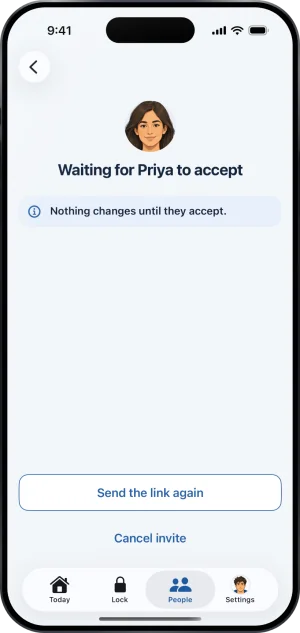
Their waiting page, with Send the link again
After you accept: your access is your account
Once you have accepted, nothing is issued to you that could be lost: no link and no page carries your role. You hold the key as a signed in account, and an account is not something you can drop. Sign in on any iPhone and the people you stand with are on your People tab. There is no sign out: one phone holds one account, which is what makes the key hard to hand around. Losing a phone is a phone problem rather than a Fold’em one.
Which account holds the key is still not something you can change on your own. Only the person you hold for can move it, by removing you and inviting the account you actually use, and you accept again from scratch.
Getting back in
-
Install Fold’em and sign in
Use the same Apple account you accepted with. A supporter's account is free and holds no protection of its own, so signing in again costs nothing and buys nothing.
-
Open People
Everyone you stand with is a row under You support, with their page behind it. Nothing was rebuilt, because what you are reading was never stored on your phone in the first place.
-
If You support is empty, check which account you signed in as
The role belongs to the account that accepted, not to the device. Signed in as a different account, People is empty and nothing is broken. Sign in as the account that accepted.
-
If it is genuinely the wrong account, ask them
Moving the key to a different account cannot be done from your side. They remove you in their app, invite the account you use, and you accept again.
What this does not do
Signing in again does not change who you are or what you can see. What a supporter is shown is the same set before and after, and it is set on their side.
A link that no longer opens the ask is not a fault to report; they may have cancelled the invite. They can share a fresh one from the same sheet.
Write to us and a person reads it. We answer within two working days, and we would rather hear the question twice than not at all.