

The full answer
An invite is not an email and not a text message: the person shares a link with you themselves, by whatever channel they use, with a QR code and their own code beside it. You open the link in the Fold’em app and answer there, and they accept your answer on their side. So the person to ask is them: if nothing reached you, ask them to share the link again.
What an invite is, and is not
Fold’em never sends an invite by email, and it never sends a text message to anyone. The invite sheet in the person's app gives them a link to share by whatever channel they already use, a QR code and their own code. The link and the QR open their ask in the app. Their code can be typed on the first page a new account sees, where Fold’em shows you who it belongs to before you send anything; a typed code asks to support them, so for the key use the link.
Whichever way you reach it, your yes is an ask that they accept on their side.
If you do not have the app yet, the link opens a web page first, with their code, a note that a supporter account is free, and a way to get Fold’em.
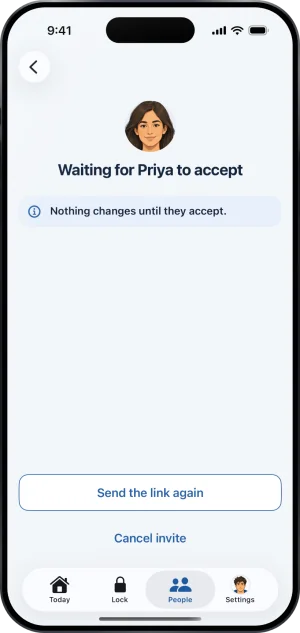
Their waiting page, with Send the link again
Working through it
-
Look in the messages they use with you
The link arrives by whatever channel they chose: a text, a chat, an email they wrote themselves. Fold’em puts nothing in the app or your inbox for you before you open it.
-
Check you are signed in as the right person
Your answer goes from the account you are signed in to when you open the link, and that is the account that will hold the key. Check it is the one you mean to use.
-
Ask them to share the link again
Their waiting page has a Send the link again button, and the invite sheet shares a fresh one.
What this does not do
A missing invite is never a reason to worry about their protection. Nothing about you holding the key exists until you accept, and their protection runs the same with or without a keyholder.
An email that you were expecting for some other reason, about your account for instance, is a different question, and the mailbox article covers it.
Write to us and a person reads it. We answer within two working days, and we would rather hear the question twice than not at all.