

The full answer
The other case is a request to end a Lockdown sooner, which you can answer from anywhere. Nothing else is asked of you, and nothing at all is asked unless one of those happens. You hold the key in the Fold’em app on your own iPhone, you cannot end their protection from it, and you cannot shorten, cancel or extend any of its waits.
The whole job is answering requests
Someone installed Fold’em on their own iPhone, blocked the gambling apps and betting sites on it, and asked you to hold the key. Protection has no end date: it runs until it is ended. While it runs, the apps they blocked do not open on that phone and the betting sites Fold’em carries do not load in its browsers. They cannot simply switch it back off, and that is the point of asking you.
You hold the key in the same app, on your own iPhone, signed in to an account of your own. It is free, it protects nothing of yours unless you want it to, and it is the only place a keyholder answers anything.
Two kinds of request reach you in Fold’em 3.0. The first is a request to end protection: if they want their protection to end, you are the person who answers. The second is a request to end a Lockdown sooner: a Lockdown is extra protection they can turn on for their weakest moments, and if they want one to end before its time, they can ask you. A handover someone began in an earlier version of Fold’em can also ask you to pass the key on. Between those moments there is nothing to do, nothing to check daily, and no schedule you are on.
The ask says what holding the key means before you agree to anything, and a person new to Fold’em sees what is shared with them and what stays private.
What answering actually means
When a request to end protection opens, their row on People turns red, moves to the top of You support and reads Asked you to end protection, and the page behind it says you decide within 7 days, or it closes. It waits there whatever your notification switches say. Two answers exist.
Saying no is one tap, from anywhere. Face ID confirms it is you first, so an answer is never one stray tap away and nothing forwarded to somebody else can answer in your name. If you say no, they are told, with no reason attached, and that closes the request.
Letting them out is meant to be done in person. There is no button that ends their protection on your own say so. Approving means tapping Show my code, behind that same Face ID, and they scan the code with the Fold’em app on their phone while you are standing together. The code is bound to that one request and works for the day it names. Fold’em cannot check that you are together, so a photo of it would scan too: show it only in person.
Answering is not the only outcome. If seven days pass with no answer from you, the server closes the request on its own. Nothing opens and their protection carries on, so silence lands in the same place saying no would have, a week later.
A request to end a Lockdown sooner is different: you can say yes to it from anywhere. Say no is the filled button and Say yes the quiet one, both behind Face ID. A yes lets them end that Lockdown now; it stays on until they do, and their usual protection stays on either way.
What you cannot do
The limits are built into the server, not into a policy anyone can waive.
You cannot end their protection, remotely or otherwise. You cannot shorten the wait that follows an approval, and you cannot cancel it once it has started: only the person you hold for can call their own request off. You cannot change their protection, their blocked apps or their sites, and there is no control anywhere that would let you. You cannot decide what they share with you either, because what is shared is set on their side, and the updates that ask something of you reach you whatever anybody has switched.
Before you accept
-
Read what accepting means
The ask says they asked you to hold their key, and that ending their protection takes your yes. If you are new to Fold’em, the first page also shows two rows: you decide on requests to end protection, and approval is in person; and you hear when support is needed. Its foot names what stays private: their check ins, goals, money, app and site names, and anything they type.
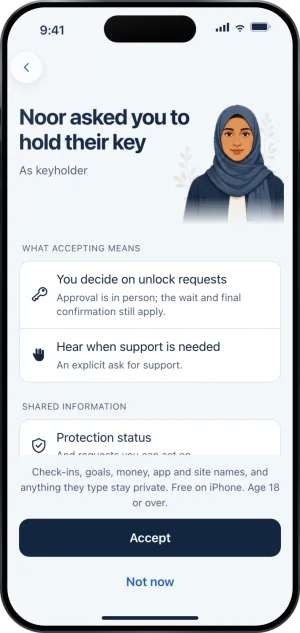
The ask, before you accept
-
Read what is shared with you
On that first page, under What you can see, three lines: their protection status and the requests you can act on, their gambling free run while they share it, and an ask for support when they say they are struggling. Once you hold the key, their page on People shows the same, under How they are doing.
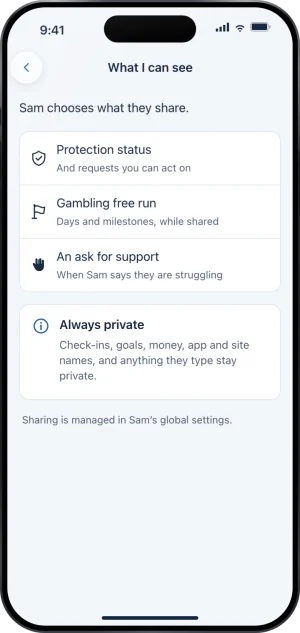
The same three rows, on What I can see
-
Say yes, or say you cannot
Hold the key is the filled button, and under it sits Not now, which sends nothing. Your yes is an ask, and you hold the key once they accept it on their phone. Saying you cannot is a real answer, and it is better than accepting a role you will not answer.
-
Know that you can leave later
Accepting is not permanent. You can step away in the app at any time. Their protection continues without a keyholder, and from that moment the path open to them is the one for somebody with no keyholder: seven days from a request before it is ready.
What this does not do
Holding a key does not make you responsible for whether they gamble. Fold’em blocks one iPhone, and a second phone, a desktop, a betting shop and cash are all outside what any app can reach. It does not make you a monitor: you are never shown what they browse or any amount of money, and no spend figure is sent to a supporter anywhere in Fold’em. Nothing they write reaches you except a note they can add when they ask you to end a Lockdown sooner. It is not a treatment service and nothing here is medical advice.
Accepting also gives you no control over their phone. There is no setting of theirs you can change, no block you can add, and no timer you can move.
Write to us and a person reads it. We answer within two working days, and we would rather hear the question twice than not at all.