

The full answer
The page says who is asking and that ending their protection takes your yes. Your tap is an ask: you hold their key once they accept it on their phone. If you are new to Fold’em, the link first shows you who is asking, what you would see and what stays private, and then you sign in. If you do not have the app, the link opens a page with their code and a way to get Fold’em. Acceptance only ever happens inside the app, signed in as you, so nothing is accepted because a link was delivered or opened.
Where the ask comes from
The person who wants you to hold their key opens the invite sheet in their app and chooses Hold the key. The sheet gives them a link to share by whatever channel they already use, a QR code, and their own code, eight characters. The link and the QR both open their ask in Fold’em with the key in it. Their code works too if you type it on the first page a new account sees, but a typed code asks to support them rather than to hold the key, so for the key use the link or the QR.
Fold’em itself sends no invite email; the link arrives by whatever they chose to share it with. Opening a link accepts nothing, and nothing is stored against your name until you answer it in the app.
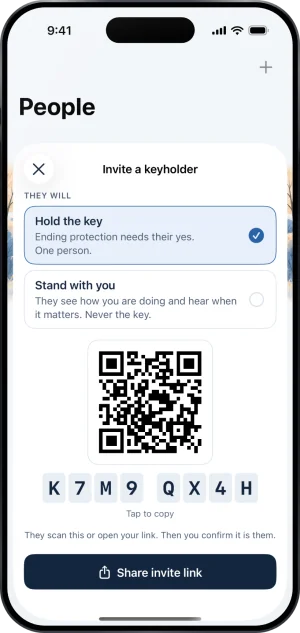
Their side: the invite sheet, Hold the key chosen
Your account, and what it costs
Holding the key is something you do as yourself, signed in. The account you accept with is the account that holds the key, and it is free: a supporter's account protects nothing of its own unless you later choose to start your own protection. You must be 18 or over.
Fold’em sends no text messages to anyone, ever. If the person you stand with wants your number so they can call you, they add it on their own phone.
Accepting, end to end
-
Open the link
With the app installed and signed in, the link opens Fold’em rather than a browser and lands on their ask, on your People tab. A card says they asked you to hold their key, and that ending their protection takes your yes. Under it, one line says what comes later: you will be asked to approve, deny or wait when they want out, and you can step back any time.
-
If you are new to Fold’em, read the first page, then sign in
The link first shows who is asking, that it is a keyholder invitation, what holding the key means, what you can see and what stays private. Continue on that page accepts nothing. Sign in with Apple, give your name, and the ask is there. Without the app at all, the link opens a web page with their code and a way to get Fold’em: install it, sign in, and tap the link again. There is no web page that can accept for you.
-
Tap Hold the key
Hold the key is the filled button; Not now is the quiet one under it and sends nothing. Your tap sends your yes to them as an ask, and the page turns to Request sent · waiting for and their name: you are connected only once they accept it. What the role asks of you is set out row by row in What am I agreeing to as a keyholder?.
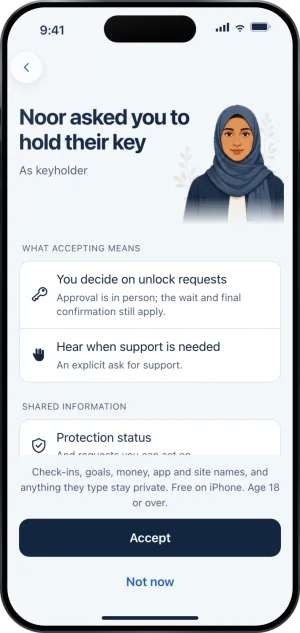
The ask, in the app
What happens right after
They see your ask on their People tab and choose Accept or Not now. When they accept, you are told that you now hold their key, unless you turned Milestones off in your notification settings. They appear on your People tab under You support, the foot of that group says whose key you hold, and their app shows you as their keyholder. Read the line under their name for what it says; every word it can carry is explained in What does each status on their card mean?.
If they decline, you are told that your ask is closed, unless you turned Milestones off, and you cannot ask them again for 7 days. A person has one keyholder and up to three other supporters, and you cannot hold your own key.
If you have not decided whether to accept yet, someone you love is gambling is the longer version of that decision.
What this does not do
Accepting does not give you access to their app, their settings or their phone. It is not a login to their account, and it does not let you move the key to a different account later on your own: only they can do that, by removing you and inviting the right account again.
Accepting also does not lock you in. You can step away later from inside the app, and their protection carries on without you.
Write to us and a person reads it. We answer within two working days, and we would rather hear the question twice than not at all.