

Someone you love is gambling. What you can do
You cannot block their phone, but you can hold the key to a block they chose for themselves.
Need someone now?
These lines are free and not run by Fold’em.
- Call 1 800 697 3738National Problem Gambling Helpline, US. Call, text or chat.
- Call 1 866 531 2600ConnexOntario, Canada. For people in Ontario.
- Call 0800 1 37 27 00BZgA Check dein Spiel, Germany
- Call 1800 858 858Gambling Help Online, Australia
- Call 0808 8020 133National Gambling Helpline, UK
- Other countries
Updated October 2026
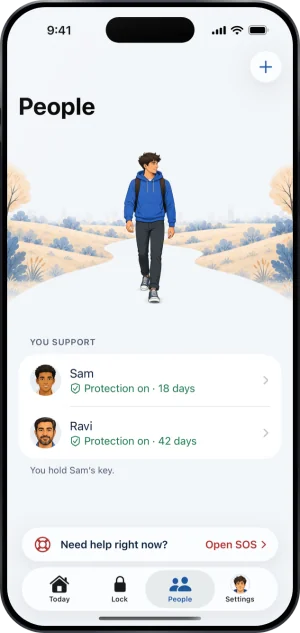
No app can make gambling impossible on an iPhone. The phone belongs to the person holding it, the Screen Time permission a blocker runs on is theirs to withdraw, and anyone telling you otherwise is selling you something. What a keyholder changes is that the block cannot come off quietly: the person who agreed to hold the key is told when protection goes off, when the phone stops confirming, and when protection is ending.
Take the support that exists for you
Before anything about phones. Every organisation below exists for you rather than for the person who gambles. None of them is us, none of them charges, and none of them needs the person you are worried about to agree to anything.
- Gam-Anon is a fellowship of meetings for the family and friends of someone who gambles. The NHS lists it first among the places to go if you are affected by another person's gambling.
- In the United Kingdom the National Gambling Helpline is run by GamCare on 0808 8020 133. The NHS states that it is free, that it runs 24 hours a day and 7 days a week, and that it is there for information, support and counselling. It takes calls from people affected by somebody else's gambling, not only from the person gambling.
- The NHS page on gambling names its own treatment clinics, and beside them GamFam, a lived experience support network, and Gambling with Lives, for people bereaved by a gambling related suicide.
- In the United States the National Council on Problem Gambling keeps a directory called Help by State, which in its own words connects you with local support and resources across all 50 states.
The block at the foot of this page carries the numbers again.
What you can do from outside their phone
The honest list is short, and it is short for a reason worth knowing before you spend a weekend looking for a way around it.
- You cannot install Fold’em on their iPhone for them. The block runs on Apple's Screen Time controls, and only the person sitting at that phone, signed in on it, can grant an app permission to use them. There is no remote install and no family plan that seals another adult's apps.
- You cannot end it for them either, and you cannot start it. A keyholder answers when they are asked and holds no other lever. That is not a gap in the product; it is what makes an adult willing to hand over a key at all.
A minor's phone is a different question with a real answer, and the answer is Apple's, not ours. Apple's own support page on Family Sharing says that it lets a parent or guardian manage a child's device with Screen Time and parental controls, and that where it is legally required an Apple Account created for a child under 18 has to be part of a Family Sharing group. If the phone is a child's, that is the route, and the page for parents says so rather than selling you an app that does not fit.
What you can do is be asked, or offer, and either way they decide. One person holds the key, and the point of it being you is that ending protection then costs a conversation.
What holding a key actually is
They install the app, choose which apps and sites to seal, and invite you: with a link, a code you type, or a code you scan when you are together. You accept in Fold’em on your own iPhone, signed in to your own account. If you do not have the app yet, the link opens a short page saying who asked and that a supporter account costs nothing, then takes you to the App Store. Once it is installed, open the link again and the ask is waiting for you in the app. Before you accept, the app shows you what you would and would not see, and saying no is an answer too. From then on their protection shows on the card you hold for them.
After that you answer when they ask to end protection or to end a Lockdown sooner, and when they ask to pass the key to someone else.
Saying no is one tap, from anywhere, in your own app, and your phone confirms it is you before the tap counts. If you say no they are told, with no reason attached, and the request closes there. A denial is a denial, and there is nowhere to write a reason. They can ask again 48 hours later, which opens a new request rather than reopening the one you closed.
- Letting them out is only ever done in person. Your app shows an approval code and they scan it with theirs while the two of you are standing together; no web page and no email can do it for you. Even then nothing opens that day: a wait of 48 hours starts from the moment you said yes.
- Doing nothing is a decision too, and it is the one that keeps protection on. If seven days pass with no answer the request closes on its own, and nothing about their protection changes. Silence is not a yes. Both answers stay open for the whole of those seven days, and an unanswered request leaves them waiting a week to be told nothing.
At the end of the wait the server marks a release that they still have to take. Nothing opens by itself, and a release nobody turns closes again after seven days, with their protection carrying on.
What reaches you
Their protection shows on the card you hold for them in your own app, and the card changes with it.
- Protection went off. Screen Time permission was switched off on that phone, or the shield Fold’em applied is gone. Your card changes to Protection off.
- The phone stopped confirming. No reading of any kind arrived for 24 hours. Your card reads Not confirmed yet, which can be as ordinary as a dead battery or airplane mode.
- Protection is ending. Your card reads Protection at risk.
Which kinds of alert also ring your phone is yours to set in your own Settings, and a request to end protection always reaches you whatever those switches say.
The full account of what reaches you sets every word on the card out side by side.
What you can see, and what you never see
A keyholder is shown eleven things, and that list is written out in full on two help pages and in the privacy policy; every other page points at it. Read it before you accept: what a keyholder can see, and the same list from their side at what my keyholder sees.
The shape of it is status, counts, dates and event kinds. You never see which apps or sites were involved, anything they browse, any amount of money, or anything they typed except a note they add when they ask you, as their keyholder, to end a Lockdown sooner. There is no spend figure anywhere in what the server sends a supporter, so there is nothing for a screen to show you by accident.
That is deliberate, and it is the reason a person is willing to name you. A tool that reported their browsing to you would be a monitoring tool, and nobody hands the key to one of those.
What none of this reaches
Fold’em holds one iPhone. A second phone, a laptop, a betting shop and cash are all outside it, and none of them produces an event you would see. A calm card means the blocks on one phone are running; reading it as evidence about a person is the fastest way to turn a support into a surveillance argument.
It is also not treatment. Fold’em is a commitment device: it moves a decision to a calmer moment and, when someone holds the key, puts a second person in the loop. The organisations at the top of this page do the other work, and they should be your first call rather than your last.
Can I block gambling apps on someone else's iPhone?
Not on another adult's phone, and not through us. The block runs on Apple's Screen Time controls, and only the person sitting at that handset, signed in on it, can grant an app permission to use them; there is no remote install and no plan that seals another adult's apps. A child's phone is a different question with Apple's own answer rather than ours: Apple's page on Family Sharing says it lets you manage a child's device with Screen Time and parental controls, and that Where legally required, an Apple Account created for a child under 18 needs to be part of a Family Sharing group. If the phone belongs to a child, that is the route, and the page for parents says so instead of selling you an app that does not fit. Source: Apple on Family Sharing, read 3 September 2026.
Will I be told if they turn the block off?
Yes, on the card you hold for them in your own app: it changes when Screen Time permission goes off or the shield disappears, when 24 hours pass with no reading of any kind from the phone, and when protection is ending. The full account of what reaches you sets every word on the card out side by side.
What can I actually see about them?
Status, counts, dates and the kinds of events, and never a website, an app, an amount of money or anything they typed, except a note they add when they ask you, as their keyholder, to end a Lockdown sooner. The list is written out in full at what a keyholder can see, and it is worth reading before you accept rather than after. The shape matters more than any single item on it. A tool that reported somebody's browsing to the person worried about them would be a monitoring tool, and nobody hands the key to one of those.
Could I set it up on their phone without telling them?
No, and it would not survive the morning even if you could. Screen Time permission is granted by the person at the phone and withdrawn by them in iOS Settings whenever they like, so a block placed behind somebody's back lasts exactly as long as it takes them to find it. What lasts is the other shape. They install it, they choose what to seal, and they name you, and being named is what makes ending protection cost a conversation. How to ask them is the page for the part that is actually hard.
Where to go from here
By who you are: a partner, or a parent, or somebody worried about their own parent. By what you are working out: how to ask, and what happens the day they ask for the key back. And if they are ready to read something themselves, a page to send them, with a paragraph you can paste into a message.
The help center answers how the app behaves, screen by screen. If your question is not there, write to us. A person reads it and answers within two working days.
If you need someone now
Free, and not run by Fold’em.
- Call 1 800 697 3738National Problem Gambling Helpline, US. Call, text or chat.
- Call 1 866 531 2600ConnexOntario, Canada. For people in Ontario.Website for ConnexOntario
- Call 0800 1 37 27 00BZgA Check dein Spiel, GermanyWebsite for BZgA Check dein Spiel
- Call 1800 858 858Gambling Help Online, AustraliaWebsite for Gambling Help Online
- Call 0808 8020 133National Gambling Helpline, UKWebsite for the National Gambling Helpline
- Other countries
Gam-Anon is a community for people supporting someone who gambles.