

The full answer
Both answers are given in the Fold’em app, on the page their request opens, and Face ID confirms it is you before either is recorded. There is no button that lets them out: saying yes means tapping Show my code and letting them scan the code it shows you, which is meant to happen while you are together. If you say no they are told, with no reason attached, and that closes the request. Nothing about their phone changes while you are deciding.
How the request reaches you
You hold the key in the Fold’em app, signed in to your own account, and that is where the request arrives. Their row on People turns red, moves to the top of You support and reads Asked you to end protection, with when they asked, and it waits there whatever your notification switches say. Tapping it opens their request, under the title End protection.
Your phone confirms it is you before it records either answer. That is not a formality. The answer is written by the account you are signed in to, so nothing that was forwarded to somebody else can answer in your name, and neither answer is one tap away on a phone left unlocked on a table.
The two answers, and their consequences
Saying no is the easy one, on purpose. Say no is the filled button, it needs Face ID and nothing else, it works from anywhere, and it takes effect immediately. They are told, with no reason attached and no message from you, because a request to end protection carries no text field in either direction. Saying no closes the request there and then, and your answer stands: nothing runs on afterwards for either of you to wait out. They can open a fresh request 48 hours later, so a refusal is an answer to this ask rather than a door bolted behind it.
It is not a way to hold somebody indefinitely, and it was never meant to be. They can remove their keyholder once no request is waiting, that takes effect at once, and from that moment the path open to them is the one for somebody with no keyholder: seven days from a request before it is ready. A run of nos has a limit as well: if they keep asking, each time within 14 days of your last no, a request they make 30 days or more after the first one does not come to you, and waits 7 days, as it would with nobody holding the key. What your answer buys is the conversation, not a permanent no.
Approving is meant to happen in person. There is no button anywhere that ends their protection for you. What an approval is made of is a code: Show my code shows it to you behind the same Face ID the other answer takes, and they open Fold’em on their own phone and scan it while you are with them. The code is bound to that one request, is redeemed exactly once, and is valid for the day it names. Fold’em cannot check that you are together, and a photo of the code would scan as well as your screen, which is why the page asks you to show it in person and never to send a screenshot.
The app is the only place that code exists. It is sent to your account and to nobody else, so nothing else carries a spare.
What an approval starts
Approving does not end their protection that day. It starts a wait of 48 hours, counted by the server from the moment you approved. The apps and the sites stay blocked, and their Today screen shows when the wait ends.
That wait is a deadline the server holds rather than a timer on anybody's phone: it does not pause because an app was closed, it cannot arrive sooner because one was opened, and neither you nor support can shorten or extend it. Only they can call it off.
You cannot take an approval back. When it ends, the server marks the request ready and their app tells them. The apps still do not open until they end protection, and a ready request nobody uses is held for seven days and then closes on its own.
Deciding, step by step
-
Open their request in the app
Both answers live on the page their request opens, from their row or from the notification, and Face ID confirms it is you before either one is recorded. Nothing opens at this step, and nothing opens today.
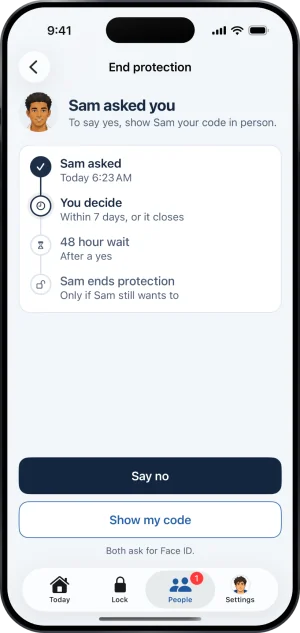
The decision, in the app
-
Talk to them first if you can
Nothing here presses you. The page says you decide within 7 days, or it closes, so there is room for a conversation before a decision, and the request stays open and unchanged while you have it.
-
Say no, or arrange to meet
Saying no is the tap you can make from anywhere. Letting them out means being in the same room, tapping Show my code, and letting them scan the code it shows you. There is no third route.
If the ask is already closed
The request is checked before either answer is accepted. If they withdrew it while you were on your way, there is nothing left to answer rather than a decision waiting for you. If it was already decided, including by an approval that has already started its wait, you are told that before anything ceremonial happens rather than after.
If what you want is help with the conversation rather than with the app, someone you love is gambling is written for that.
What this does not do
Saying no answers this request and closes it, and that is the whole of what it does. Approving does not end their protection on its own, does not remove you as keyholder, and does not open anything from your phone. Nothing you do here reaches a second device or a desktop.
Silence is not a third answer either. Seven days without an answer closes the request on its own, which is where saying no would have left it, reached a week later and without a word from you.
Write to us and a person reads it. We answer within two working days, and we would rather hear the question twice than not at all.