

The full answer
Scanning the code your app shows you records your approval and starts a wait of 48 hours, held as a deadline on the server rather than as a timer on anybody's phone. Only when it ends is the request ready, and even then the apps open when they end protection, not on their own.
The wait starts when you approve, not before
A request to end protection is approved face to face: they show you the request, the Fold’em app on your phone shows you the approval code, they scan it with their own app, and that is the moment the clock starts. The wait is 48 hours after the approval, counted by the server from the instant it records the scan. It is a deadline the server holds rather than a timer running on a phone, so neither device can move it, and nothing lengthens it or shortens it.
Nothing about the phone changes while the wait runs. The apps and the sites stay blocked, and their Today screen shows when the wait ends.
What the scan actually does
Your app shows the code; their phone does the scanning, inside the Fold’em app they are signed in to. The scan sends the code to the server, which checks it against the one open request before it records anything: a code that has expired, or that belongs to another request, is refused.
That is why a photograph of your screen is not a spare key. A code belongs to one request, and a request is decided once.
The code is shown in your app and nowhere else, and only while the request is open. It is valid for the day it names, so a screenshot taken last week does nothing.
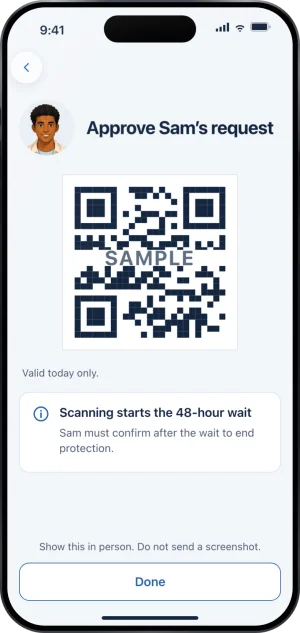
The code an approval is scanned from
Only they can call it off
During the wait, the person you hold for can withdraw the request and end it. You cannot take an approval back, and support cannot shorten it or extend it. The rules that guard the request let its owner change its state and let nobody else touch it, so there is no screen and no support action that would move the date. If you have second thoughts, the person to talk to is them.
If they do withdraw, a notification tells you they withdrew their request, with nothing to answer now, and their row on People goes back to their protection word. Nothing else is asked of you about it.
What your app shows while the wait runs
The approval resolves the request, so the red line leaves their row on People: it reads Can end it and the moment the wait ends. The row is rewritten by the same server step that records the decision, so it does not wait for you to open anything.
The approval code stops being useful the moment the request is decided, because the request it names can be decided only once, and the app has no reason to show you one for a request that is closed.
What happens when the wait ends
The server marks the request ready and their app tells them. The apps do not open by themselves: they have to end protection. A ready request nobody uses is held for seven days and then closes on its own, the block carries on, and their protection is unchanged.
Ending it is a hold in their app, Hold to end protection, and the server is what grants it. The phone applies whatever the server last said and nothing else; it never decides on its own that a wait has finished.
What the weeks after a decision like this can feel like from your side is described in someone you love is gambling.
What this does not do
Approving does not end their protection on its own, and it does not remove you as their keyholder. It does not let you open anything from your own phone: the only thing your app can do is show a code for an approval you give in person, and no button or link anywhere in Fold’em approves for you. Approving is also not a way to change any other clock. The 48 hours is the same 48 hours whoever holds the key and however recently they came to hold it. Nothing you do here reaches a second device or a desktop.
Write to us and a person reads it. We answer within two working days, and we would rather hear the question twice than not at all.