

What you are reading, and where it comes from
Their row under You support, and their page behind it, are the server's view of them, kept up to date on your phone while it is online. There is no copy on your phone that waits to be told about a change, and nothing to pull down or reinstall to make it fresher. If the server has not rewritten that view for more than six hours, a line under their row says Up to date as of and the time it was written.
Offline, People says so in a line at the top, and every row shows the last thing it saw, with Up to date as of under it. Encourage goes quiet on their page, with Reconnect to send a nudge, and so does stepping away, because nothing you do can reach the server until you are back on a network. Nothing is lost while you are offline: the moment you are back, People reads the server again.
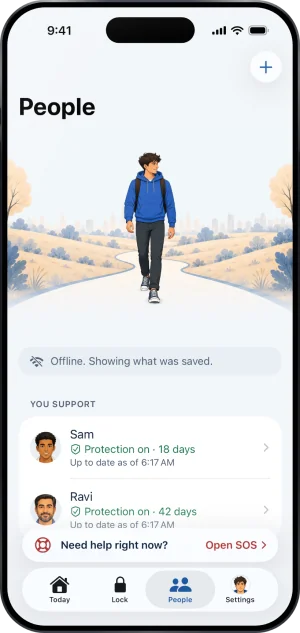
Offline, the tab says so
The part that can lag is their phone
A status word is a report from their iPhone, and their iPhone reports when it can: when the app runs, and on background wakes the system grants it. So Protection on is a claim about the last report, not about this minute. When the reports stop coming, the row does not keep saying Protection on. It changes to Not confirmed yet, which is the row telling you that it no longer knows, rather than a row that has gone stale.
Their day count is worked out from the same instant their own app counts from, so it is never a day behind.
The moments that matter do not wait
A request to end protection opening, a handover that needs you, protection going off, a phone that has stopped confirming, an ask for support and protection that is ending all reach their row as soon as the server has them. A request waits on their row whatever your notification switches say, so nothing that needs you depends on a notification being seen.
If you need to know right now
-
Get on a network and open People
Any connection will do. Once People reads the server again, the Offline line leaves the top and their row shows what the server holds now.
-
Read the word for what it is
Protection on means their phone confirmed it recently. Not confirmed yet means Fold’em cannot say right now that protection is running: their phone may have been quiet, or may need its apps picked again.
-
Ask them, if it is still Not confirmed yet
Their phone reports the next time the app runs. Opening Fold’em on their side is what turns the word back to Protection on, and a message from you is the shortest route to that.
What this does not do
Reinstalling Fold’em, or signing in again, cannot make a row more current than the last report their phone sent. Nothing on your side reaches their phone.
A quiet row is also not proof that nothing has happened. What it means is narrower: what you are reading is what the server holds, and anything that needs you is on it.
Write to us and a person reads it. We answer within two working days, and we would rather hear the question twice than not at all.