

The full answer
After seven days with no answer from you the server closes it, their protection carries on exactly as it was, and nothing about their phone changes. Silence is the slow way of saying no rather than a way out, so being unsure or busy is not the dangerous outcome it sounds like. Answering is still the better act, because a week of not knowing is harder on them than a plain no.
The rule, exactly
A request that has been open for seven days with no answer from you is closed by the server. Nothing opens, nothing is granted, and their protection carries on exactly as it was. No button is pressed and nobody is asked again.
Doing nothing ends where saying no does: the request closes and protection stays on. Saying no reaches them at once, and they can ask again after 48 hours; silence makes them wait the whole seven days, and then they can ask again at once. That is the real cost of not answering, and it falls on them rather than on you.
The clock is a deadline held by the server, so it runs whether or not anybody opens the app. Nothing on your phone counts it, and nothing on theirs does either.
Why silence closes rather than opens
An unanswered ask must never become a yes. If it did, a keyholder who stopped opening the app would be the fastest way out of a commitment, and the role would work best for exactly the people least willing to hold it.
It does not make you a trap either, and that matters just as much. The route out that never needs you is to remove you: once no request is waiting, removing a keyholder takes effect at once, and from that moment they have none, so the path for somebody without a keyholder opens. On that path seven days pass between asking and the request being ready. Not answering therefore costs them time; it cannot hold anybody forever, and it was never meant to.
Being unsure, being busy, or wanting to talk to them first does not pause the clock, and there is no way to extend it. If what you want is time to think, you already have it: nothing moves for seven days, and Say no stays available for the whole of them.
What your app shows while the clock runs
Their row on People carries the ask for the whole seven days, red and first under You support, and the page behind it says you decide within 7 days, or it closes, so the deadline sits with the person rather than only in a notification you may have dismissed. The code you would need to approve in person is shown by the app when you tap Show my code, and is valid for the day it names.
When the seven days run out, the ask leaves their row, and their app shows them that it closed with no answer. Nothing about it is a decision, because nothing was decided.
If the seven days already ran out
-
Look at their row anyway
The request is checked before any answer is offered. One that has already closed, including one closed by the clock, is not a decision waiting for you: it is gone from their row, and a page you had open says so before anything ceremonial happens rather than after.
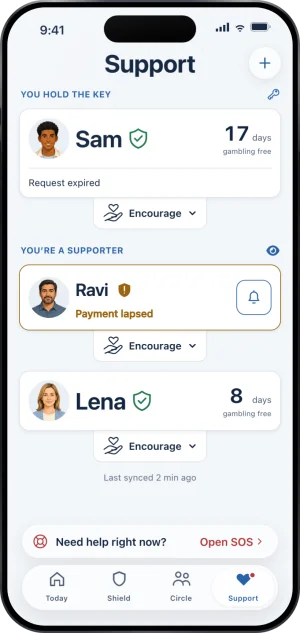
Their card, request expired
-
Say something, because they waited a week for it
Nothing is broken and nothing needs undoing. But a week of silence reads as an answer about them rather than about the request, and you are the only person who can correct that reading.
-
Decide whether to keep holding the key
If answering is not something you can do reliably, stepping away is better than holding a key and not answering. It is one confirmed act in the app. Their protection continues, they carry on without a keyholder, and the path for somebody without one opens at once.
Holding a key is one part of a larger role, and the rest of it is set out in someone you love is gambling.
What this does not do
Silence does not let them out, and it does not end the arrangement either. You are still their keyholder after a request closes this way, and if another one opens it starts a fresh seven days. It sends nobody a reminder that fixes it later, and it changes nothing about their phone: the apps and the sites stay blocked throughout.
The seven days here are also not the only seven days in Fold’em, and three of them are easy to confuse. This one is the window you have to answer a request. The second is the wait on the path for somebody without a keyholder, from their request to it being ready. The third is the week a ready request is held before it closes unused. Three clocks, three jobs, and none of them is the other.
Write to us and a person reads it. We answer within two working days, and we would rather hear the question twice than not at all.