

The full answer
A fact not on the list has no carrier for a supporter to read. You never see which apps or sites or anything they browse, and the only thing they typed that can reach you is a note they add when they ask you, as their keyholder, to end a Lockdown sooner. Their check ins, their goal and Money kept stay with them, and nobody is told when a Lockdown starts, is extended or ends on its own.
The list, and it is the whole list
Everything you are shown about a person comes from one view of them, written for your role and read by your app. These are its eleven facts.
- The character they chose for themselves, and their first name. Never their full name.
- Whether protection is on, as one of the five words their card can carry: Protection on, Not confirmed yet, Protection at risk, Protection off or Protection ended.
- A count of days from the day their protection started, and its milestone days, while the Gambling free run switch in their Sharing settings is on.
- If you hold their key: that a request to end protection is open, the date you must answer by, and how it ends, whether you agreed and they confirmed it, you declined, they withdrew it, or it closed unanswered.
- If you hold their key: that they started the 72 hour wait to turn off Deletion delay, when, and whether Deletion delay stayed on or turned off.
- A handover: that one is running and the first name of the person taking over, shown to the current keyholder and to that person and to nobody else.
- Asked for support, when they ask for it.
- If their subscription ends while protection is on: that their protection is ending, shown as Protection at risk, and a Remind button that sends them a reminder about the payment.
- The nudges between you, as a kind and a time, never as words.
- If you hold their key: a notice, once, if they close their account.
- If you hold their key: that they asked you to end a Lockdown sooner, when it would end on its own, and the note they wrote with the ask, if they wrote one.
Never their check ins, their goal, Money kept, that they gambled, how many attempts were blocked, which apps or sites they blocked, anything they browse, or anything else they typed. Nobody is told when a Lockdown starts, is extended or ends on its own.
Items 4 to 6 and 11 travel with the key, and item 10 reaches only the person holding it. A supporter without the key sees the row change state and never the request behind it, and learns of a handover only if the key is being offered to them. The character on their row is the one they chose for themselves, and the one you chose reaches them the same way.
Where each fact reaches you
Three places, and which one carries what is a rule rather than a habit: their row and their page, your notifications, and History at the foot of their page.
Their row carries the standing picture. It sits under You support on People, and their page behind it holds How they are doing and History. When protection goes off, their phone stops confirming it, or protection is at risk, the row says so. Offline it shows the last copy your phone kept, and says when that was, which is the intended behaviour rather than a failure.
Notifications carry what needs you: a request to end protection, a request to end a Lockdown sooner, a handover that offers you their key, the moment they ask for support, protection going off or their phone going quiet, protection that is ending, a milestone day they reached. Settings › Notifications has a switch for Milestones and one for Protection ending, set once for everyone you stand with. Turned off, that kind is not sent to your phone, and what it was about still shows in the app. Requests ignore every switch: an ask for support, a request to end protection, a request to end a Lockdown and a handover that offers you their key reach you whatever the switches say. A handover that asks you to pass the key on sends no notification: it waits on their row, and in an email if Fold’em has your address.
History, at the foot of their page, holds what happened between you: the nudges and their thanks, the moments their protection changed, and, if you hold their key, a wait to turn off their deletion delay and how it ended. Nobody is sent a notification for that wait.
What never crosses at all
These have no carrier in Fold’em, which is stronger than a promise not to show them.
App and site identities are never sent. What they picked lives on their phone as an opaque token that no server can read back into a name.
Anything typed stays with them, with one exception. A request to end protection carries no message in either direction and a nudge is a kind rather than a sentence. The exception is a note they choose to add when they ask you, as their keyholder, to end a Lockdown sooner; it reaches you and nobody else.
Their check ins and their goal stay on their phone. Nothing about either reaches anyone.
Location and browsing are never read. Fold’em blocks by asking the phone's own Screen Time controls and, if they set up site blocking, by answering betting addresses with nothing; the resolver keeps no history of the addresses it answers, so there is nothing to send.
Money kept is never shared. It is worked out on their phone, and there is no switch that sends it to anyone. The app never shows you a payment either: if their subscription ends, it tells you their protection is ending, and not why.
Lockdown is theirs alone. Nobody is told when a run starts, extends or ends on its own. If you hold their key, the one thing you can see is a request they send you to end a run sooner.
Reading their row
-
Open People
Under You support, one row per person you stand with: their face, their first name, the state of their protection and, while they share it, their gambling free days. The foot of the group says whose key you hold.
-
Tap through for the page
The page carries the same facts. Under How they are doing it gives their gambling free run, or Not shared, and their protection, and an ask for support leads the page while it is current. If you hold the key and a request is open, the page is where you answer it, behind a check that it is really you holding the phone.
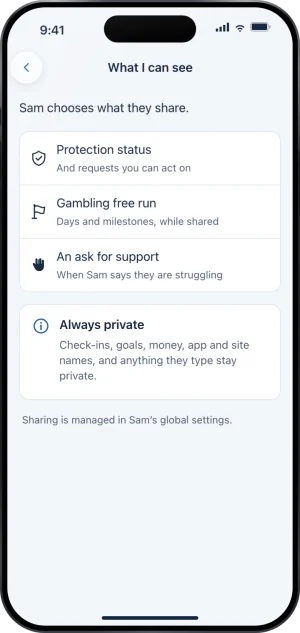
What I can see, in the app
-
Read History as kinds, not as a story
Every row in History is a kind of thing that happened and when. It is filtered to your own link, so you never learn from it that another supporter exists, and it holds nothing anybody typed.
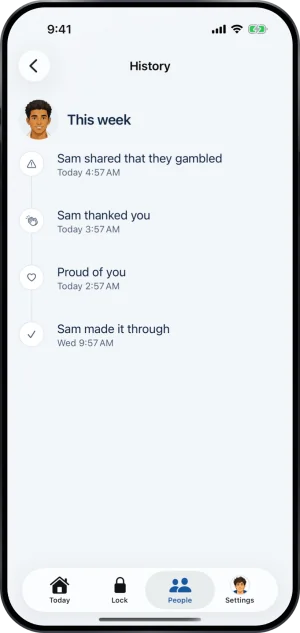
Kinds and times, never words
If you are weighing whether this is enough to be useful to them, someone you love is gambling takes that question up properly.
What this does not do
Nothing on this list tells you whether they gambled unless they chose to tell you. It tells you whether the blocks on one iPhone are running. A second phone, a desktop, a betting shop and cash are all outside what any app on that phone can see, and none of them produces an event here.
The list also does not make you an auditor of the people around them. Nothing lists who else stands with them; the one name that reaches you is the person taking over your key, in a handover. The differences for a supporter without the key are set out separately.
Write to us and a person reads it. We answer within two working days, and we would rather hear the question twice than not at all.