

Cancelling an invite is not a removal
An invitation nobody has accepted is not a relationship yet, so cancelling it is cheap. Only an invitation from before Fold’em 3.0 can still be out, and its page has Cancel invite. The alert says exactly what it does: they will no longer be able to accept it, and you can ask again later. Nothing about your protection changes, because nothing had changed when you sent it.
Removing your keyholder
Removing your keyholder is a hold, Hold to remove with their name, and the line under it states the three things that are true from the moment you finish it: your protection keeps running, they stop seeing your updates, and you can invite someone new immediately. The person who held the key is told once that they are no longer in your circle, unless they switched off Milestones, and sees nothing of yours after that.
The hold waits in two cases. While a request to end protection is waiting on them, the line reads You can remove them once your request is answered or withdrawn, because they are the one who answers it. During a Lockdown run it reads Changes wait until Lockdown ends.
There is no waiting period on the seat and nothing is added to any wait. What a removal costs you is the faster road out rather than time: with a keyholder, an agreement starts a wait of 48 hours, and with none, the wait before a request is ready is 7 days. That road opens the moment they are gone, and Fold’em accepts what follows: a keyholder’s no can be escaped by removing them and waiting the 7 days, and the 7 days is the price.
Removing a supporter
Low stakes by construction. A supporter holds no key, answers no request and carries no friction, so removing one is instant and touches nothing but that connection: they stop seeing your updates, your keyholder is untouched, and so is every wait. Their place opens immediately for somebody else. If you also hold that person’s key, removing them as your supporter does not change that; you keep their key until you step away on their page in People.
Where the controls are
-
Edit, on their page
Open the person on People and tap Edit. For your keyholder the page ends with the hold. For a supporter it ends with a red Remove supporter row, which asks first, and the alert’s easy answer, Keep with their name, keeps them.
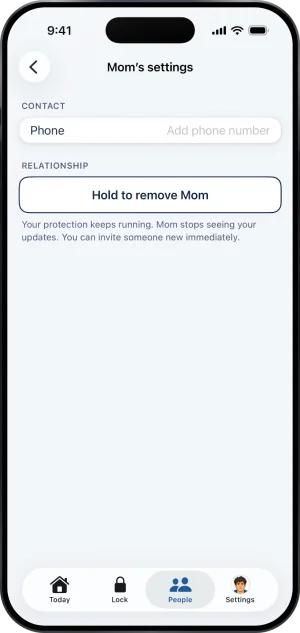
The ending row, last
-
The place, open at once
After a removal their row is gone from Your circle, and the plus at the top right of People opens the invite straight away, with the role chooser if it was your keyholder. Your other supporters are exactly where they were.
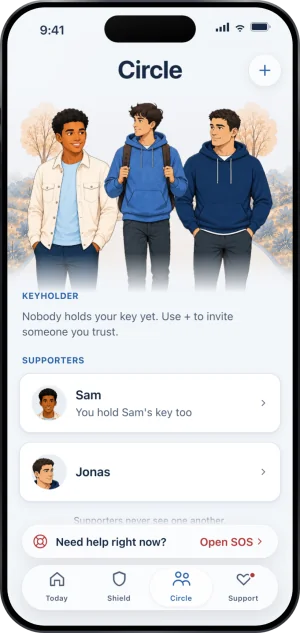
A moment after removal
They can leave too
A keyholder can step away without asking you, from your page in their own app, and you are told they stepped away. It lands like a removal from your side: from that moment you have no keyholder, a new one can be invited, and the road out is the longer one. Step away is blocked while your request to end protection is open and while a handover is running, so nobody can leave in the middle of a decision.
A supporter stepping away is the mirror of removing one. It ends that connection and nothing else.
What this does not do
Removing anybody ends nothing about your block. The apps stay blocked, the sites stay blocked, your protection carries on and the gambling free count carries on with it. It is not a shortcut out either: the road with no keyholder is the longer one. It does not delete anything they already saw, and it does not reach the key you hold for anyone else.
Write to us and a person reads it. We answer within two working days, and we would rather hear the question twice than not at all.