

The full answer
No invite waits on a letter, and nor does a keyholder who uses the app: for them, inviting, saying yes and answering all happen in the Fold’em app, and an invite is a link, a QR code or a code you share yourself. Everything that matters to a keyholder in the app shows on your row on their People tab, whatever a mailbox does, so for them a missing letter holds nothing up. A keyholder who joined by email before 3.0 learns of a request from a letter, and can say no from it, so for them the letter matters: if it did not arrive, tell them yourself.
Where the letter comes from
Every Fold’em email, without exception, is sent from hello@foldem.app. Searching a mailbox for that address finds the lot, and letting it through is the most useful thing to do if you want the letters at all.
Email is not the channel anything depends on, except for somebody who joined your circle by email before 3.0. A keyholder or supporter who joins in Fold’em 3.0 uses the Fold’em app on their own iPhone, signed in to their own account, and an ask, a request or a decision reaches them there. Letters go to the people who joined by email, and for a keyholder among them, a letter's link is where they say no to a request. No link in a letter can accept an invite, agree to a request or end protection.
There is no invite email to go missing
An invite is a link, your code or a QR code, and you share it yourself, by message or in person, whichever way you like. Fold’em does not email it on your behalf, and saying yes does not need an email address or a code sent to one: they say yes in the app, and you accept their ask. So a missing invite is a message that did not reach them, and the fix is to share it again.
Working through it
-
Search for the sender, not the subject
Search the whole mailbox for hello@foldem.app, including spam and trash, and on a work address check whether a filter moved it. Subjects vary by event; the sender never does.
-
Look in the app instead
Anything that matters to a keyholder who uses the app is already on your row on their People tab, and anything waiting on them waits there, not in a mailbox.
-
Share your invite again
If the person you invited never saw it, tap the plus on People and Share invite link again; it is the same code every time. An invitation from before Fold’em 3.0 that is still out has its own page in Your circle, with Send the link again.
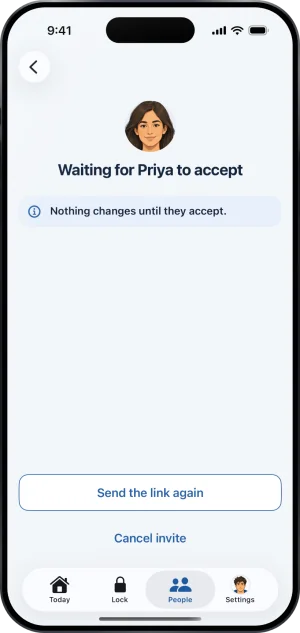
The waiting page
What this does not do
Fold’em never sends a text message, so a phone number is not a fallback for a mailbox that is not working. A missing email does not pause your protection or weaken the block, and it does not hold up a request to end protection either: a keyholder who uses Fold’em gets the request in the app. If they never answer it, it closes after 7 days rather than opening anything. Silence is not agreement, and a request that runs out of days does not turn into the road you would have had if you had never named a keyholder. If nobody can reach your keyholder any more, the honest route is to remove them and invite someone new. While a request of yours is waiting on them, removing them waits too: withdraw the request first, or let it close.
Write to us and a person reads it. We answer within two working days, and we would rather hear the question twice than not at all.