

The full answer
While nobody holds your key the sheet asks which role you are inviting for, Hold the key or Stand with you, and then gives you three ways to reach them: your QR code, your own code to type, and Share invite link, which goes to your own share sheet so you send it through Messages, WhatsApp or anything else on the phone. They open it in Fold’em and say yes there, and their yes comes back to you as an ask. They hold your key once you accept it, and until then you are still without a keyholder. There is one keyholder, so once somebody holds the key the sheet only invites supporters.
What the invite is
Every account has its own code, and the invite is that code in three forms: shown as a QR code, written out to copy, and carried inside a link. Whichever form reaches the other person, Fold’em checks the code on the server, and the other person still has to say yes. A code is never discovery: it has to be given to you.
Fold’em sends no invite email. The link goes to the iOS share sheet and you choose how it travels. The person opens it, installs Fold’em from the App Store if they need to, signs in to their own account and says yes there. Their yes reaches you as an ask, and you accept it in your own app. There is no page on the web where a key is accepted.
It works in one direction only. The person who wants support shares the code, so you never enter somebody else’s code; they open yours.
Sharing it again
Sharing again is the same sheet: tap the plus and Share invite link, as many times as you need. It is the same code every time. Nothing waits on your side until they say yes, and then their ask is the first row in Your circle.
Sending one
-
Open the People tab
Tap the plus at the top right. With nobody on People yet, the page reads Nobody here yet and its Invite a supporter button opens the same sheet. While nobody holds your key, the sheet opens on Hold the key and is titled Invite a keyholder.
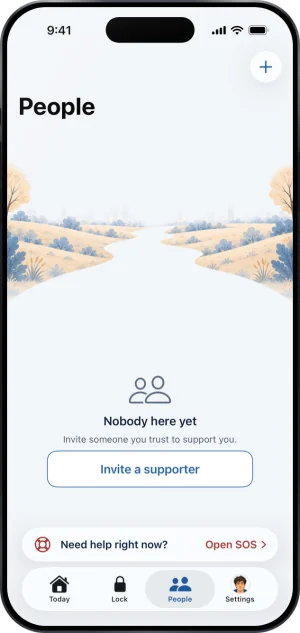
People, with nobody in it
-
Choose the role, then share
Hold the key: ending protection needs their yes, one person. Stand with you: they see how you are doing and hear when it matters, never the key. Under the choice sit your QR code, which a tap makes larger, and your code, which a tap copies, then Share invite link. The line under the code says how it works: they scan it or open your link, then you confirm it is them. The role travels with the link.
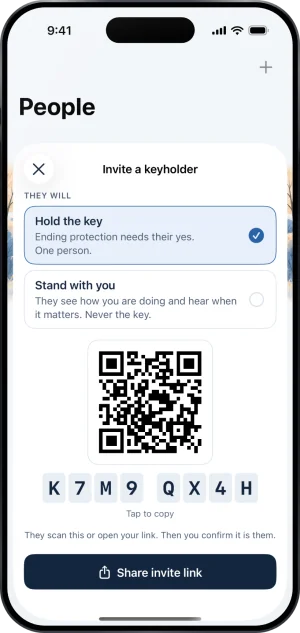
Choosing the role
-
Accept their ask
When they tap Hold the key in their app, you get a notification and their row comes first in Your circle, in red: Asked to hold your key. Tapping it opens their ask with Accept and Not now. You are still without a keyholder until you accept, because the server records a keyholder only at that moment.
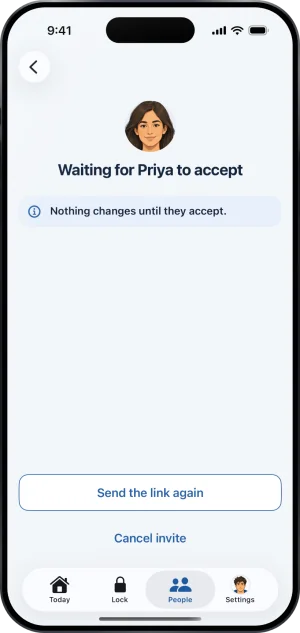
An invite waiting
When the plus is off
The plus is greyed out in four cases, and VoiceOver reads the reason.
- Not while a request to end protection is open. Keep protection on the request withdraws it, and then you can invite somebody.
- Not during a key handover. Only a handover started before Fold’em 3.0 can still be running, and the plus comes back when it closes.
- An invitation is already pending. Somebody’s ask is waiting for your answer, or an invitation from before Fold’em 3.0 is still out. Answer it or cancel it first.
- Your circle is full. Four is the most, one keyholder and three supporters.
Once somebody holds your key, the sheet no longer offers the role: there is one keyholder, and changing who holds it starts with removing the one you have.
Their phone number
A person’s page carries an optional phone number, kept on this phone and never uploaded, and it powers a Message and a Call button you press yourself. Fold’em never sends anyone a text message.
If you are reading this on behalf of somebody else rather than for yourself, someone you love is gambling is written from your side of it.
What this does not do
Sharing a code or a link does not give anybody the key: only your yes to their ask does that, and until then you have no keyholder and ending protection takes the path for somebody with no keyholder. It does not upload your contacts, and it does not let you take on a keyholder while a request to end protection is open or while a handover is in flight. A keyholder approves ending protection only with a code you scan, which is meant to be done in person, and inviting one changes nothing about which apps are blocked on this phone.
Write to us and a person reads it. We answer within two working days, and we would rather hear the question twice than not at all.