

The full answer
Three things are done again on the new phone, because they cannot travel with you: granting Screen Time, picking the apps, and turning the site blocking profile on. Until Screen Time is allowed on the new phone, your keyholder and supporters see Protection off. Once it is, they see Not confirmed yet until your apps are picked again, and Protection off again if that takes more than 12 hours. Deleting and reinstalling the app on the same phone follows the same path, and neither is a way out of protection.
What comes back on its own
Protection does not live on your phone. It lives on Fold’em’s server, and the phone's job is to put it back up. So the first thing the new phone does after you sign in is ask the server what is true, and what comes back is the protection you committed to, your gambling free count carried straight through from the date of your last bet, and the person who holds your key.
None of that is redone, negotiated or reset. A phone that has just been set up cannot ask the server for anything weaker than what is on it, and protection that is still running is still running.
What has to be done again, and why
When you pick apps, Apple hands the app an opaque token for each one. Those tokens are made on one phone and are meaningful only there, and Fold’em never uploads them, so there is nothing to send to the new phone even in principle. The same is true of the Screen Time permission, which is granted per device, and of site blocking, which is a profile installed on the phone itself.
So the new phone repeats exactly those: grant Screen Time, pick the apps and any sites you had added, turn site blocking on. Everything else it reads back off the server.
Your keyholder and supporters see one of a fixed set of words for you: Protection off while the new phone reports that Screen Time is not allowed, Not confirmed yet once Screen Time is allowed and until your apps are picked again, or if no phone of yours has reported for 24 hours, and Protection on once the new phone reports that its shield is applied. If picking the apps takes more than 12 hours, Not confirmed yet turns to Protection off. A reading reaches the server straight away if Fold’em is running when a layer changes, otherwise the next time it runs.
Moving to the new phone
-
Install Fold’em and sign in with the same Apple Account
Take Sign in on the first screen rather than Get started. The page reads Welcome back, and Sign in with Apple is the whole of it. Signing in with a different Apple Account gives you a different account, not your protection.
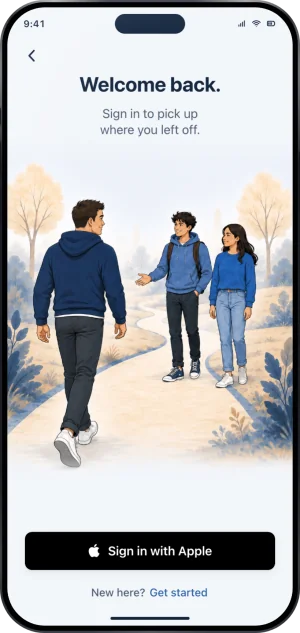
Signing back in
-
Grant Screen Time and pick the apps again
Today shows a card that reads Apps need attention, or 2 layers need attention while site blocking is off too, and tapping it opens the Gambling apps sheet on the Lock tab, which reads Screen Time is off, so gambling apps are open. Its Allow Screen Time button raises the same one prompt as the first time. Then the sheet asks for your apps again, and Choose apps opens Apple's own picker; Games is chosen again from its own sheet with Select Games. The picture shows the same layer on a phone that kept its picks; a new phone has none to keep.
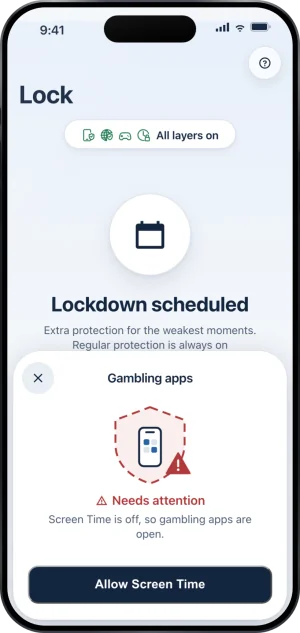
The layer asking for Screen Time again
-
Turn site blocking back on
The Sites page says Site blocking is off, so gambling sites are open, and Set up walks you through turning it on in iOS Settings again. Sites you added came from Apple's picker like your apps, so once site blocking is on and your apps are picked, add them again with Add a site.
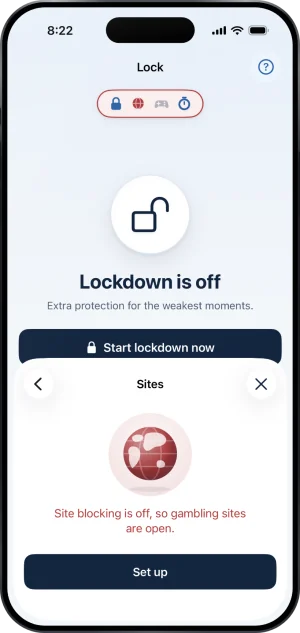
Sites, off until it is set up again
What this does not do
A new phone does not restart, weaken or pause your protection, and it does not reset your gambling free count: both are read back from the server, which is also why deleting the app does not end protection. It asks nothing of your keyholder either: they use the Fold’em app on their own phone, and your new phone neither moves nor needs anything of theirs. And Fold’em cannot rebuild your old app list, because it never knew which apps were on it: it counts picks and never reads identities. Picking a smaller list on the new phone is therefore possible, and it changes nothing about your protection, the wait to end protection or who holds your key.
Write to us and a person reads it. We answer within two working days, and we would rather hear the question twice than not at all.