

The full answer
Fold’em asks iOS for provisional permission first, which delivers straight into Notification Center with no banner and no sound and shows you no prompt at all, so notifications arrive but nothing interrupts you. Moving to the loud kind takes one tap on a row on Settings › Notifications, under the master switch, which raises the real iOS prompt. If you have already told iOS no, that row changes to point you at iOS Settings, because iOS will not ask twice.
Why they are quiet
Fold’em asks iOS for the provisional kind, which needs no prompt and no decision from you: notifications are delivered to Notification Center, with no banner across the screen and no sound. So they are all there, in the list, and none of them has ever interrupted you.
That is the permanent floor. A phone that declines the louder kind, or never gets asked, keeps working exactly as described and misses nothing.
The one place it changes
The ask for full delivery happens once, as a beat in the setup act after your circle is in place, and it can be declined. Declining raises nothing at all: no prompt is spent, so it can still be raised later. Only the iOS dialog itself can spend the prompt, and once you have answered Don't Allow there, iOS will not present it again from inside any app.
For everyone else, and that includes every install made before the beat existed, the route is one row in Settings. On Settings › Notifications, under the master switch, a row appears reading Allow alerts, with the line They arrive quietly today, in Notification Center only, or Fold’em cannot reach you yet if iOS has not been asked at all. Tapping it raises the real iOS prompt. Once you grant it the row disappears on the spot, because there is nothing left to do. If iOS has already been told no, the row instead reads Allow alerts in Settings over iOS will not ask again from here, and opens iOS Settings.
The row is absent when nothing would come of it: when delivery is already full, and when the master switch above it is off. A row that could not work would be worse than no row.
What actually gets sent
Everything shares one Notification Center. Some notifications come from the server: the one that tells you the deletion delay's release has completed, and the updates that follow a request to end protection, a handover, an invite, a lapse or a keyholder stepping down. Some come from people, through the server: nudges and reminders from the people who support you, and asks for support and requests to end protection from the people you support, among others. And some come from your own phone: the reminder before a free trial ends, the daily check in reminder, and motivation lines, which ship switched off and send nothing until you set a count in Settings.
If one kind never arrives, look at its switch as well as the tier. Settings › Notifications carries a switch for Encouragement, Reminders, Milestones and Protection ending, and a kind switched off there is not sent to you at all. Requests have no switch and read Always: an ask for support, a request to end protection or a Lockdown, a key handover and an ask to connect arrive whatever the switches say.
Making them louder
-
Open Settings, then Notifications
The master switch at the top is Fold’em’s own and on by default. If it is off, turn it on first: while it is off Fold’em asks iOS for nothing at all, and the row below it does not appear.
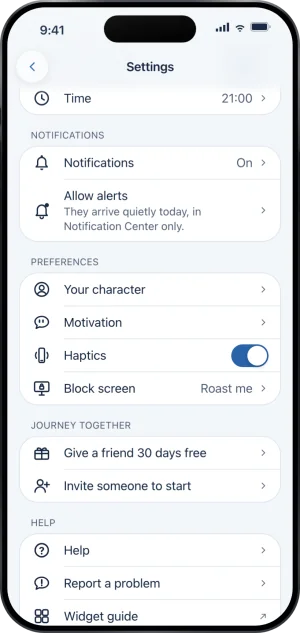
Settings, with Allow alerts
-
Tap Allow alerts
Allow alerts sits directly under the master switch while delivery is still quiet. Tapping it raises the iOS dialog. Whatever you answer, the row reads the real answer again straight after, so it can never sit there offering to fix something that is already fixed.
-
If iOS will not ask
The row changes to Allow alerts in Settings and takes you there. iOS lands on Fold’em’s own page rather than on the notification list, and the switches you want are on it.
What this does not do
Turning Fold’em’s master Notifications switch off stops the server sending the four kinds of news under it, and it stops the phone’s side too: while it is off, Fold’em never asks iOS for permission and never routes a tap on a notification anywhere. Neither it nor the switch for a kind ever holds back an ask for support, a request, or an alert that someone’s protection went off. And none of these notifications enforce anything: no notification blocks an app, releases one, or changes a wait, and nothing about being quiet or loud changes what is blocked on this phone.
Write to us and a person reads it. We answer within two working days, and we would rather hear the question twice than not at all.