

The full answer
Your protection, the day you started, your keyholder and the lock itself are held on the server, so signing in on the fresh install brings all of it back exactly as it was, and never as anything weaker. Three things have to be done again on the phone: granting Screen Time, picking your apps and turning site blocking on, because those picks are bound to the device and never left it and site blocking is a profile the phone itself holds. Until Screen Time is allowed again, your keyholder and supporters see Protection off. Once it is, they see Not confirmed yet until your apps are picked again, and Protection off again if that takes more than 12 hours.
What comes back on its own
Deleting Fold’em deletes an app, not your protection. The state that matters is not on the phone: your protection, the day your run started, whether a keyholder holds your key and who they are, and any request to end protection already in motion all live on the server. Sign in on the fresh install and it is handed back, unbroken. A day count does not restart at one, and a reinstall can never produce a weaker lock than the one you had.
What has to be done again, and why
Three things do not come back, and two of them are a privacy property rather than a gap. When you pick apps, or add sites, in Apple's picker, what the app receives is a set of tokens bound to that installation of the app on that phone. They are never uploaded, because only the count of them ever goes up, so there is no copy anywhere for the server to return. The same is true of the Screen Time permission: it is granted to an install, and a fresh install has not been granted anything. Site blocking is a profile the phone holds for the app, so the fresh install turns it on again from the Sites page.
So the fresh install asks for all three. Until Screen Time is allowed on it, your keyholder and supporters see Protection off, because a phone without the permission is a phone with the shield off.
Putting the phone back together
-
Sign in with the same account
Signing in is what finds your record. There is no code to keep and nothing to have written down: the account is the key, and buying again is not part of this. If you reach a paywall on a phone with live protection, sign in first.
-
Allow Screen Time
Today shows a card that reads Apps need attention, or 2 layers need attention while site blocking is off too, and tapping it opens the Gambling apps sheet on the Lock tab, which reads Screen Time is off, so gambling apps are open, with one button, Allow Screen Time. It raises Apple's own request, so the sheet that follows is Apple's. Granting it hands the shield back the authority it stands on.
-
Pick your apps again
With Screen Time allowed, the same sheet reads Your app choices need picking again, so gambling apps are open, and Choose apps opens Apple's picker. Pick everything you had, and anything else you have thought of since: adding is always allowed, and the picks you make here hold for the rest of your protection. Sites you had added go back in from the Gambling sites sheet, with Add a site, once site blocking is on and your apps are picked.
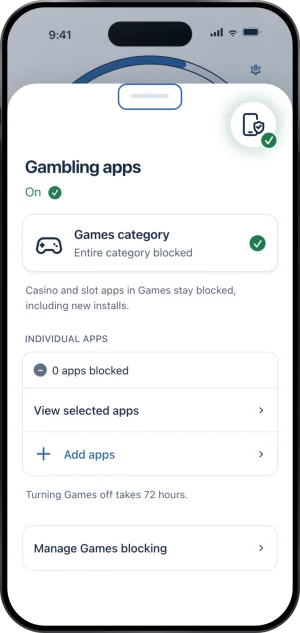
The count, back at zero
If the deletion delay was on
If you had turned the deletion delay on, deleting Fold’em was not simply available: turning it off opens a 72 hour window on the server first. The delay is the answer to deleting the app as an escape route, and it is why the honest way out of protection is a request to end protection rather than the home screen.
What this does not do
Reinstalling does not end your protection, restart your day count, remove your keyholder, cancel a request to end protection that is already running or change any wait that is counting down. It does not restore your picks, and nothing in a device backup restores them either. It does not hide itself: if the phone is silent for 24 hours your keyholder and supporters see Not confirmed yet, and the fresh install reads Protection off to them until Screen Time is allowed again, then Not confirmed yet until your apps are picked again. And it does not ask you to buy anything again: a signed in session is checked against your live record before the paywall would ever charge, which is exactly why signing in first is the first step above.
Write to us and a person reads it. We answer within two working days, and we would rather hear the question twice than not at all.