

The full answer
They ship switched off: the count starts at zero, and nothing is sent until you raise it and turn on at least one voice. Your phone draws the times and schedules them itself, so the feature makes no network call and no line about you leaves the device. Setting the count back to zero stops it.
It starts at zero
The whole of this feature is one page, Settings, then Notifications, then Motivation under Your reminders, and it does nothing until you go there. The count starts at 0, which is the off state, and the row reads Off. Nothing about it appears in setup or on the block screen picker, and that row is its only door, so every line this feature sends was asked for on purpose.
Two things beyond the count can stop it: emptying the pool by turning every voice off, and the master switch at the top of Settings, then Notifications. The page prints whichever one is true under the count, one line at a time, so you are never guessing why nothing is arriving.
The count, the window and the times
You set a count from 0 to 4 and a window inside 07:00 and 23:00, at least an hour wide. The two are related: the ceiling is one note plus one for every 90 minutes the window holds, so a narrow window offers fewer than four and the page prints the reason under the control rather than refusing the tap. The times themselves are drawn at random inside the window, never picked by you and never shown anywhere, with at least 45 minutes between any two. A note carries the line and no title, because a lock screen truncates a title and renders a body whole.
Once it is on it runs until you turn it off. The queue is topped up every time you open the app and again on the background wake the app already uses, so it does not run dry after a few days. The end of your protection does not stop it; four things do, and they are the count at zero, the pool emptied, the master switch off, and deleting your account.
The voices
The voices are the same ones that speak on the block screen, the ones the Block screen row in Preferences chooses between, and each speaking one carries 50 written lines. Roast me, Soft, No excuses, Make me laugh and Keep me honest are the five, and My own words is the sixth, holding only the sentences you write. Default has no lines and is not listed, because it exists to say the minimum and get out of the way. Turning a voice on adds it to the mix; the notes are drawn across everything you switched on rather than one voice per day.
Every voice row opens before it sends: tap the row and its page shows real lines under What it sends, with the switch, Send these, above them. The row itself carries no switch and only reads On or Off. While your request to end protection is open the mix narrows to Soft and your own words, at one a day, and the page says so.
Turning it on
-
Set a count and a window
Settings, then Notifications, then Motivation. Raise the count with the plus, and set From and To under Between. The window opens at 09:00 to 22:00 and can be moved anywhere inside 07:00 and 23:00.
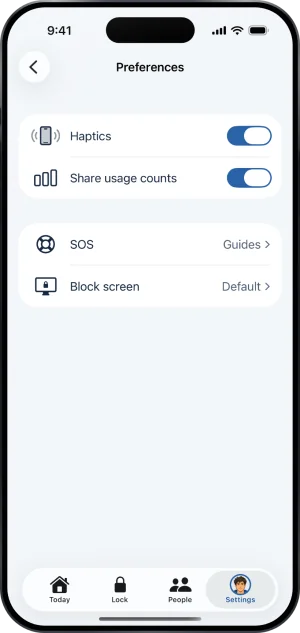
Preferences, with the Block screen row
-
Read a voice, then switch it on
Tapping a voice opens what it sends, with real lines from its own 50, and the Send these switch above them, so you decide after reading rather than before.
-
Write your own, if you want
My own words is listed even when it is empty, and its row reads Nothing written yet. On its page, Add a message takes one line at a time, up to six, and Send these stays dimmed until you write one. What you write is stored on the phone and is deleted with your account.
What this does not do
Nothing here reaches a server. Motivation makes no network call at all: no line, no schedule and no count leaves the phone, and no keyholder or supporter is told anything about it. It asks for no permission of its own and inherits whatever delivery the app already has, so on a device that has not allowed alerts these arrive quietly in Notification Center rather than as banners. The lines never name a sport, an operator, an app, odds or a near miss, and they carry no streak and no day count. A tap on one opens Fold’em and goes nowhere in particular. And none of it touches your block: no note changes what is blocked, moves a deadline, or has any part in ending protection.
Write to us and a person reads it. We answer within two working days, and we would rather hear the question twice than not at all.
If you need someone now
Free, and not run by Fold’em.
- Call 1 800 697 3738National Problem Gambling Helpline, US. Call, text or chat.
- Call 1 866 531 2600ConnexOntario, Canada. For people in Ontario.Website for ConnexOntario
- Call 0800 1 37 27 00BZgA Check dein Spiel, GermanyWebsite for BZgA Check dein Spiel
- Call 1800 858 858Gambling Help Online, AustraliaWebsite for Gambling Help Online
- Call 0808 8020 133National Gambling Helpline, UKWebsite for the National Gambling Helpline
- Other countries
Gam-Anon is a community for people supporting someone who gambles.