

The full answer
The Deletion delay layer has no switch that turns it off on the spot: it carries Turn off deletion delay, and the slide behind it starts a 72 hour wait that is stamped and counted by the server rather than by your phone. Nothing changes while the wait runs, so Keep deletion delay ends it with one tap right up to the end, and only when the server closes the wait can apps be deleted again.
What the delay is holding
The deletion delay is a layer you turn on, and it is off unless you chose it. What it uses is a Screen Time restriction that stops apps being removed from this phone, so while it holds no app on the phone can be deleted, not just Fold’em. The layer's page says what it does under one figure: 72 hours, "before Fold’em can be deleted, counted from when you ask".
It exists because deleting Fold’em is the oldest way around a blocker. The delay does not make that impossible forever. It makes it slow, and if someone holds your key, it makes the asking visible to them.
Turning it on is instant: one tap on the sheet's Turn on deletion delay button applies the restriction to the phone straight away. Tightening is never made to wait. Loosening is the direction that has a wait on it.
A release is a wait, not a switch
There is no off switch. The sheet carries a red row, Turn off deletion delay, which opens a page headed Fold’em stays put for 72 hours, with the line "Then it can be deleted until you turn this on again." and, if someone holds your key, "This shows in their name's history." It names the steps, You start the wait, then the 72 hour wait, then Fold’em can be deleted. Keep deletion delay is the filled button, and under it sits the slide, Slide to start the wait. There is no reason to give.
Starting the wait sends one call to the server, and the server stamps the moment it ends at 72 hours from its own clock. Everything after that is the server's: the phone renders the count from that stamp and keeps the restriction applied, unchanged, for the whole wait. Changing the phone's clock, turning it off or reinstalling the app moves none of it, and asking twice does not start a second wait.
These 72 hours are the deletion delay's own. Two other 72 hour waits exist, the Games category's and the lapse window's, and the wait after a keyholder agrees to end your protection is 48 hours. Each is counted separately and none of them shortens another.
Keeping the delay on
While the wait runs, the page is headed with the moment, such as Can be deleted Thu 8:30 AM, with the line "Fold’em stays put until then.", and it carries one filled button: Keep deletion delay. One tap ends the wait and the delay simply carries on; it needs a connection, because the wait is the server's. It stays available right up to the last moment.
While a Lockdown run holds, the wait cannot be started at all: the page says "Changes wait until Lockdown ends.", because a run blocks app deletion for its whole length anyway.
Asking for the release, step by step
-
Open the Deletion delay layer
It is one of the four tiles in Your protection, which the pill on the Lock tab opens, and its page opens with 72 hours and the line "before Fold’em can be deleted, counted from when you ask", and the red Turn off deletion delay row under it.
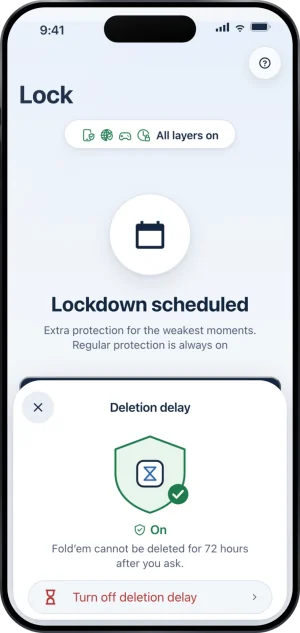
The layer, on
-
Slide, or keep it
The page names the 72 hours and what happens at the end of them. Keep deletion delay closes it with nothing changed; Slide to start the wait begins the wait.
-
The sheet counts, and stays cancellable
It reads Can be deleted with the weekday and time the release is due, and the Keep deletion delay button under it. Nothing about the phone has changed yet: apps still cannot be deleted for the whole wait, and app and web blocking are untouched by the wait.
-
The server releases it, and the phone catches up
At the end the server turns the delay off and the phone applies that the next time it runs; apps can be deleted on this phone again. Turning it back on later is one tap on the sheet, and that is the only way back to on.
Who sees it
Nobody is sent a notification or an email when the wait starts. If your keyholder opens your status page on the Fold’em website, it lists that you started the wait and when. In the app, your keyholder’s History of you names it: that you started the wait, and then how it ended, kept on or released. Your supporters do not see it. It is a fact, not an ask: there is nothing for anyone to approve or refuse. This is item five of the thirteen things a keyholder can see.
If nobody holds your key, the wait works exactly the same way, and the page simply leaves out the line about history.
What this does not do
Releasing the deletion delay does not end your protection, does not touch a request to end protection, and does not unblock a single app or site. It is not a way out: your protection keeps running and the layers stay exactly where they were. Deleting the app afterwards still does not end your protection, because protection lives on the server, and reinstalling brings your protection back exactly as it was; the delay comes back only when you turn it on again.
Write to us and a person reads it. We answer within two working days, and we would rather hear the question twice than not at all.