

The full answer
Near the end of setup the app asks once, on a screen you are free to decline, whether it may show them on your lock screen instead. Declining costs nothing and leaves the same ask waiting on the Notifications page. Tapping Don't Allow inside the iOS dialog is different: iOS will not ask again from inside the app, so that one is changed in iOS Settings.
What provisional delivery is
iOS has a quiet tier. An app may ask for provisional authorisation instead of the usual one, and iOS grants it on the spot without putting a dialog in front of you. What arrives goes straight to Notification Center, with no banner on your lock screen and no sound. Fold’em asks for that tier once your free trial or your protection starts, which is why the app can go a long time without ever having interrupted you. A supporter account has no quiet tier: it is asked once in its own setup, and until it allows alerts nothing reaches it.
The trade is that quiet notifications are easy to miss. So the app asks, once, whether it may raise its voice, and it asks near the end of setup, after showing you examples of what it would be sending.
One centre, and the switches over it
Some notifications come from the server: the note that the deletion delay's release has finished, and the updates that follow a request to end protection or to end Lockdown sooner, a handover, an invite, a lapse or someone in your circle stepping away. Some come from people, through the server: nudges and payment reminders from the people who support you, and asks for support, requests, milestones and protection ending from the people you support. And some come from your phone with no server involved: the trial reminder, the daily check in reminder, and motivation lines, which ship switched off and only exist once you set them up.
All of them go through the one notification centre. Settings, then Notifications, carries a master switch, and under it four switches for news from other people. The server reads them before it sends, so turning one off stops that kind being sent to you, and turning the master switch off stops all four. A request still arrives whatever the switches say, because it asks you to act, and the page says so; so does an alert that someone's protection went off or came back on, or that their phone went quiet.
The ask, and the row that carries it afterwards
-
The screen that asks, once
It sits near the end of setup and shows two inert examples of what would arrive. Allow notifications raises the real iOS dialog. Not now raises nothing at all: no prompt is spent, delivery stays quiet, and the ask is still available later. A phone that already allows Fold’em’s notifications never sees this screen.
There is no picture of this screen here, because it appears only on a phone that has not yet answered the notification question, and a phone that has answered skips straight past it.
-
Settings, then Notifications
The page opens on the master switch, which is on by default. While delivery is still quiet a second row sits under the switch, Allow alerts, with the line "They arrive quietly today, in Notification Center only." (or "Fold’em cannot reach you yet." before iOS has been asked at all). Tapping it raises exactly the same iOS prompt the setup screen offers, and the row disappears the moment permission is granted. It is hidden while the master switch is off. This is the whole route for anyone who tapped Not now, and for any install that predates the ask.
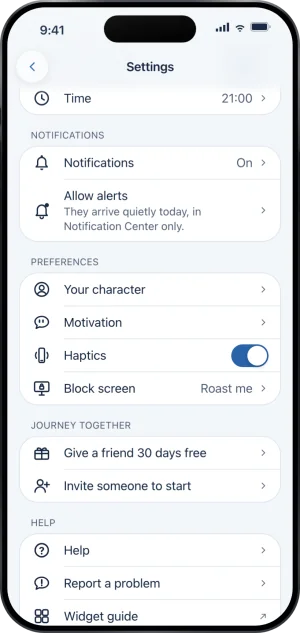
Settings, with Allow alerts
-
If you already tapped Don't Allow
That answer is spent: iOS refuses to raise its dialog a second time for the same app. The row changes to Allow alerts in Settings and says that iOS will not ask again from here, and tapping it opens Fold’em’s page in iOS Settings, where the choice can be changed. Nothing was lost in the meantime, and nothing was turned off; the notifications simply kept arriving quietly.
What this does not do
No switch holds back a request: the master switch stops the server sending the four kinds of news under it, and the switch for a kind stops that kind. The master switch also gates what this phone does: whether Fold’em asks iOS for permission at all, whether its own reminders are scheduled, and whether tapping a notification opens the screen it belongs to. Turning any of them off changes nothing about your block, your protection or your request to end protection, and nothing about your switches reaches anyone else. They do not govern what your keyholder receives either: that arrives on their own phone, under their own switches. And granting full delivery changes the tier and not the content: the same notifications are sent, on the same terms, and none of them can release anything.
Write to us and a person reads it. We answer within two working days, and we would rather hear the question twice than not at all.