

The full answer
If the page leads with 356,500 and the line "gambling sites blocked in every browser and app", site blocking is answering, and the site you hit is not on its list. If the Sites tile is red, site blocking is not the one answering: either the profile is off, and Set up walks you into iOS Settings and watches for the switch, or another VPN answers first, and the page says so.
What a blocked site looks like, and why a loaded one is a reading
A site that site blocking stops has no block screen, so what you saw is the first clue. Site blocking works through a DNS profile on the phone: every address this phone asks for goes to Fold’em’s own resolver first, and a known gambling domain is answered with nothing, so the page never loads and the browser reports that the server cannot be found. It looks like a broken site rather than a block, deliberately, because the request stops before the site is ever reached. It covers the known gambling domains and it covers every browser on the phone, since they all ask the same resolver.
A website you added yourself with Add a site is blocked by Screen Time instead, so it shows Fold’em’s block screen, and it stays blocked while protection holds.
So a site that loads is one site blocking did not answer for: either it is not on the list, or it was not asked. The Sites page says which.
The Sites layer is the first thing to read
Sites, a tile in Your protection on Lock, opens its page, and what it says is a reading rather than a claim: the app watches the profile and reports what iOS says, and it never holds the switch itself.
356,500, with the line "gambling sites blocked in every browser and app", means site blocking is answering. A site that loads anyway is not on the list. When another VPN answers the phone's lookups before site blocking can, the tile is red and the page says "Another VPN is in front of site blocking. Your added sites still apply in Safari." That is honest rather than broken: site blocking cannot answer a question it is never asked, and it takes over again on its own the moment that VPN goes off. The What this means row explains it.
"Site blocking is off, so gambling sites are open." means the profile was never turned on, or was switched off or removed in iOS Settings. Your added sites are kept for you, and the page's filled button, Set up, walks you through the profile in iOS Settings and moves on by itself once the switch flips. Today shows the same fault as a card, Sites need attention. If the phone could not check, the page says "Site blocking could not be read on this iPhone." with Set it up and Try again.
Site blocking does not change what the people in your circle see: their card follows Screen Time and the app shield, so it can read Protection on while site blocking cannot be confirmed.
What to do, by what the layer reads
-
If it says gambling sites are blocked
Site blocking is answering, so the site is one the known list does not carry. Add it yourself: tap Add a site, which is there once at least one app is blocked, and pick the website in Apple's picker with your apps still ticked. It stays blocked while protection holds.
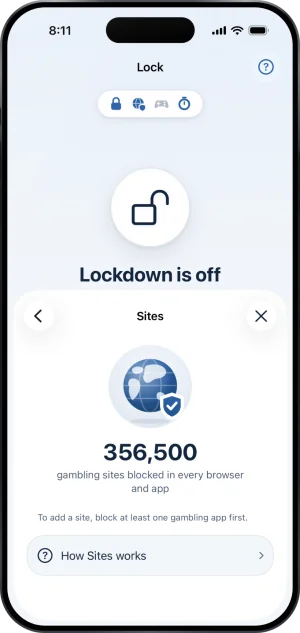
Sites, on
-
If another VPN is on
Turn it off and site blocking resumes by itself. Nothing in Fold’em can push it in front of a VPN you chose to run, and nothing here pretends otherwise.
-
If it says site blocking is off
Tap Set up. There is no in app off switch anywhere in Fold’em, because iOS owns that switch and the app can only watch it.
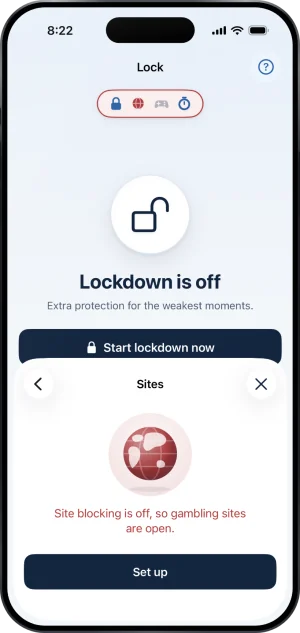
Sites, off
What this does not do
Site blocking does not block a site on a laptop, a second phone or anyone else's device: it is a profile on this iPhone and it reaches nothing beyond it. It never tells your keyholder which site you asked for, and no site name or web address reaches them at all. It does not block the whole internet or anything that merely mentions gambling, only domains on its list. And it is not a lock: iOS holds the switch, so it can be turned off in Settings at any time. What Fold’em does about that is show it on the Sites page, in the pill and on Today.
Write to us and a person reads it. We answer within two working days, and we would rather hear the question twice than not at all.