

The full answer
It is not a VPN and it opens no tunnel. It changes where this phone asks for addresses, so that a request for a known gambling site is answered with nothing and the page never loads. iOS keeps the switch, which is why Fold’em walks you into Settings to finish it and cannot turn it off for you afterwards.
What iOS is asking to add
Before a browser can load anything it asks where the site is, and that question goes to a resolver. Site blocking changes which resolver this phone asks. Fold’em’s own resolver answers a known gambling domain with nothing at all, so the page never loads and the browser reports that the server cannot be found. Every known gambling site on its list is answered that way, and because every browser asks the same question, it reaches all of them rather than Safari alone.
iOS treats a DNS setting as something you have to agree to, so when you tap Allow the profile the app saves the configuration and iOS puts up its own alert asking you to allow it. Answering Don't Allow simply returns you to the app with nothing changed. Nothing scolds you and you can start again whenever.
It is worth saying plainly what it is not. There is no VPN and no packet tunnel: Fold’em routes none of your traffic through itself, and there is no extra network extension on the phone. It answers a question about addresses, and that is the whole of the mechanism.
Finishing the switch
-
Allow the profile
The first page explains what will happen, and its button, Allow the profile, saves the configuration, which is what triggers Apple's alert. If the save fails, the app says so in one flat line and offers another go: it cannot tell a refusal apart from a failure, so it does not pretend to.
-
Choose Fold’em under DNS
Saving it is not the same as switching it on, so one switch is left and it lives in iOS Settings. The page headed Where the switch lives. gives four taps: Open Settings. Tap General. Tap VPN & Device Management. Tap DNS, then Fold’em web shield. Go to Settings lands on Fold’em’s own page because iOS aims no deeper than that, which is what the four steps on screen are for.
-
Come back, or do not
The app watches the setting rather than waiting for you to return, and says "Fold’em saw it." the moment the switch flips. Leaving Fold’em entirely is fine: the page works out where you are by reading the setting again every time it opens, so a saved but unswitched profile resumes at the four steps instead of starting over.
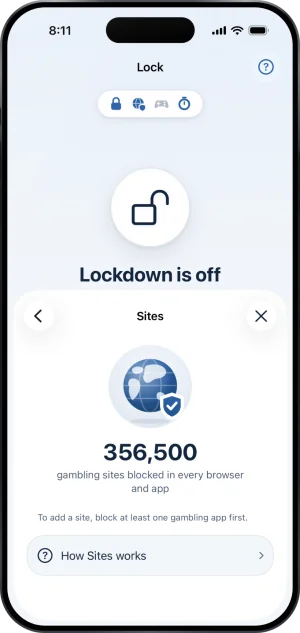
Sites, on
Turning it off, and why Fold’em cannot
The same four taps run backwards: General, then VPN & Device Management, then DNS, and choose Automatic. Fold’em never removes the configuration itself, and there is no off switch anywhere in the app. Set up, on the Sites page, opens the steps to turn it on rather than switching anything itself, because the app only observes this setting and claiming otherwise would be a control that does not control anything.
If you already run a VPN
Another VPN answers the phone's lookups before site blocking can, so with one running it is never asked. It is not an accusation: a VPN for work answers first in exactly the same way. The Sites page says so in its own words, "Another VPN is in front of site blocking. Your added sites still apply in Safari." The profile stays saved and blocking takes over again by itself the moment that VPN goes off.
What this does not do
The setting blocks domains on a list and nothing else: it does not filter the web at large, it does not read pages, and it does not touch anything on another phone or a laptop. It does not shield apps, which is Screen Time's job on a separate layer, so the DNS setting being on says nothing about whether your apps are blocked. It cannot be held open by Fold’em: iOS owns the switch and it can be turned off in Settings at any moment, which is why the app checks it and shows what it finds on the Sites page.
Write to us and a person reads it. We answer within two working days, and we would rather hear the question twice than not at all.