

The full answer
Adding it takes one tap and holds for the rest of your protection. The standing fix for apps you have not thought of yet is the Games category, which catches every App Store game including ones installed later. If the layer reads Needs attention, with Screen Time is off, the shield itself is not holding and that is a different problem.
The shield blocks the apps you picked, and only those
When you set Fold’em up you picked apps in Apple's own picker, and those picks are what the shield holds. There is no wider net behind them and no name matching: Fold’em cannot look at your home screen and decide that something looks like a sportsbook, because Apple hands the app a set of opaque tokens rather than a list of names.
That boundary is now a choice rather than a limit. Since iOS 26.4 the system can hand an app the names of what is installed, under a wider permission. Fold’em does not ask for that permission and does not call that interface, so all it ever knows is how many apps you blocked, never which ones.
Why a new install is not caught
An app you installed after you started protection is not in that set, so nothing stops it. There are two answers and they are different in kind. Adding the app by name is exact and takes a tap. Blocking the Games category is the standing answer: it shields every App Store game on the phone, including ones that land next month, without you opening Fold’em. It is off until you select it, it catches nothing filed outside Games, and turning it off takes a 72 hour wait that your phone times for itself.
A betting site opened in another browser
If what opened was a browser rather than a betting app, the browser is not the problem. Site blocking covers every browser on this phone, so a site that loads is one its list does not carry, or it is not answering: open Lock, tap the pill, then Sites, and check that the page leads with 356,500 gambling sites blocked in every browser and app.
Adding it
-
Read the Gambling apps layer first
Open Lock, tap the layers card, then Gambling apps. On, with a count under Blocked apps, means the shield is holding and the app simply was not in the set. Needs attention, with Screen Time is off, means the permission behind the shield is off, and adding an app would change nothing until that is back.
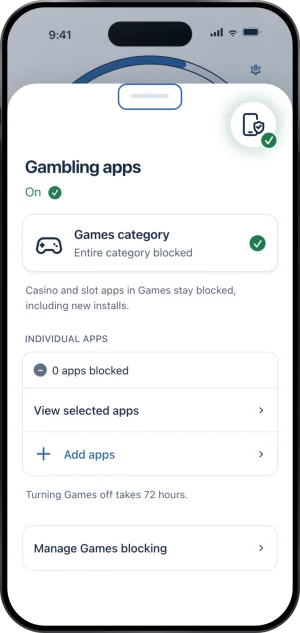
The apps layer, holding
-
Add apps
Add apps opens Apple's picker. What you tick there is added to what you already blocked, so nothing you picked before can fall out by accident. While a Lockdown run holds, Add apps waits until it ends.
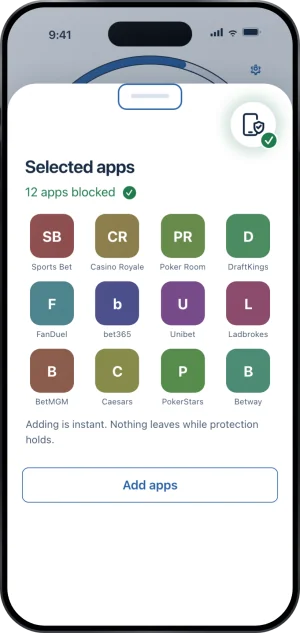
The apps sheet
-
Done
Adding is instant. From that moment the new app is blocked for the rest of your protection, and there is no way to take it back out before protection ends: nothing leaves while protection holds.
What this does not do
Adding an app does not reach a second phone, a laptop, a shop or cash, and no app on any phone can. It does not remove the app or touch what is inside it, and it does not delete an account you hold with a bookmaker. Blocking the Games category does not catch a sportsbook filed under Sports or Finance, which is why adding by name still matters. And none of this is reversible before your protection ends: adding is one tap in, and the way out is a request to end protection, not the sheet.
Write to us and a person reads it. We answer within two working days, and we would rather hear the question twice than not at all.