

The full answer
When that file is missing, the widget draws its empty face, and when it cannot be read the face asks you to open Fold’em, rather than inventing a number either way. Opening Fold’em once rewrites the file and reloads the placed widgets. If the empty face persists after that, the first thing to check is whether there is anything to draw yet, because no run is recorded on this phone.
What a widget actually reads
A widget on iOS is a separate small program from the app, and it cannot ask the app a question while it draws. So Fold’em does the opposite: the app writes a compact file into the container the app and its widgets share, and every face is drawn from that file alone. The widget signs in to nothing, calls nothing over the network and derives no figure of its own. Where the app and a widget could disagree about a number, they cannot, because there is only one place the number comes from. The Standing with faces read a second file of their own, which iOS keeps closed while the phone is locked.
The file is rewritten when protection starts or ends, when you start, extend or end a Lockdown run, when Fold’em comes to the front, when it goes to the background, and when your circle changes, which covers someone joining or leaving and a name you edit. That is the whole of it. Anything that happens while the app has not been opened is not in the file yet.
A blank face is a statement
If the file is missing, the widget falls back to its empty face rather than throwing away the draw. If it is unreadable, or written by a version the widget does not understand, the face asks you to Open Fold’em for updates instead. On the Gambling free faces the empty face reads No run recorded, and that is all it says: nothing on an empty face encourages you, scolds you or fills the space with a number that has no start. The same rule governs the ring. A deadline on its own cannot fill one, so with no anchor the face draws no ring and no zero rather than a fraction it made up.
Which means the first question is not what is wrong with the widget, but whether there is a run to draw. A phone with no run recorded has an honest empty face and there is nothing to fix.
Why the count still moves between rewrites
The run does not sit still waiting for you to open the app. When the widget asks for a timeline, it is given the current reading plus one entry at each of the run's own boundaries, timed to the anchor's own time of day rather than to midnight, so the count rolls over at the same instant the app would roll it. With no anchor there are no boundaries at all, so the face checks back once a day in case a run has been recorded since.
The Circle face and the seats
The circle half is written more carefully than the rest, and the reason is worth knowing. On a cold launch the app's own circle is not settled yet, and a writer that baked what it saw at that moment would blank the Circle widget and then confidently reload it with the blank. So an unsettled circle is written as nothing known this pass, and the seats already on the widget are kept. A genuinely empty circle is written as empty and does clear it.
If a face is blank or stale
-
Open Fold’em, then go back
Bringing the app to the front rewrites the file and asks iOS to reload the widgets that read it. This is the fix for almost every stale face, and it is the only one that is entirely in your hands: when iOS actually redraws is Apple's decision, not the app's.
-
Judge it on the home screen, never in the gallery
The widget gallery keeps its own cached pictures of each face, and those pictures survive the app being reinstalled. A gallery preview that looks blank or out of date is not evidence about your widget. Place the widget and look at the placed one.
-
Add it again from Apple's guide
Settings, then Help, carries a Widget guide row that opens Apple's own instructions for adding a widget, because Apple maintains those and Fold’em maintains nothing in front of them. Fold’em offers four kinds: Gambling free, Circle, SOS and Standing with.
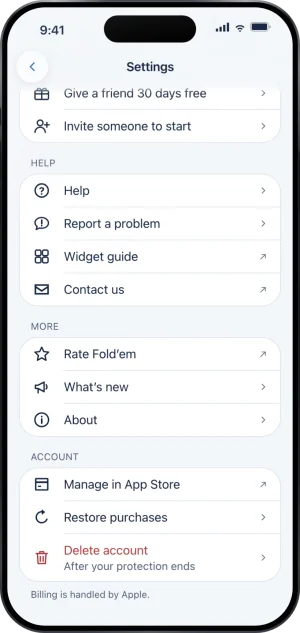
Settings, the Help group
What this does not do
A widget enforces nothing. Removing one, or every one, blocks nothing extra and releases nothing: the shields are held by Screen Time and a DNS setting, and the file a widget reads is a picture of the state, never the state itself. A widget cannot show a status word for the shields either, and that is deliberate rather than missing: nothing that rewrites the file fires when Screen Time is turned off or site blocking drops, so a word there would go stale on exactly the faults it claimed to report. No face names what is blocked, the lock screen faces included: they show Your Time, or only the number and its unit, because a lock screen is read without unlocking anything.
Write to us and a person reads it. We answer within two working days, and we would rather hear the question twice than not at all.