

The full answer
The app says so: on Lock and on Today, Gambling apps reads Needs attention, with Screen Time is off, and the people in your circle see Protection off on your card. Your protection does not end, and your gambling free count carries on. Granting it again puts the shield straight back.
Why the apps open when Screen Time goes off
The app shield is not a Fold’em invention. It is Apple's own Screen Time, driven through Family Controls, and the list of apps you blocked lives in a Screen Time store that only holds while you have granted Fold’em that permission. Turn the permission off in iOS Settings and iOS empties the authority the shield was standing on, so the blocked apps open on the next tap.
The app reads that permission on the phone itself, with no round trip to a server, which is why the fault shows the moment you come back to Fold’em rather than at some later sync. Site blocking is a different layer and is untouched by this: it is a DNS setting iOS holds separately, so betting sites can still be blocked while the apps are open.
What the app says while it is off
The surfaces that change agree with each other. On Lock, the layers card opens by itself with Gambling apps first, in red, reading Screen Time is off, and its sheet says the whole of it: "Screen Time is off, so gambling apps are open.", with one button, Allow Screen Time. Today raises a card, Apps need attention, with Screen Time is off under it. And the people in your circle see Protection off on your card, with a notification that you turned off your protection. That turn comes from the phone's own report: the reading carries the permission's state, and the server treats a phone that is not authorised as revoked before it looks at anything else.
How soon the card turns depends on one thing: if Fold’em is running when the permission changes, the reading goes straight away; if not, it goes the next time the app runs.
What happens to your days
Your gambling free count carries on, and so do its milestones: they count the days since your last bet, not the days the block held, and only your own admission that you gambled resets them. Money kept is the one figure that waits: while the permission is off it stops rising and its card adds the line Estimate paused, and when the permission is back, and your app choices are picked again if they need it, it carries on from where it stopped, with nothing added for the gap. There is no countdown running underneath any of it: protection has no end date, so turning the permission off buys no time.
Putting the permission back
-
Open the Gambling apps layer on Lock
If it reads Needs attention, with Screen Time is off, the permission is the fault and nothing else needs changing. If it reads On with a count of blocked apps, the shield is holding and the thing that got through belongs in another scenario.
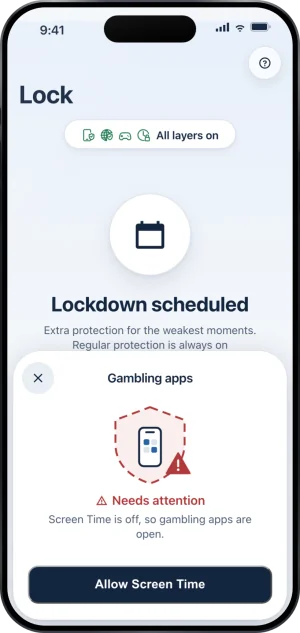
The apps layer, needing Screen Time
-
Or tap the card on Today
Today carries the same fault as a card, Apps need attention, with Screen Time is off. Tapping it opens the same sheet on Lock, or, once iOS will no longer ask, the Screen Time step of setup, which takes you to iOS Settings. Nothing else about your protection is set up again.
-
Allow Screen Time, and answer Apple's own sheet
Allow Screen Time is the system request itself, so the words in the sheet that follows are Apple's. If iOS has already been told no once it will not ask again from here, so the button opens iOS Settings instead, the only route left. Fold’em cannot grant this for you, and no support request can either.
If iOS will not ask you at all
Two answers from iOS look the same from the outside and are not. If you already answered Don't Allow, iOS refuses to present the dialog again and the only route left is Settings. If this iPhone has no device passcode at all, iOS will not hand Screen Time to any app: set a passcode in Settings first, then come back and grant it. Fold’em is never told anything else about why, and it never asks for a Screen Time passcode itself.
What this does not do
Granting the permission again does not remove the record that protection was off: the people in your circle saw it, and that stands. It does not end your protection, cancel a request to end protection, or change a wait that is already counting. It does not touch site blocking, which iOS holds separately. And nothing here is a way out: turning Screen Time off unblocks the apps on this phone, lifts the deletion delay and the Games category with them, and shows on the cards of the people in your circle, with a notification or a letter to each of them, which is the whole of what it does.
Write to us and a person reads it. We answer within two working days, and we would rather hear the question twice than not at all.