

Three layers, three different failures
The three layers are worth naming before the scenarios, because which one you met decides what you see. Site blocking sits at the name lookup, through a DNS profile on the phone, and answers a known gambling address with nowhere, so the page never loads and the browser reports that the server cannot be found. Screen Time carries a short curated list that shows Apple's own restricted site page inside Safari. And the app shield blocks the apps you picked, and the sites you added with Add a site, and those show Fold’em’s own block screen. Three different failures, three different pictures on screen.
A betting site loads in Chrome, Firefox or Edge
A defect, do thisSite blocking answers the phone's lookups for every browser on it, so a site on its list fails in Chrome, Firefox and Edge exactly as it does in Safari. A site that loads is one its list does not carry, or site blocking is not the one answering.
Do this: open Lock, tap the pill, then Sites. If the page says "Site blocking is off, so gambling sites are open.", tap Set up. If it leads with 356,500 and the line "gambling sites blocked in every browser and app", add the site yourself with Add a site, which is there once at least one app is blocked, leaving your apps ticked in the picker; it stays blocked while protection holds.
A betting site loads in Safari
A defect, do thisSite blocking answers for the known gambling domains, but only while its DNS setting is on. Open Lock, tap the pill, then Sites: the page leads with 356,500 and the line "gambling sites blocked in every browser and app" when it is answering. If the Sites tile is red and the page says "Site blocking is off, so gambling sites are open.", the DNS setting was never enabled or was switched off in iOS Settings.
Do this: tap Set up and follow the steps into Settings. The page says "Fold’em saw it." once iOS reports the setting enabled.
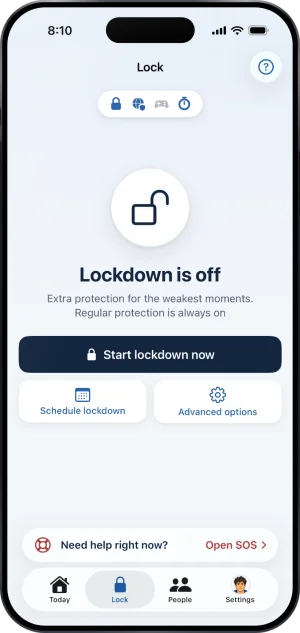
The Lock tab, every layer on
Another VPN is on
IntendedAnother VPN is answering the phone's lookups in front of site blocking, and the Sites page says so: "Another VPN is in front of site blocking. Your added sites still apply in Safari." That is honest, not broken: site blocking cannot answer a question it is never asked, and Fold’em does not claim it is holding when the phone's own test cannot confirm it. Turn the other one off and blocking takes over again on its own, with nothing for you to switch back on.
Does my circle see site blocking?
IntendedNo. Your card follows Screen Time and the app shield, and site blocking does not change it, even when site blocking is off. Lock and Today are what tell you: the pill and the Sites tile turn red, and Today shows Sites need attention. If the setting was switched off, put it back, and if another VPN was in front, turning it off is enough.
If your circle sees Protection at risk on your card, it is about your subscription, not site blocking: the subscription ended, and protection ends unless it is restored.
iOS asked me to approve a DNS setting
IntendedThat is site blocking being installed, and iOS is right to ask once. It is not a VPN and it opens no tunnel; what changes is where this phone asks for addresses. iOS keeps the switch for it, which is why Fold’em walks you into Settings to finish the job and why Fold’em cannot turn it off for you afterwards either. Fold’em can read whether the setting is on and report it; that is the whole of its power over it.
A gambling app I installed this week opens
A defect, do thisThe app shield covers exactly the apps you picked and nothing else. A new install is caught only if the Games category is blocked, and only if the App Store files that app under Games. Sportsbooks filed elsewhere have to be added by name, which is one tap and holds for the rest of your protection.
Do this: on Lock, select Games from the Games layer if you have not, and add the app with Add apps on the Apps page. Adding is one tap; removing waits for protection to end.
An app I definitely blocked opens, and Apps reads Screen Time is off
A defect, do thisThis is the whole app layer, not one app. Fold’em blocks apps through Screen Time, so when that permission is withdrawn the shield stops holding and everything you blocked opens. Apps reads Needs attention, with Screen Time is off, on Lock and on Today, and the people in your circle see Protection off on your card. Your protection does not end, and your gambling free count carries on, because only your own admission that you gambled resets it.
Do this: tap Allow Screen Time on the layer's page, or tap the card on Today. The shield goes straight back on.
I deleted and reinstalled Fold’em, and nothing is blocked
A defect, do thisReinstalling does not end anything. Your protection, the day you started, your keyholder and the lock itself are held on the server, so signing in on the fresh install brings all of it back exactly as it was, and never as anything weaker. Two things have to be done again on the phone, because they never left it: granting Screen Time, and picking your apps. Until Screen Time is granted again, the people in your circle see Protection off on your card; once it is, they see Not confirmed yet while you pick your apps again, and Protection off if the apps are still not picked 12 hours later.
Do this: sign in, grant Screen Time, and pick your apps again.
Notifications arrive with no sound and no banner
IntendedQuiet is not a fault. If you allowed notifications when setup asked, they arrive with a banner and a sound. If you skipped that question, they arrive quietly, straight into Notification Center with no banner and no sound, and moving to the loud kind takes one tap on Allow alerts, in Settings under Notifications, which raises the real iOS prompt. If you told iOS no, none arrive until you allow them in iOS Settings, and that row reads Allow alerts in Settings instead, because iOS will not ask twice.
My widgets are blank
IntendedA Fold’em widget reads one small file the app writes into the space the two of them share, and it works out nothing for itself. When that file is missing or cannot be read, the widget draws its empty face and says so rather than inventing a number. Opening Fold’em once rewrites the file and reloads every placed widget. If the empty face persists after that, the first thing to check is whether there is anything to draw yet, because no protection is running.
The site opened on my laptop, or on another phone
IntendedEvery layer Fold’em has is installed on the one iPhone it runs on. There is no account wide block, no browser extension and no router setting, so a second device is outside all three layers by construction. That is a limit rather than a fault, and it is the reason the app treats itself as one layer among several and points at the others.
What this does not do
No app can reach a second device, a desktop, a shop or cash, and none of them produces anything Fold’em can see. What Fold’em adds is on this phone: if anyone is in your circle, switching the block off is not quiet, and the block on this phone stays exactly where you put it. None of these scenarios can be fixed by shortening a wait, because no page, email or support action anywhere can move one.
Write to us and a person reads it. We answer within two working days, and we would rather hear the question twice than not at all.
If you need someone now
Free, and not run by Fold’em.
- Call 1 800 697 3738National Problem Gambling Helpline, US. Call, text or chat.
- Call 1 866 531 2600ConnexOntario, Canada. For people in Ontario.Website for ConnexOntario
- Call 0800 1 37 27 00BZgA Check dein Spiel, GermanyWebsite for BZgA Check dein Spiel
- Call 1800 858 858Gambling Help Online, AustraliaWebsite for Gambling Help Online
- Call 0808 8020 133National Gambling Helpline, UKWebsite for the National Gambling Helpline
- Other countries
Gam-Anon is a community for people supporting someone who gambles.