

The full answer
Remove your current keyholder from their settings page, which takes effect at once, then invite the person you want and accept their ask. Fold’em 3.0 has no handover to start. Until the new person accepts you have no keyholder, so a request to end protection waits 7 days. Removing your keyholder waits while a request of yours is waiting on them and while a Lockdown run holds.
Remove, then invite
Fold’em 3.0 has no handover to start. The key moves in two plain steps instead: you remove the keyholder you have, and the person you want asks to hold it and you accept.
Open your keyholder on People, tap Edit, and use Hold to remove with their name. The line under it says what is true from that moment: your protection keeps running, they stop seeing your updates, and you can invite someone new immediately. Then tap the plus on People, choose Hold the key and share your link with the person you want. When they tap Hold the key in their app, their ask comes first in Your circle, and the key is theirs the moment you accept it.
A supporter cannot move into the keyholder’s place while they support you, because one person holds one place in your circle. To make a supporter your keyholder, remove them as a supporter too, then send them your link with Hold the key.
The gap between the two
Between the removal and your yes to their ask, nobody holds your key. A request to end protection opened in that gap takes the road for somebody with no keyholder: 7 days from the moment you ask. Once the new keyholder accepts, a request goes to them, and their yes starts the usual 48 hour wait. Both waits are the server’s, so nothing on your phone counts them.
What waits for what
Removing your keyholder waits while a request to end protection is waiting on them, and the page says so: you can remove them once your request is answered or withdrawn. It waits during a Lockdown run too, with the line Changes wait until Lockdown ends. And while a request is open, nobody new can join your circle: the plus reads Not while a request to end protection is open.
Changing keyholder moves who answers and none of the waits: an agreement still starts a 48 hour wait, and with no keyholder at all a request still waits 7 days before it is ready. SOS is untouched by any of it.
A handover started before Fold’em 3.0
-
A row for each of them
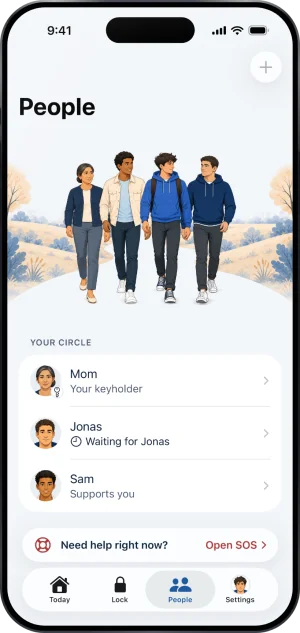
If a handover you started before 3.0 is still running, it finishes the way it started. Your keyholder’s row still reads Your keyholder, because the key is still theirs. The person taking over has their own row, reading Waiting for whoever answers next, then Ready with the day the key moves. Today carries a Key handover card as well.
A handover in flight
-
The steps, and who is next
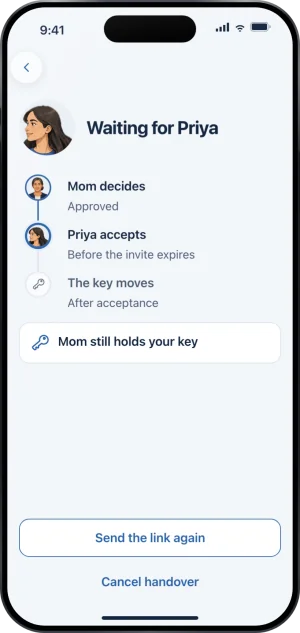
The Key handover card on Today opens the handover: your keyholder decides, the new person accepts, the key moves. The page is headed with whoever it is waiting for, says who still holds your key, and offers Send the link again and Cancel handover.
Approved, waiting on the new person
Declines, cancellations and time running out
Either person can decline, in their own app. Cancel handover asks you to confirm, because from then on the person taking over can no longer accept and your current keyholder keeps the key. However it closes, your protection stays in place. While it runs you cannot ask to end protection: the request page reads A handover is in progress. You can ask after it ends.
Once the new person has accepted and the day on their row arrives, the handover is complete and they hold your key from then on.
What this does not do
Changing keyholder does not shorten your protection, does not lift a block, and does not release anything. Removing a keyholder cannot happen while a request of yours waits on them, so it is not a way around an answer that has not come yet. It does not remove your supporters, and it does not change what anybody sees: the new keyholder sees what the previous one did, and no more.
Write to us and a person reads it. We answer within two working days, and we would rather hear the question twice than not at all.