

The full answer
Games is a layer of its own on the Lock tab. It is off until you select it, which takes one pass through Apple's picker, and it never raises a fault while it is off. Turning it off starts a 72 hour wait, with the category blocked throughout and Keep Games blocked there to stop it. Your phone times that wait itself, because the Games switch was never the server's to hold.
How the category block holds
Screen Time can shield a whole App Store category as well as the individual apps you picked. Fold’em asks it to shield Games, because casino and slot apps are filed under Games, and blocking the category catches those, installed now or later. A game you install next month is caught by the category the moment it lands, without you opening Fold’em.
The category is added to the apps you already blocked rather than replacing them, and your existing app blocks stay on whatever happens to it. The block only ever tightens from here: adding Games changes nothing about the apps you picked, and turning it off is a wait rather than a switch.
Why the sheet asks for Games, and only Games
Apple's picker hands Fold’em a token rather than a name, so the app can count what came back and cannot read which category it was. Select Games therefore asks for one thing: tick Games in Apple's picker, then Done. If nothing comes back, or more than one category does, the sheet says so and asks you to try again with Games alone. Once it is blocked, the sheet shows the category by the name iOS gives it, so you can read the word Games for yourself. Show me how walks through the same pass as a demonstration, and a demonstration does not select it for you.
Selecting it, and starting the wait
-
Open Games on the Lock tab
Tap the pill, then Games. While it is off, the page says "Block every game in the App Store, including new installs." and "Turning it off later takes a 72 hour wait.", with Select Games and Show me how. It needs Screen Time access first: with access off, Allow Screen Time stands in place of Select Games, and while a Lockdown run holds it says "Changes wait until Lockdown ends."
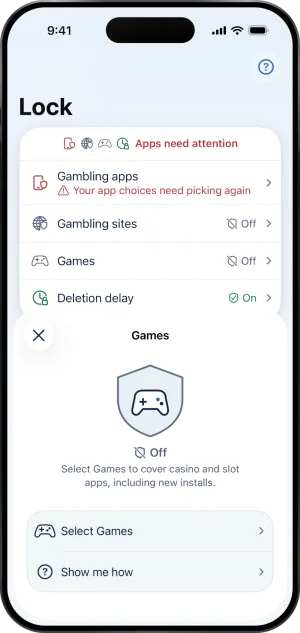
Games still to select
-
Select Games, then Done
Select Games opens Apple's picker. Tick Games and tap Done. The page then leads with Every game and the line "in the App Store is blocked, new ones too", with the category named under it and a red row, Turn off Games blocking.
-
Turning it off starts the wait
Turn off Games blocking opens a page headed Games stays blocked for 72 hours, with the line "Then it opens on this iPhone. You can stop the wait any time." Under it a short timeline reads You start the wait, 72 hour wait, Games opens. Keep Games blocked is the filled button, and the slide beneath it, Slide to start the wait, is the only way forward. There is no reason to give. Once the wait starts, the page is headed with the moment, such as Games opens Mon 9:00 AM, with the line "Games stays blocked until then.", and its filled button, Keep Games blocked, stops the wait at any point, with no connection needed.
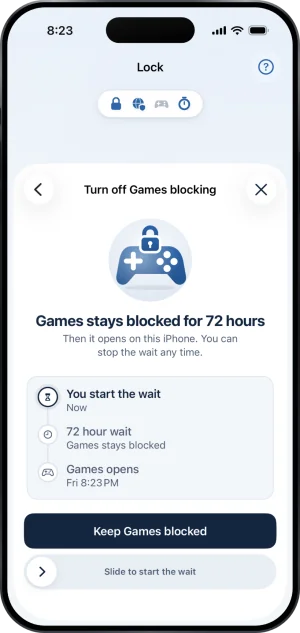
Where the wait is started
A release your phone times for itself
In Fold’em the server decides when your protection ends and the phone only applies what it is told. Your phone times three things for itself: this wait, the end of a Lockdown run, and the 3 hour wait that ends a Lockdown run sooner when you have no keyholder. The Games category is allowed to be one of them for a narrow reason: that switch has never existed on the server. It has no field on the wire, no callable behind it and no server side rule that reads it, so there is no server decision for the phone to contradict.
The Games release's 72 hours are counted against this phone's own clock, so moving the clock forward ends that one wait sooner, on any phone. That is friction rather than a wall, and it reaches only the Games category: the apps you picked, site blocking, the deletion delay and your protection are all untouched by it.
The category is on until the release has actually landed, because a sheet that showed zero first would be promising something the phone has not done yet. While a Lockdown run holds, the wait cannot start, and the page says "Changes wait until Lockdown ends."
Why a switch like this one exists at all is part of a longer answer, and it is set out in how to block gambling apps on iPhone.
What this does not do
It does not touch your picked apps, site blocking, the deletion delay, your protection or a request to end protection. It cannot catch an app the App Store files outside Games, it cannot reach a second phone, and it cannot block a betting site, which is site blocking's job. A wait that is still running cannot outlive protection itself: when protection ends every shield comes off together, so there is nothing left for the wait to open, and protection started again carries no deadline with it, so a wait never carries over.
Write to us and a person reads it. We answer within two working days, and we would rather hear the question twice than not at all.