

The full answer
Under the title, one pill shows your four layers, Apps, Sites, Games and Deletion delay, as four icons with no words. Tap it and Your protection opens: one tile per layer, and a tile opens that layer's page, which is where you add. Below the pill sits Lockdown, with Start lockdown now, Schedule lockdown and Advanced options, and the question mark beside the title opens About Lock. Nothing on it ends your protection: turning off Games or the deletion delay starts a 72 hour wait instead.
The pill and Your protection
Apps, Sites, Games and Deletion delay sit together because they are the layers of your usual protection, and each is drawn from one reading rather than assembled from scattered state. The pill shows four icons and no words, and turns red when Apps or Sites needs you; the lock icon on the Lock tab then carries a red "!". Tap the pill and Your protection opens, with one tile per layer. A tile carries no state word: on top it says what the layer does, such as Block gambling sites, then comes a drawing, and the layer's name sits at the foot. The tile's look is its state:
- Holding. The layer is on and the tile is plain.
- Off. The tile is grey. Games and Deletion delay stay grey until you turn them on, and every layer is grey while protection is off.
- Needs you. Something you can fix. The tile turns red, and its page says what is wrong and carries the one action that fixes it: Screen Time is off, Your app choices need picking again, Site blocking is off, or Another VPN is in front of site blocking.
- A wait in flight. A 72 hour wait is counting, for Games or the deletion delay. The layer holds until it ends, the tile shows the hours left, such as 45 hours left, and its page names the moment it ends.
- Checking, or could not check. Sites is the one layer the phone has to read. Until the first reading lands, the page says "Checking site blocking on this iPhone." When the reading failed, it says "Site blocking could not be read on this iPhone." with Set it up and Try again. Neither is a fault, and neither is drawn as holding.
A Screen Time problem marks Apps alone. Sites reads whether the DNS profile is on, which a Screen Time revoke does not touch, and Games never raises a fault, so the tiles read the layers separately rather than painting everything red. When a fault arrives nothing pops up: the pill turns red and stays red until the fault is fixed. Your keyholder is not here: the people in your circle are on People.
What the page carries
-
Every layer holding
The pill shows four plain icons. Under it the page reads Lockdown is off, with the line "Extra protection for the weakest moments. Regular protection is always on", the one filled button, Start lockdown now, and two tiles, Schedule lockdown and Advanced options. Once a weekly schedule exists, the title reads Lockdown scheduled and the first tile reads Weekly schedule.
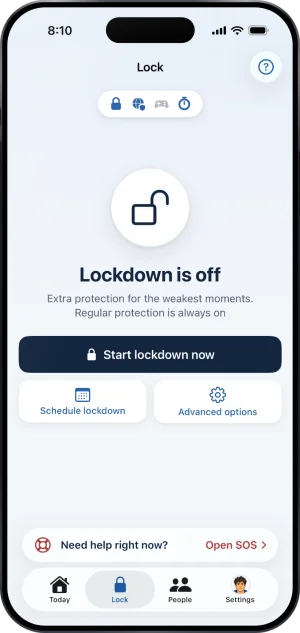
The Lock tab, at rest
-
Screen Time withdrawn
The pill turns red and the lock icon on the tab carries a red "!". Tap the pill and the Apps tile is red. Its page reads "Screen Time is off, so gambling apps are open." with one filled button, Allow Screen Time, which raises Apple's own prompt, or opens iOS Settings once iOS will no longer ask. Today shows the same fault as a card. Your gambling free count carries on, because it counts days since your last bet, and the people in your circle see Protection off on your card.
-
What Apps opens
The Apps tile shows a few of your blocked apps and how many more. Tapping it opens its page: "Gambling apps are blocked on this iPhone.", then the tiles iOS draws for your blocked apps, Add apps, and the line "Adding is instant. Nothing leaves while protection holds." Games has a tile of its own.
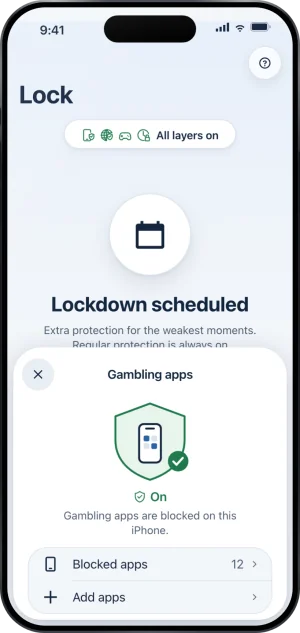
Gambling apps, from the layers card
What the other layers open
Sites opens a page that leads with 356,500 and the line "gambling sites blocked in every browser and app", with Added by you once you have added some, then Add a site, then How Sites works, which opens the help article on blocking sites. When site blocking is off, Sites opens straight on Set up Sites, which walks you through the profile in iOS Settings, with the Sites page one step back. Games opens a page that leads with Every game and the line "in the App Store is blocked, new ones too", or, while it is off, Select Games and Show me how. Deletion delay opens a page that leads with 72 hours and the line "before Fold’em can be deleted, counted from when you ask". Turn off Games blocking and Turn off deletion delay each open a page whose filled button keeps the layer on and whose slide, Slide to start the wait, starts a 72 hour wait. Back always returns to Your protection.
Lockdown, and the passcode
Lockdown lives on this tab. Start lockdown now opens the start sheet, the same one SOS opens; Schedule lockdown sets the weekdays a run starts by itself; Advanced options holds the options every run uses and the one list of allowed apps. While a run holds, the page turns dark and reads Lockdown is on with the time remaining. The schedule and options tiles are hidden until it ends, and the page offers Extend lockdown and a quiet button to end it sooner. The question mark beside the title opens About Lock, which answers the common questions and ends with Setting a Screen Time passcode and its guide, How to set it up. What is Lockdown? covers the rest.
What this does not do
Nothing on this page removes an app, a site or site blocking, and nothing on it ends your protection or shortens a wait; a request to end protection starts in Settings, under Your protection. Turning off Games or the deletion delay starts a 72 hour wait rather than acting at once. While a Lockdown run holds, one line shows, "Changes wait until Lockdown ends.", and adding apps or sites and turning off Games or the deletion delay stay closed until it ends; turning on the deletion delay and fixing a fault stay open. It cannot tell you your blocked apps' names itself: the tiles on the Apps page are drawn by iOS from the picker's tokens, and Fold’em never learns which app each one is. And the pill reports this phone only: another device has its own state and this page cannot see it.
Write to us and a person reads it. We answer within two working days, and we would rather hear the question twice than not at all.