

The full answer
Protection on means the last reading said Screen Time is granted and the shield is applied. Protection off means the reading said Screen Time is off, or that the shield is gone while protection is running. Not confirmed yet means no reading has arrived for 24 hours, so nothing is known either way. The server keeps eight states of its own, and nobody is ever shown their names; your circle sees the words above. Two quieter words sit beside them: Protection at risk and Protection ended.
The three main words
Protection on is the healthy reading: Screen Time is granted and the shield Fold’em applied is still on the phone. Nothing happens, and nobody is told anything.
Protection off is the loud one, and it is reached two ways. The first is Screen Time permission being switched off, which the server checks before anything else in the reading, so a phone cannot talk its way out of it by claiming something softer lower down. The second is Screen Time still being granted while the shield itself is gone and protection is running, which is the shape a tampered phone has.
Not confirmed yet is what silence becomes. No reading of any kind for 24 hours, and the server marks the phone as unheard from. It is not an accusation: a dead battery, airplane mode and a week in a drawer all look exactly like this.
The server keeps eight states of its own, and none of their names is a word a person is shown; your circle sees the five words on the card.
The three states, on their phone
-
Protection on
Your row on their People tab, under You support, carries your name, your character and the words Protection on, and asks nothing of them, because there is nothing to do. If you share your run, your day count sits beside it.
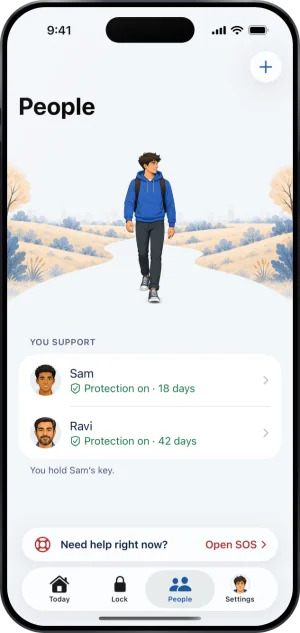
Sam, protection on
-
Protection off
The row turns red and reads Protection off, and on your page, under How they are doing, Protection reads Off. It says that the blocks stopped and nothing about why: this can be a hard moment, or simply Screen Time being reset for another reason. Each of them also gets a push saying you turned off your protection.
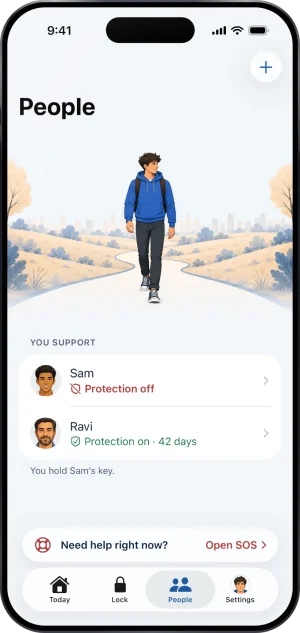
Sam, protection off
-
Not confirmed yet
The row reads Not confirmed yet, and each of them gets a push saying your phone has gone quiet. It is the gentler of the two: it says the phone has gone quiet, not that anything was switched off.
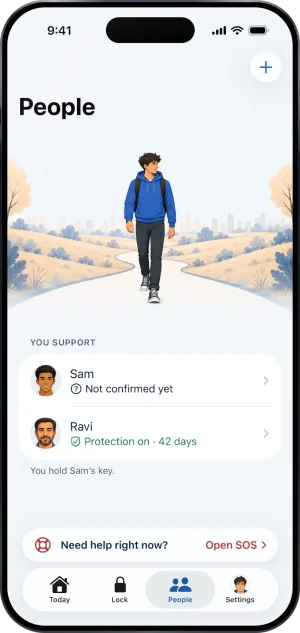
Sam, protection not confirmed
The quieter words
After a reinstall or a move to a new phone, Screen Time has to be granted again and the apps picked again. A phone that has not granted Screen Time yet reads Protection off, like any other. Once it has, it reads Not confirmed yet until the apps are picked again, and Protection off again if that takes more than 12 hours.
Site blocking does not change your row: it follows Screen Time and the app shield, and site blocking that is off shows on your Lock tab and on Today. If your subscription ends, the row reads Protection at risk while the lapse window is open, and the push your circle gets says your protection is ending, never why. Once protection has ended, for any reason, the row reads Protection ended, which says nothing is wrong with the phone.
What your keyholder can and cannot do with it
They can see it and they can talk to you. That is the whole list, and the same is true of a supporter.
- A keyholder cannot agree with a tap: the one answer they can give from their own phone is Say no. A yes is a code they show you, from their app or their Wallet card, and you scan it with your phone, which is meant to happen in person.
- They cannot shorten or cancel the wait that follows an agreement either, because that clock is the server's.
Neither of you can mute these. Your one sharing switch covers your gambling free run and its milestones; whether protection is on is always shown. Requests reach them whatever their switches say, their switches for news about you cover milestones and protection ending, and none of them is a switch for protection going off or going quiet.
No amount of money reaches them. Money kept is never shared, so there is nothing for any screen of theirs to show by mistake. The full list of what a keyholder can see is written out in full, on what a keyholder can see.
What this does not do
None of these words describe you. They describe one phone's protection: whether the permission is granted, whether the shield is applied, and whether the phone has spoken lately. Gambling somewhere Fold’em cannot reach does not change the word, and neither does a bad day.
A calm word is not proof that the moment is calm. A reading is true for the moment it was taken, and a row read offline shows the last copy the phone kept. If it matters right now, send a message.
And a word is not a lever. Nothing on the row changes your protection, your apps, your sites or your wait; the words report the state and never set it.
Write to us and a person reads it. We answer within two working days, and we would rather hear the question twice than not at all.