

The full answer
The phone sends a reading straight away if Fold’em is running when the permission changes, and otherwise the next time it runs; the server writes Revoked, and your keyholder and supporters see Protection off. Money kept stops rising, and its card on Today adds the line Estimate paused. Your gambling free run is not touched: it counts from your last bet and only your own admission resets it, so switching a permission off never costs you a day. Protection itself does not pause and does not end, and site blocking was never running on Screen Time in the first place.
What stops, and what does not
The app shield is Apple's Screen Time doing the blocking, at the operating system level, on the apps you picked. Fold’em asks for that permission once and holds the block through it, so when the permission goes away the block goes with it. There is no second mechanism underneath that keeps the apps blocked.
Site blocking is a different layer and is untouched by this. It answers gambling domains through a DNS setting rather than through Screen Time, so sites keep failing to load while the apps are open. So does the deletion delay's own record on the server, and so does your protection.
How fast the change is reported depends on one thing. If Fold’em is running when the permission changes, it takes a reading and sends it straight away. If it is not, the reading goes the next time the app runs. Either way the server writes the state from the reading, never from the phone's own claim.
Who sees it
The server writes Revoked. Your keyholder and your supporters then see Protection off on your row, and each gets a push saying you turned off your protection. There is no ask in it. With nobody in your circle, nobody is told.
Neither of you can switch that off. Your one sharing switch covers your gambling free run and its milestones, and whether protection is on is always shown; none of their notification switches is a switch for protection going off. What they see is the state of the permission and nothing about what you did while it was off.
Money kept, and your count
While the permission is off, Money kept stops rising and its card on Today carries the line Estimate paused. When the permission is back it carries on from where it stopped, and if your app choices need picking again, it waits until you have picked them. Nothing is added for the time in between.
Your gambling free count is a different number and it never pauses: it counts on with nothing blocked, because it measures the days since your last bet rather than the days Fold’em was holding. Only your own admission that you gambled resets it.
There is nothing here that a pause could postpone. Protection has no end date to push back and no deadline to sit out, so turning Screen Time off buys no time at all.
A lapsed subscription is a different thing and is worth separating. The shield keeps holding for the 72 hour lapse window; if the window runs out, protection is released, which is its own page.
The way back
Today says it plainly. A card reads Apps need attention, with the line Screen Time is off in red.
-
The card opens the apps layer
Tapping it opens the Lock tab at the Gambling apps sheet, which reads Screen Time is off, so gambling apps are open, with one button, Allow Screen Time. If you once tapped Don't Allow on Apple's own sheet, iOS will not ask again, so the card opens the Screen Time step of setup instead, with a way to iOS Settings. It is not a new setup: your protection, your keyholder, your Games choice and every app you picked are kept.
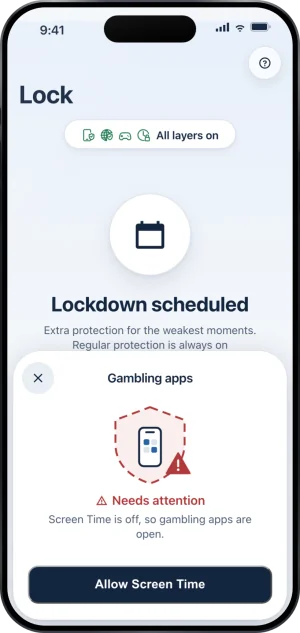
The apps layer, waiting on Screen Time
-
Answer Apple's own sheet
Allow Screen Time raises the system request itself, so the words are Apple's. As soon as the permission is granted the app applies the shield again on the same apps and sends a reading. The state goes back to Verified, your keyholder and supporters see Protection on again, and each gets a push saying your protection is back on.
What this does not do
Turning Screen Time off does not end your protection, does not open a request to end protection and does not shorten a wait. The record the block lives on is on the server, and nothing you can switch in iOS Settings reaches it.
It does not cost you a day. Your gambling free count lost nothing, because it was never counting the block.
Fold’em also cannot switch the permission back on for you. It can ask, and Apple decides, which is why the way back is a step you take rather than something the app does quietly on your behalf.
Write to us and a person reads it. We answer within two working days, and we would rather hear the question twice than not at all.