

The full answer
Fold’em uses that piece to seal the apps you picked, which is why the seal is held by iOS itself rather than by Fold’em. You grant it once, through a prompt iOS raises and confirms with Face ID, and nothing can be sealed until you do. Fold’em never asks iOS which apps you use or how long you use them.
What the two names mean
Screen Time is the restriction system itself, the one with its own page in iOS Settings. Family Controls is the doorway to it: the framework an app uses to place a restriction through Screen Time, and it opens only when you approve it from inside the app. ManagedSettings is the third name in the set, and it is where an approved restriction is actually written down.
Fold’em asks for individual authorisation, the mode for a person restricting their own iPhone rather than a parent restricting a child's. There is exactly one place in the whole app that asks, and it asks for nothing else.
The restriction is written into a store of Fold’em’s own, named for your protection, and never into the shared store every app can reach. A restriction Fold’em writes belongs to Fold’em, and Fold’em touches nothing that another app or a parent set.
What granting it hands over
The app picker you use is Apple's own, not a list Fold’em drew. What comes back from it is a set of opaque tokens, so the app learns how many apps you picked and never which ones. The Games category is chosen the same way, as a category rather than a list of names. What the shield gets is a token it can seal and cannot read.
Screen Time is the layer that holds apps. The sites are a separate layer, and the person holding your key is a third.
Granting it, and the two ways it can fail
-
Grant Screen Time
The step is the first layer of the wall in setup, headed First, give iOS the controls. Grant Screen Time raises the real system alert, "Fold’em" Would Like to Access Screen Time; Continue hands the permission over, iPhone confirms with Face ID, and that confirmation step is Apple's rather than Fold’em’s. On a phone that already holds protection, the same ask appears on the Gambling apps layer's sheet as Allow Screen Time.
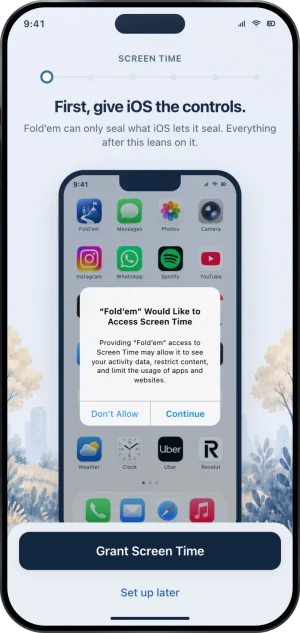
Granting Screen Time
-
If this iPhone has no passcode
iOS refuses to hand Screen Time to any app on a phone with no passcode, and no amount of tapping changes that. The step says so and offers Settings instead: set a passcode there, come back, and grant it.
-
If you tap Don't Allow
Nothing is sealed and nothing is lost. The button stays live, so you can ask again on the spot, and Set up later returns you to the setup hub, where the wall reads Not started until it is done. What you cannot do is walk past it: the apps cannot be sealed without it.
What this does not do
Screen Time permission does not report what you do on your phone to Fold’em, and Fold’em asks for no part of it that would. On its own it blocks nothing: it holds the apps you picked and the Games category, and the sites are site blocking's job. It is granted on one iPhone and holds only there, so it reaches no second phone and no computer. And turning it off in Settings does not end your protection: the block stops holding, and your keyholder and supporters see Protection off. Your gambling free count carries on either way, because only your own admission that you gambled resets it.
Write to us and a person reads it. We answer within two working days, and we would rather hear the question twice than not at all.