

The full answer
You pick them in Apple's own picker, which hands Fold’em opaque tokens: the app counts how many you blocked and never learns which they are. The block is written to a store only Fold’em writes to, it is always on with no schedule and no daily window, and the phone writes it back on every launch. You can add apps while protection runs; nothing leaves while protection holds.
What the app shield is
The app layer is Apple's Screen Time, driven through the Family Controls framework. When you block your apps, Fold’em writes their tokens into a settings store of its own, named fp_exclusion_<uuid>, and never into the device's shared default store. Every app in that set is shielded by iOS itself, so the block sits in the operating system rather than inside Fold’em, and it holds while Fold’em is closed.
The store is always on. The apps you picked are blocked at 2am the same way they are blocked at noon: no schedule decides it. Lockdown is separate: a schedule can add layers to the same store for the hours you choose.
You pick the apps in Apple's own picker. It hands back opaque tokens rather than names, so Fold’em knows how many apps you blocked and never which ones. Since iOS 26.4 the framework can vend app identities to an app that asks for the wider authorization; Fold’em does not ask, which is a choice written down as a requirement rather than a limit of the platform. The picker can block any app installed on the phone.
One block holds up to 50 apps, which is the cap the framework documents.
Blocking your apps, and adding more later
-
Pick them during setup
The setup step asks whether any gambling apps are still on this phone. Check this phone opens Apple's picker, what you tick there becomes the block, and you slide to block them. Having none to tick is an answer too, and Set them up later moves on without blocking anything.
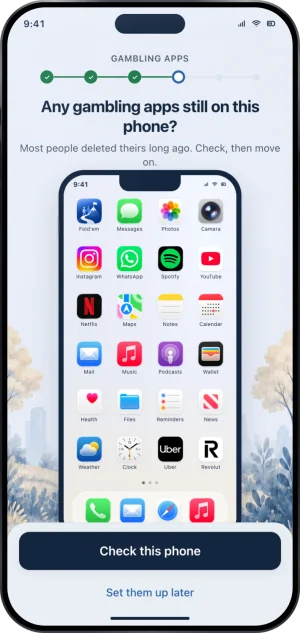
Setup, checking the phone
-
The Apps page shows them back
On the Lock tab, tap the pill, then Apps: the page shows a tile for each blocked app, and the Apps tile shows a few of them and how many more. Fold’em never has a list of names, for the same reason the picker hands back tokens; iOS draws the tiles, not Fold’em.
-
Add to the block while protection runs
Add apps opens the same picker; tick what you want and finish there, and the additions join what you already blocked at once. Adding is instant, and nothing leaves while protection holds. While a Lockdown run holds, Add apps waits until it ends.
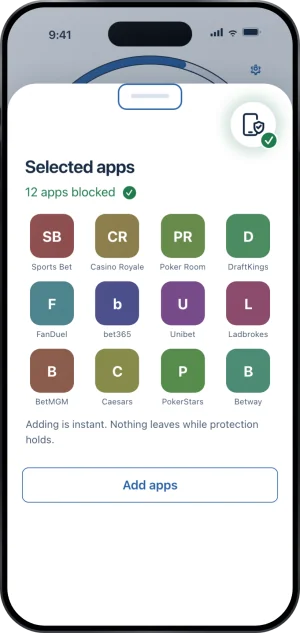
Adding apps while protection holds
How the block survives the phone
On every launch and every time you bring Fold’em to the front, it checks that the store still carries what your protection says it should, and silently writes it back if it does not. That repair only ever restores enforcement. The phone cannot decide to take a shield off: ending protection is the server's call, and the device applies what it is told.
Deleting and reinstalling Fold’em is not a way out. Signing in again pulls your protection back from the server as it was. The block itself waits on two things Apple's tokens do not carry across a reinstall: granting Screen Time, and picking your apps. Until Screen Time is granted again, the people in your circle see Protection off for you, and until your apps are picked again, Not confirmed yet, which turns to Protection off if that takes more than 12 hours.
Whether Fold’em itself can be deleted is a separate, optional choice. The deletion delay is off unless you turn it on, and while it is on no app on the phone can be removed until a 72 hour wait ends on the server.
If you found this while deciding what to install rather than while setting it up, how to block gambling apps on iPhone is the same subject written for that moment.
What this does not do
The app shield covers the apps you picked on this phone and nothing else. It does not reach a second phone, a tablet, a computer or a browser on another device. It does not catch a betting app you never picked unless the App Store files it under Games, which the Games category catches. It cannot stop you revoking Screen Time in iOS Settings, because no app can; what happens then is that Apps reads Needs attention, with Screen Time is off, on Lock and on Today, and the people in your circle see Protection off on your card. And it blocks apps, not money: Fold’em never sees your bank, your card or a balance.
Write to us and a person reads it. We answer within two working days, and we would rather hear the question twice than not at all.