

The full answer
Tap the pill on Lock, then Apps, then Add apps: Apple's picker opens, and what you tick there joins the block when you finish. For a site, tap Sites, then Add a site, and pick it in the same picker; that row is there once at least one app is blocked. Adding is instant and open for the whole of your protection, except while a Lockdown run holds; removing is not, because nothing leaves while protection holds.
Two doors, one rule
Apps and websites are different things on an iPhone, so each has its own door, and both open Apple's picker, which lists the apps and websites from this phone. The picker hands Fold’em a token rather than a name, so each page shows what you picked without ever learning what it was.
The rule is the same behind both doors. Adding is instant, and nothing leaves while protection holds. Whatever you tick is added to what you already blocked, so an untick cannot drop anything, and neither list has a remove control at all.
Adding one
-
An app: Apps, then Add apps
On Lock, tap the pill, then Apps. The page shows your blocked apps, then Add apps. Add apps opens Apple's picker; tick what you want and finish there, and the additions apply at once. Apple draws the real icons and names in the picker and Fold’em never sees them, which is why the page behind it shows tiles rather than lists.
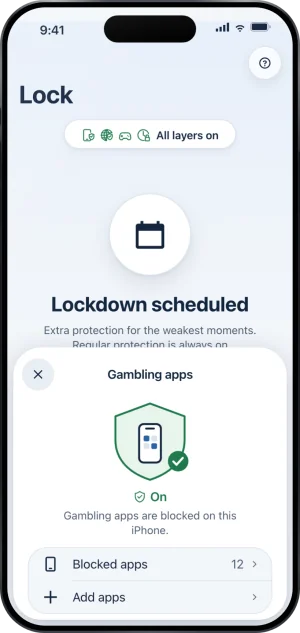
Gambling apps, with Add apps
-
A site: Sites, then Add a site
Tap Sites, then Add a site. Apple's picker opens with what you already blocked ticked; pick the website there and finish, leaving at least one app ticked, and it joins your list. The row is there only while site blocking is on and at least one app is blocked; until then, the page says why.
-
Read it back
An added app joins the tiles on the Apps page at once, and an added site is listed under Added by you with a lock beside it. Neither needs a save, a wait or a confirmation from anyone else.
The cap
Apple's framework holds up to 50 shielded apps, and that is the cap on the apps you pick. The apps on the Apps page count against it. Your added sites are listed on the Sites page, and site blocking's own list of known gambling domains is a third number that belongs to neither; the three mean different things and are never summed.
Categories are not added here
The Games category is a layer of its own on Lock, with its own Select Games, because blocking a whole category is a different commitment with a different way out: turning Games off takes a 72 hour wait, while an individual app never comes out at all while protection holds. What does the Games layer do? covers it.
What this does not do
Nothing on either page removes anything. There is no remove control while protection runs, no way to shrink either list, and support cannot do it for you; the block comes off when protection ends. You cannot add an app that is not installed on this phone, and nothing you add here reaches another device. A site can be added only while site blocking is on, and it stays blocked while protection holds. While a Lockdown run holds, neither door is offered: the page says "Changes wait until Lockdown ends."
Write to us and a person reads it. We answer within two working days, and we would rather hear the question twice than not at all.