

The full answer
Fold’em ships seven of them, six written for a particular voice and a seventh you write yourself, and you choose which one your phone uses. Whichever you pick, the screen carries one line from that voice, drawn at random each time it appears, a button that keeps you out and a button that takes you into Fold’em. It cannot be dismissed into the app behind it, and while a Lockdown run holds it carries one more line saying when the run ends.
What is actually on the screen
When you tap a blocked app, iOS asks Fold’em’s shield extension what to draw and puts that in front of you. The app is not opened, and it is not deleted: it stays where it was, behind the wall.
The wall carries a mark, one line of text, an optional day count and two buttons. The line comes from the voice you chose, and it is drawn at random from that voice's lines on every appearance, so the same wall does not read like a sign you stopped seeing after a week. The day count is derived at the moment the screen is configured, from an anchor baked into the wall's own file, which is why it rolls over at midnight without you opening Fold’em.
The first button keeps you out. On the default face it reads Stay folded. The second is the way out, and it does not open the app: it opens Fold’em, at the place you told it to. There are three destinations to choose from, Ride it out, which lands in SOS, a call to your keyholder, or a call to a helpline. A shield extension cannot dial and cannot open a link, so each of those is something the app does when you arrive, never something the wall does on its own.
Choosing which one you get
-
Settings, then Preferences, then Block screen
Open the Settings tab and tap Preferences. The Block screen row shows the voice you are on, and a fresh install reads Default.
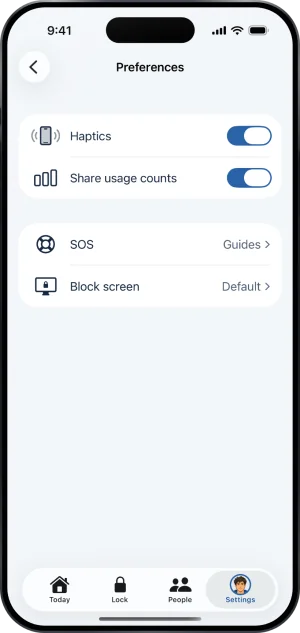
Settings, Preferences
-
Page through the seven
Each one is a phone wearing the wall, with the voice's name and one line about it underneath. Drag sideways to move between them and use the shuffle control in the frame to see another of that voice's lines. Select puts the wall on your phone.
-
Customize, if you want the details
Customize carries the shared settings: a Days folded switch, off unless you turn it on, and the SOS button's destination. It is also where My own words is written.
The seven voices
Six are written: Default, which says the minimum and gets out of the way; Roast me, cold and pointed at the plan rather than at you; Soft; No excuses; Make me laugh; and Keep me honest. The default face carries one sentence, "You set this to stay closed.", and the Fold’em mark; the other five carry an emoji instead.
The seventh is My own words. You write one emoji, a headline of up to 24 characters and a second line of up to 90, and you may remove either button and add it back. Your text never becomes a button label, because a label has to follow what the button does, and the escape can never be lost by accident.
Emptiness is legal. A wall with no mark, one line and no buttons is a wall the phone can draw. What is never legal is a broken one: if the file is missing, unreadable or empty, the extension falls back to its own compiled in Default face rather than handing iOS nothing, because nothing would make iOS draw its own Restricted screen and you would read that as Fold’em failing.
One more line while Lockdown holds
While a Lockdown run holds, the wall over a blocked app carries one extra line, such as "Lockdown · until Mon 06:00". The rest of the wall is unchanged: the voice, the day count and the way out stay as you set them. The line is read from the run your phone is holding, so a run the phone has not yet started shows no line rather than a wrong one.
A site that site blocking stops draws no wall
A site that site blocking stops never reaches a page, so no wall is drawn for it: the browser reports that it cannot find the server. If you saw a broken page rather than a wall, site blocking did its job. A site you added yourself with Add a site is different: Screen Time blocks it the way it blocks an app, so it draws this same wall.
What this does not do
The block screen carries no money figure and no countdown, and there is no code, no password and no button anywhere on it that opens the app. The day count and the end of a Lockdown run are the only figures it can carry, and the day count is off unless you switch it on. Changing the voice changes what the wall says and nothing else: it does not touch what is blocked, your protection, or the way out of it.
Write to us and a person reads it. We answer within two working days, and we would rather hear the question twice than not at all.