

The full answer
A run always blocks deleting apps. During a run one line shows on the protection pages, "Changes wait until Lockdown ends.", and it closes adding apps or sites and every loosening, such as turning off Games or the deletion delay. Keeping a layer, turning on the deletion delay and fixing a fault stay open. Advanced options can add Block app downloads, Prevent time changes and Only allow selected apps. You start one from Lock or from SOS with a hold. It ends on its own, or sooner: with your keyholder’s yes if they use the Fold’em app, or otherwise after a 3 hour wait, which can start only while more than 3 hours are left.
What a run blocks
Every run holds the options in Advanced options, on Lock. Two are always on during Lockdown:
- Block changes in Fold’em. While a run holds, one line shows, "Changes wait until Lockdown ends." It closes adding apps or sites, selecting Games and every loosening, such as starting the wait to turn off Games or the deletion delay. Keeping a layer, turning on the deletion delay and fixing a fault stay open. On Lock, a run can still be made longer or ended sooner, while the schedule and the options wait until it ends. A request to end protection waits too.
- Block app deletion. No app on the phone can be deleted, Fold’em included.
Three start off, unless you chose allowed apps during setup, which turns on Block app downloads and Only allow selected apps:
- Block app downloads. The App Store is hidden, so nothing new can be installed, and apps do not update on their own while it is on. Turning it on shows a page, App downloads, that says so first.
- Prevent time changes. It asks iOS to keep the date and time set automatically for the length of a run.
- Only allow selected apps. Every app but your allowed apps closes, and Fold’em stays open.
The options save as you change them, under the line "Changes apply to every Lockdown.", and a run keeps the options it started with. If your deletion delay is already on, nothing changes for it. A run can only add to the deletion delay: when it ends, deletion goes back to what you had chosen before, and never lower.
The one allowed list
There is one list of allowed apps, and every run uses it, whether you started the run or the schedule did. It counts only while Only allow selected apps is on. Picking it while setting up Fold’em turns that option on, with Block app downloads; if you decide later, both stay off until you turn them on. You change the list in Advanced options, under Allowed apps, whenever no run is holding. It holds up to 50 apps, and Fold’em itself always stays open. Phone always stays open, and so does anything in Screen Time’s Always Allowed list.
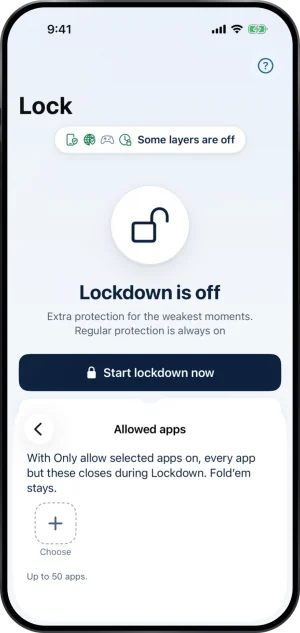
The one allowed list, with no run holding
How long a run lasts
You choose the length on the start sheet, on a wheel headed How long: 30 minutes, 1, 2, 4, 8 or 12 hours, or 1, 2, 3, 5 or 7 days. It opens on 1 day, and the line under it shows when the run will end, such as Until Sat 9:41 AM.
The one change a run takes while it holds is to make it longer. Extend lockdown, on the run face, adds a length to the current end, because the end can only move later. If you have asked to end the run sooner, extending withdraws the request, or cancels your keyholder’s yes, and the sheet says so before you hold.
Starting a run
Start lockdown now, on Lock, and the Lockdown button at the top of SOS open the same start sheet. You start the run with a hold, Hold to start lockdown, and the line under it says how it can end: "Ending sooner needs Mom’s yes." when your keyholder uses the Fold’em app, or "Without a keyholder, wait 3 hours before ending Lockdown sooner." otherwise. The page then turns dark: Lockdown is on, the time remaining, and when it ends. Today shows a card while a run holds and never starts one, and the SOS widget opens SOS rather than starting a run itself. Lockdown needs your protection to be on: with protection off, Lock offers Start protection instead.
Ending a run sooner
A run ends on its own at the time it shows. The run face carries a quiet button to end it sooner, and it opens one sheet, End Lockdown, whose filled button always keeps Lockdown on.
- With a keyholder who uses Fold’em. You ask them. Your hold sends the request, with a message if you add one, and Lockdown stays on while they decide. If they say yes, you end the run yourself with Hold to end Lockdown, and their yes lasts until the run would have ended anyway. If they say no, Lockdown stays on and you can ask again.
- Without a keyholder who uses Fold’em. This is also the way when your keyholder joined by email before Fold’em 3.0, because a request reaches only a keyholder in the app. You start a 3 hour wait, and once it is over you come back and end the run with a hold. The wait can start only while more than 3 hours are left. With 3 hours or less left and no wait started, the run cannot end sooner, and the sheet reads Let this Lockdown finish. If a keyholder joins while the wait runs, you ask them instead.
Ending a run sooner ends that run and nothing else: your usual protection and your schedule's later days stay as they were.
The Lockdown schedule
A weekly schedule starts runs for you on the weekdays you choose. Schedule lockdown opens it, and the tile reads Weekly schedule once a day is set. There is one entry per weekday: turn on Lockdown on Fridays, say, then choose Whole day or From a time. From a time starts at the time you pick and runs until midnight, so a late night that crosses midnight takes two days, one for each side of it. Every change saves as you make it, with no Save button.
At least one full day a week always stays free, and the sheet says so: "Keep at least one full day free." A day that would take the last free one is refused and springs back off. Runs you start yourself do not count against it. A scheduled run uses the same options as every other run, and the schedule can be changed only while no run is holding.
When a scheduled run starts and ends
Your phone starts and ends a scheduled run by itself, and Fold’em does not have to be open for it. iOS does this only while the phone is in use, so a phone nobody touches at the start time begins its run the next time it is used.
Lockdown is only shown as on when your phone is holding it. Until a scheduled run has begun, Lock reads Lockdown scheduled. While a run holds, the block screen over a blocked app carries one extra line, such as "Lockdown · until Mon 06:00", and your SOS widget can show the same line once the app has seen the run.
A run your phone times for itself
A run's end is counted against this phone's own clock, and so is the 3 hour wait that ends a run sooner without a keyholder, so moving the clock forward can end a run sooner, on any phone. That is friction rather than a wall, and it reaches only Lockdown: your protection, the apps you picked, site blocking and your own deletion delay are all untouched by it, and deletion goes back to what you had chosen before, never lower. Prevent time changes asks iOS to hold the clock on automatic during a run, and it is off unless you turn it on. The Games layer's wait is timed by your phone the same way.
Who is told
Nobody is told when a run starts, gets longer or ends on its own. Like your goal, Lockdown is yours alone. The one exception is a request you send to end a run sooner: your keyholder sees that request, when the run would end on its own and any message you add with it, and is told if you withdraw it, which extending the run also does. Supporters see nothing about Lockdown.
What this does not do
Lockdown does not change site blocking or the gambling apps you blocked, and it does not start, end or shorten your protection. Ending a run sooner ends that run and nothing more. It never lowers your deletion delay.
Write to us and a person reads it. We answer within two working days, and we would rather hear the question twice than not at all.