

The full answer
Where it lands is a choice you made in advance, and the default is the SOS screen. The escape carries up to three destinations; the other two open the dialer on your keyholder, if you have one, or on the helpline for your country.
The two buttons on the wall
When you open a blocked app, iOS draws Fold’em’s block screen over it instead of the app. On each of the six walls Fold’em ships it carries a line, a mark and two buttons. The first is the calm dismiss and on the default wall it reads Stay folded: the app stays closed and nothing is recorded. The second is the escape, and it is deliberately the quieter of the two, because the prominent button on a wall should be the one that keeps the wall up.
The escape cannot dial and it cannot open a link. A block screen extension is allowed to do exactly four things when a button is pressed, and only one of them opens the app that owns the shield, so every destination below is something the app runs after it opens.
Where the escape lands
The escape carries up to three destinations, and pressing and holding it shows the rest as a menu. A plain press always fires and always resolves to the one you chose.
- Ride it out is the default and the universal fallback. It opens the SOS screen. It depends on nothing, so it can never become unavailable.
- Call your keyholder opens the dialer on the number stored for them. It needs a keyholder with a name and a usable number.
- Call a helpline opens the dialer on the number for your country. It needs a resolved organisation that has a phone number.
A destination whose data has gone falls back to Ride it out and its label falls back to SOS, because a wall offering to call somebody who has left the circle is worse than a wall that says SOS. You choose which destination the wall carries in Settings, under Preferences, then Block screen, then Customize, then SOS button: Where it goes lists the three, with a tick on the one in use. A destination with nothing behind it is shown dimmed rather than hidden, so the screen never quietly drops a choice you could have.
What happens when you press it
-
Press the second button
The block screen writes one small routing note into the space it shares with the app, then asks iOS to open Fold’em. The open happens whether or not the note was written, because a failed note must never stop Fold’em opening.
-
Fold’em opens and reads the note
The app reads the note once, deletes it, and acts on it only if it is less than five minutes old and your protection is still on. A note read while nothing is blocked is thrown away rather than acted on, so a stale press cannot open anything later.
-
It lands where you chose
On the default setting you arrive on the SOS screen, and the app waits up to two seconds for your circle to load before it reads a call destination. If your circle has not answered by then it takes Ride it out rather than guessing, so the wrong number is never dialled.
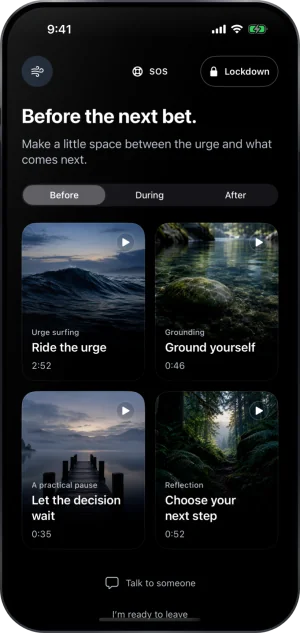
Where the default escape lands
What is recorded
Nothing is kept. The routing note only tells Fold’em where to open, and Fold’em deletes it once it has read it. Pressing Stay folded records nothing either.
What this does not do
The escape does not open the blocked app you were opening, and it does not shorten any wait. It never places a call by itself: on the two calling destinations, iOS opens its own dialer with the number filled in and you press call. It reaches only this phone, so a blocked app on a second device has no escape at all. It cannot appear on a wall that iOS never drew: with Screen Time permission withdrawn there is no block screen and no button on it. And it is not guaranteed to be there on a wall you wrote yourself, because a wall built from your own words can be saved without the escape button; the six walls Fold’em ships always carry it.
Write to us and a person reads it. We answer within two working days, and we would rather hear the question twice than not at all.
If you need someone now
Free, and not run by Fold’em.
- Call 1 800 697 3738National Problem Gambling Helpline, US. Call, text or chat.
- Call 1 866 531 2600ConnexOntario, Canada. For people in Ontario.Website for ConnexOntario
- Call 0800 1 37 27 00BZgA Check dein Spiel, GermanyWebsite for BZgA Check dein Spiel
- Call 1800 858 858Gambling Help Online, AustraliaWebsite for Gambling Help Online
- Call 0808 8020 133National Gambling Helpline, UKWebsite for the National Gambling Helpline
- Other countries
Gam-Anon is a community for people supporting someone who gambles.