

The full answer
Site blocking works through a DNS profile rather than a Safari setting, so it sits under every browser on this phone: Safari, Chrome, Firefox, Edge and the browsers built into other apps all ask the same resolver where an address lives, and a known gambling domain is answered with nowhere in each of them. No browser has to be picked or blocked for that to hold. What site blocking does not reach is another device, a site its list has never seen, or a phone where another VPN is answering first.
One profile, every browser
A browser does not decide where an address lives; it asks the phone. Site blocking is the DNS profile that answers that question for the whole phone, which is why the Sites page puts it in one line under its count: "gambling sites blocked in every browser and app". Safari, Chrome, Firefox and Edge all ask the same resolver, and so does the browser that opens inside a social app when you tap a link there.
That is also why setting it up names no browser. You allow one profile and turn it on once in iOS Settings, and there is nothing to pick per browser and nothing to install twice. The setup step says it in its own words: not just in Safari, but every browser on the phone and the ones inside other apps.
Reading it for yourself
-
Open the Sites layer
On the Lock tab, tap the pill, then Sites. When site blocking is on, the page leads with 356,500 and the line "gambling sites blocked in every browser and app", and there is no list of browsers under it, because there is nothing to list.
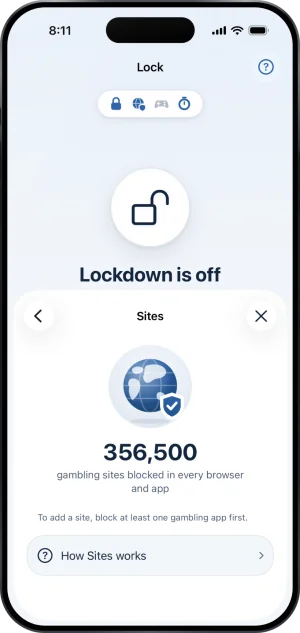
Sites, on
-
Read How Sites works
The How Sites works row opens the help article on blocking sites, which says that site blocking covers known gambling domains across browsers on this phone, the profile is managed in iOS Settings, and removing it turns site blocking off. A site the known list is missing can be added with Add a site once at least one app is blocked, and it stays blocked while protection holds.
What a blocked site looks like, in any browser
A site that site blocking stops looks the same everywhere: the page never loads and the browser says it cannot find the server. There is no Fold’em screen for it and no browser that draws one, because the address was answered with nowhere before any page was reached. If you expected a wall and saw a broken page instead, site blocking did its job.
If the browsers are the part that has defeated you before, when quitting gambling did not stick is where that story is told rather than the settings.
What this does not do
Every browser on this phone is not every browser you own: a laptop, a tablet or a second phone carries none of this. The known list reaches every browser on the phone, but a gambling site it has never seen will open until you add it. And site blocking answers only when it is asked: while another VPN is answering the phone's lookups first, it is bypassed in every browser at once, and it takes over again on its own when that VPN is turned off.
Write to us and a person reads it. We answer within two working days, and we would rather hear the question twice than not at all.