

The full answer
Every address this phone asks for goes to Fold’em’s own resolver first, and a known gambling domain is answered with 0.0.0.0, the address for nowhere, so the page never loads in any browser on the phone, the browsers inside other apps included. Once at least one app is blocked, you can add a site the list is missing, and it stays blocked while protection holds. Fold’em can read whether the profile is on and say so; it can never switch it off, because only iOS Settings can.
Site blocking is a DNS profile, not a VPN
Every time this phone opens a page it first asks where that address lives. Site blocking works through a DNS profile on the phone: it puts Fold’em’s own resolver, dns.foldem.app, in front of that question, as an encrypted DNS profile registered with iOS. When the address is one of the 356,500 known gambling domains on its list, the resolver answers 0.0.0.0, which is nowhere, and the browser reports that the server cannot be found. Nothing is intercepted and no traffic is tunnelled through Fold’em: the only thing that changes is who answers the question.
Because it sits at the name lookup, site blocking reaches every browser on the phone and the browsers built into other apps. Nothing has to be picked or blocked browser by browser, and there is no Fold’em screen for a site it stops: a name that resolves to nowhere never reaches a page.
Setting it up
-
Allow the profile
The step reads "A block in every browser." and "Allow the DNS profile, then turn it on in Settings." Allow the profile raises Apple's own prompt, asking whether Fold’em may add a DNS configuration. Allow saves the profile on the phone. Not now continues without it; Sites then needs you, so its tile on Lock is red and Today shows Sites need attention, and its Set up button walks you through the same steps whenever you come back to it.
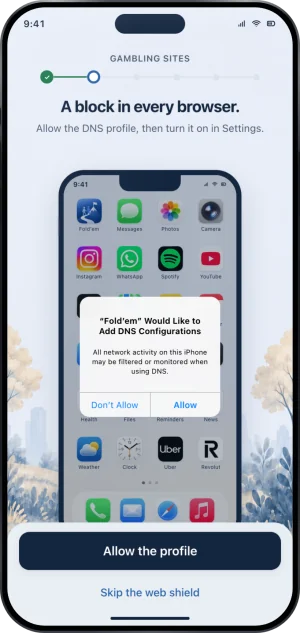
Setup, allowing the profile
-
Turn it on in iOS Settings
Allowing the profile saves it; iOS keeps the switch that selects it. The next page, Where the switch lives., walks it in four taps: Open Settings. Tap General. Tap VPN & Device Management. Tap DNS, then Fold’em web shield. Go to Settings opens Settings, and Fold’em watches for the profile rather than waiting for you to report back. Once it is ticked the page says "Fold’em saw it." and "Site blocking is connected.", and Done closes the guide.
-
Read it on the Lock tab
Tap the pill, then Sites. Its page leads with 356,500 and the line "gambling sites blocked in every browser and app". Below it, Added by you lists each site you added, with Apple drawing the name, then Add a site once at least one app is blocked, then How Sites works, which opens this article.
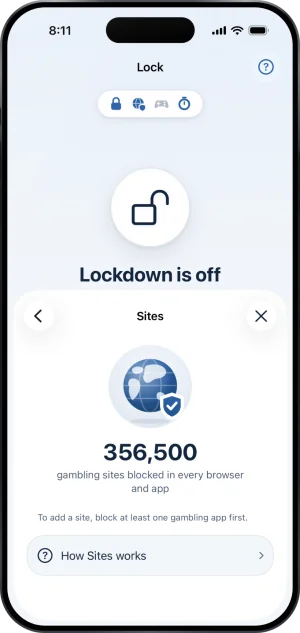
Sites, from the pill
What the app can and cannot do to the profile
Fold’em can save the profile and can read whether iOS has it on. It can never remove it and never switch it off: the profile is managed in iOS Settings and belongs to you, so the app is built to read and report rather than to hold the switch. Removing it turns site blocking off: the Sites tile turns red, Today shows Sites need attention, the Sites page says "Site blocking is off, so gambling sites are open." with a Set up button, and your added sites are kept for you. Site blocking does not change what the people in your circle see: their card follows Screen Time and the app shield, so it can read Protection on while site blocking is off.
Site blocking also answers only when it is asked. While another VPN is answering the phone's lookups first, it is bypassed: a resolver that is never asked cannot block anything. The Sites page says so in its own words, "Another VPN is in front of site blocking. Your added sites still apply in Safari." A What this means row explains that this is often normal, and blocking takes over again the moment the VPN turns off. If the state cannot be read at all, the page says "Site blocking could not be read on this iPhone." with Set it up and Try again, rather than claiming it is on, because a reading it cannot make is not a reading.
The wider version of this question, written for somebody who has not installed anything yet, is how to block gambling apps on iPhone.
What this does not do
Site blocking covers this phone. It does not reach a laptop, a second phone or a friend's device on the same network. It cannot block a site that is not on its list, and no list of gambling domains is complete, which is why you can add sites yourself and why the operator pages state coverage per site rather than in general. It answers names, never pages: Fold’em does not read your browsing history, and no site name reaches anyone who supports you. And it is not a lock: iOS holds the switch, so the profile can be removed in Settings at any time, and what Fold’em does about that is show it.
Write to us and a person reads it. We answer within two working days, and we would rather hear the question twice than not at all.