

When quitting gambling did not stick
The next attempt holds when undoing it costs more than a tap at one in the morning.
Need someone now?
These lines are free and not run by Fold’em.
- Call 1 800 697 3738National Problem Gambling Helpline, US. Call, text or chat.
- Call 1 866 531 2600ConnexOntario, Canada. For people in Ontario.
- Call 0800 1 37 27 00BZgA Check dein Spiel, Germany
- Call 1800 858 858Gambling Help Online, Australia
- Call 0808 8020 133National Gambling Helpline, UK
- Other countries
Updated October 2026
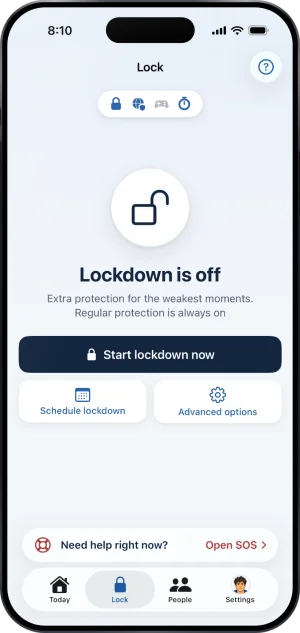
The cost is built from three mechanisms: a shield iOS keeps over the apps you pick, a filter that stops the sites loading in every browser, and an end to protection the server times in days. Name a keyholder and it also takes a second person, who can say no.
People who do this for a living, first
None of what follows is treatment, and a page about phones is a poor substitute for a conversation. These organisations are free, they are not run by us, and they answer whether or not you ever install anything.
- In the United States the National Council on Problem Gambling runs the National Problem Gambling Helpline, printed on its own pages as 1-800-MY-RESET, with call, text and chat. Its Help by State directory describes itself as a way to connect with local support and resources across all 50 states.
- In the United Kingdom the National Gambling Helpline is run by GamCare on 0808 8020 133. The NHS page on gambling states that it is free, that it runs 24 hours a day and 7 days a week, and that it is there for information, support and counselling. The same page names the NHS gambling treatment clinics in England.
- If the person struggling is somebody else, Gam-Anon is a fellowship of meetings for family and friends, and the first thing the NHS lists for anyone affected by another person's gambling. The pages for the person beside them start there.
The block at the foot carries the numbers again.
Why it came back is not a character question
A decision made once, in daylight, by somebody calm, then has to survive being undone by the same person at midnight with about four seconds of friction in the way. Deleting an app takes those four seconds. Reinstalling it takes fifteen. A limit you set yourself is a limit you can lift yourself.
Coming back is also the ordinary course, not the rare one. A study of 101 people with pathological gambling who had just quit found that only 8 percent were entirely free of gambling across the following twelve months. Source: Hodgins and el-Guebaly, Journal of Consulting and Clinical Psychology, 2004, abstract on PubMed.
So the useful question is not how to want it more. It is what stands between an urge and an open betting app, and how long that thing takes to remove. Everything below answers that, and each answer states its own limit.
Three places, and what each one holds
Fold’em holds one iPhone in three places with separate failure modes: the apps, the addresses and the person who holds the key. The Lock tab lists the layers one by one.
- The apps. You pick betting apps in Apple's own picker and Fold’em asks Screen Time to shield them, so tapping one draws a block screen over it instead of opening it. The picker hands over opaque tokens rather than names: the app counts how many you sealed and never learns which, and only that count goes to the server. There is no daily window and no schedule, and the phone writes the seal back on every launch. How the app seal works.
- The addresses. A separate setting points every lookup this phone makes at Fold’em's own encrypted resolver, which answers a known gambling domain with 0.0.0.0, the address for nowhere, so the page never loads. That reaches every browser on the phone, browsers inside other apps included, and it needs no tunnel. The list it answers for is about 356,500 domains. One more list sits beside it and is never added to it: any website you add by typing its address, and it stays blocked while protection holds.
- The commitment and the person. The first two are settings, and a setting you can change is not a commitment. So the record of your protection lives on the server rather than in the app, and the server decides when protection comes off. The phone reads that answer and applies it, which is why turning the phone off, flying, or changing the date in Settings does not end your protection. Who actually ends protection sets out every deadline and where each is held.
What ending protection actually costs
This is the part that decides whether the other two matter.
You ask inside the app, and the request goes to the server rather than to a switch on the phone. If you named a keyholder, the request reaches them in Fold’em on their own iPhone, signed in to their own account. They either say no, which is a tap and Face ID in their app, or they agree in person: their app shows an approval code and you scan it with yours while you stand together. No web page and no email can agree for them. An agreement starts a wait of 48 hours counted from the moment they said yes.
Two facts are worth knowing, and both are true here. If your keyholder says nothing for seven days the request closes rather than granting anything, so a keyholder who never answers is a keyholder who left protection on. And if you named nobody, no decision is waiting on anybody: the request is ready seven days after you made it. With a keyholder ending protection costs a conversation. Without one it costs time.
At the end of either wait the server marks a release you still have to take. Nothing opens by itself. A release nobody turns closes again after seven days, and your protection simply carries on. What the wait is for goes through the waits one at a time.
What none of it reaches
Every on device blocker has the same boundary, and a page that hides it leaves you to find it at a bad hour.
Fold’em holds one iPhone. A second phone, a tablet, a laptop, a betting shop and cash are all outside it. On the phone itself, Screen Time permission is yours and can be withdrawn in iOS Settings, and no app on iOS can stop that. Neither can the encrypted DNS setting be held on against you: only iOS Settings can turn it off, and Fold’em cannot turn it back on.
Withdrawing Screen Time is not blocked. The app shield stops holding, and if someone stands with you, their card for you shows Protection off; if the phone sends no reading of any kind for 24 hours, the card reads Not confirmed yet instead of staying green. If nobody stands with you, nobody is told. Your day count carries on through all of it, because it counts the days since your last gamble and only your own admission resets it. That is deterrence rather than an operating system lock, and it is the honest word for it.
The DNS setting works the same way. Switch it off and the sites load again, and the Gambling sites layer then reads Needs attention.
Fold’em's own ways out, stated plainly
Two of them exist and neither is hidden. Naming them is the only way the rest of this page is worth trusting.
- Deleting Fold’em removes the settings Fold’em applied. An optional restriction stops apps being deleted while it holds, and it is off unless you turn it on. Deleting is not a way to end protection, though: the record lives on the server, so signing in again brings back your protection, the day count unbroken, your keyholder and the lock itself, and a reinstall can never bring back a weaker one. Granting Screen Time and picking the apps have to be done again by hand, because Apple never lets the app pick leave the phone that made it.
- A subscription that ends releases the block. If your subscription ends, protection stays on for 72 hours, then ends unless the subscription is restored. It is the one way out that is not a request, and if someone stands with you, their card for you shows Protection at risk and they are told that protection is ending. The fuller account of both, with the deletion lock's own wait.
Can I just give my Screen Time passcode to someone I trust?
A Screen Time passcode can be reset without the person holding it. Apple's own page on a forgotten passcode says to open Settings, tap Screen Time, tap Change Screen Time Passcode, then again, and, if asked, enter the Apple Account email address and password that you used to set up the Screen Time passcode. If that account is yours, the spare key is in your pocket. Fold’em's setup asks the other way round: someone you trust sets a passcode you never see, with recovery on their own Apple Account, not yours. Where iOS supports it, loosening your protection later goes through them. Source: Apple, if you forgot the Screen Time passcode, read 3 September 2026.
Can a self exclusion be cancelled once it has started?
That depends which one you mean, and the two answers have nothing to do with each other. A national scheme sets its own minimum length and its own route back, in its own words, and those move without telling anybody, so the country pages here quote each scheme's own page with the day it was read: the United Kingdom, the United States, Canada and Australia. On this phone the answer is fixed and it is written above: a request rather than a switch, a wait of 48 hours behind a keyholder's yes, seven days from the request when nobody holds your key, and nothing at all where a keyholder stays silent, because silence closes the request after seven days. At the end of a wait there is a release, and you still have to take it.
I blocked the betting sites and I am still getting through. What is missing?
Look for a missing layer before a fault in the one you set. An app seal stops an app opening and does nothing about that operator's website. Apple's own website filter works inside Safari and in no other browser, so Chrome, Firefox, Edge and the browser living inside a social app are all still open. A DNS answer sits underneath the browser and reaches every one of them at once, which is why the two layers are set together rather than either on its own. And if this phone is covered but a laptop, a tablet or somebody else's handset is not, nothing on this phone reaches those. Which failures are the blocker's and which are the setup's takes them one at a time.
Is deleting the betting apps enough?
No, and the reason is the clock rather than your resolve. Deleting takes about four seconds and reinstalling takes about fifteen, so a deleted app is a decision with nothing standing behind it at one in the morning. Two things change that. The address layer answers the operator's website with nowhere, so the browser route closes at the same moment as the app route. And the Games layer covers the whole App Store Games category, which reaches apps installed later, so a betting app filed as a game is covered before you have heard of it; the setup walks you through selecting it, and switching it off afterwards starts a wait of 72 hours. What the Games category shield does.
Where to go from here
If it happened tonight, start at what to do before you sleep. If a blocker did not hold, which failures are the blocker's and which are the setup's. If you are registered with a national scheme and still getting through, what self exclusion covers. If you are starting from nothing, the order that holds, or the phone version at how to stop gambling on your phone. And if the question underneath all of it is why none of this has worked yet, what actually stops me.
The help center answers how the app behaves, screen by screen. If your question is not there, write to us. A person reads it and answers within two working days.
If you need someone now
Free, and not run by Fold’em.
- Call 1 800 697 3738National Problem Gambling Helpline, US. Call, text or chat.
- Call 1 866 531 2600ConnexOntario, Canada. For people in Ontario.Website for ConnexOntario
- Call 0800 1 37 27 00BZgA Check dein Spiel, GermanyWebsite for BZgA Check dein Spiel
- Call 1800 858 858Gambling Help Online, AustraliaWebsite for Gambling Help Online
- Call 0808 8020 133National Gambling Helpline, UKWebsite for the National Gambling Helpline
- Other countries
Gam-Anon is a community for people supporting someone who gambles.