

How to block gambling apps on iPhone
The betting apps will not open, the sites will not load, and ending protection takes days rather than a tap.
Updated October 2026
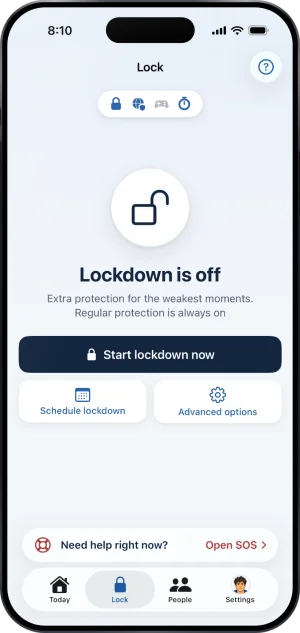
A block that holds on an iPhone lives in three places: a Screen Time shield that iOS itself keeps over the apps you pick, an encrypted DNS setting that stops known gambling sites loading in every browser, and a record on a server that decides when protection ends. Fold’em applies all three, and ending protection is a request rather than a switch: a keyholder you chose says no or agrees in person, and even an agreement starts a wait of 48 hours.
Three places a block can live
The obvious first move is deleting the apps. That works until about eleven at night, because reinstalling takes fifteen seconds and nothing stands in the way of it. So the useful frame is not which app to download. It is where on the phone a block can actually sit, and how long each of those places takes to undo. There are three, they cover different things, and they are worth knowing apart before you pay for anything.
The apps, and what a shield actually does
Real app blocking on iOS goes through Screen Time, which Apple exposes to developers as the Family Controls framework. An app granted that permission can ask iOS to shield particular apps, to shield a whole App Store category, and to filter website addresses inside Safari. The shield is held by iOS itself rather than by the app that asked for it, which is why a sealed app does not open even if the blocker is not running.
Two details decide whether this is worth anything to you. You choose the apps in Apple's own picker, and the picker hands the blocker opaque tokens rather than names, so a well built product counts how many you sealed and never learns which they are. And there is no continue button on the screen that lands over a sealed app. It is not a reminder, a nudge or a daily limit that runs out. The app stays installed and simply does not open.
Fold’em's version applies that seal with no schedule and no daily window, and writes it back on every launch. How the app seal works is the fuller version.
One part of the app seal is worth knowing about separately, because it catches the thing a list cannot: the whole App Store Games category, which includes apps installed later, so a betting app filed as a game is covered before you have heard of it. In Fold’em Games is its own layer. The setup walks you through selecting the whole Games category in Apple's picker, and turning it off afterwards starts a 72 hour wait. What the Games category shield does.
The addresses, which is the half an app seal misses
A sportsbook with an app also has a website, and the website works whether or not the app is on the phone. So an app seal on its own moves the problem into a browser rather than solving it.
Apple's own website filter is real and it is small. It takes effect inside Safari and nowhere else, which means Chrome, Firefox, Edge and every browser living inside another app are untouched by it.
The layer that reaches all of them at once sits below the browser. A DNS setting points every name this phone looks up at a chosen resolver, and the resolver answers a known gambling domain with 0.0.0.0, the address for nowhere, so the page never loads whatever opened it. Fold’em's resolver answers for about 356,500 domains, needs no tunnel, and is the reason a betting site fails in a browser you never thought to seal. Blocking betting sites on iPhone goes through the three outcomes one at a time.
The part that decides whether the first two matter
Both layers above are settings. A setting is exactly as strong as your willingness to leave it alone at the hour it was built for, and that is the honest reason a blocker made only of settings does not hold.
So the third place a block lives is not on the phone. In Fold’em the record of your protection sits on the server, and the server decides when protection comes off; the phone reads that answer and applies it, so turning the phone off, flying, or changing the date in Settings does not end your protection.
Ending protection is a request rather than a switch. If you named a keyholder, the request reaches them in Fold’em on their own iPhone. They either say no, which is a tap and Face ID in their app, or they agree in person: their app shows an approval code and you scan it with yours while you stand together. No web page and no email can agree for them. An agreement starts a wait of 48 hours counted from the moment they said yes.
The fact worth knowing before you choose is what silence does. If your keyholder says nothing for seven days the request closes rather than granting anything, and protection carries on: a keyholder who never answers is a keyholder who left protection on. If you named nobody, no decision is waiting on anybody and the request is ready seven days after you made it. So with a keyholder ending protection costs a conversation, and without one it costs time. Who actually ends protection sets out every deadline and where each one is held.
What none of it reaches
Every on device blocker has the same boundary, and a page that leaves it out is leaving you to find it at a bad hour.
Fold’em holds one iPhone. A second phone, a tablet, a laptop, a betting shop and cash are all outside it, and no setting on this handset changes that. On the phone itself, Screen Time permission is yours and can be withdrawn in iOS Settings, and no app on iOS can prevent that. The DNS setting is the same: only iOS Settings can switch it off, and Fold’em cannot switch it back on.
What the design does about that is put a person in view of it, if you name one. Withdraw Screen Time and the app shield stops holding, and if someone stands with you, their card for you shows Protection off; after 24 hours with no reading of any kind it reads Not confirmed yet instead of staying green. If nobody stands with you, nobody is told. That is deterrence rather than an operating system lock, and deterrence is the honest word for it. Your day count is not touched by any of this: it counts the days since your last gamble, and only your own admission resets it.
Switching the DNS setting off in iOS Settings lets the sites load again, and the Gambling sites layer then reads Needs attention, with the line The filter is off, so gambling sites are open.
What to look for in any blocker, including this one
Five questions separate a tool that holds from one that comes off in four seconds, and you can answer all five from a product's own pages before you install it.
- Where does the blocking happen. A shield held by iOS is a different object from a list of avoided apps, a screen you dismiss, or a filter that only works in one browser. If the product does not name the mechanism anywhere on its own site, that is an answer too.
- Can the undo be bought. If ending the block involves a payment, a support ticket or a code, there is a price on the thing you were making expensive. It does not matter how high the price looks in the afternoon; a payment takes seconds at one in the morning.
- Who is on the other side of the undo. Being told after the fact and being asked beforehand are not the same feature. A notification cannot refuse.
- Is it honest about the ways out. Every blocker on iOS is removable by the person holding the phone, because iOS gives no app the power to prevent it. A product claiming to be unbeatable is wrong about something, and the interesting question is which thing.
- Does the block survive a payment problem. This is the one Fold’em does not pass, and it is the fifth question rather than a footnote for that reason. If your subscription ends, protection stays on for 72 hours, then ends unless the subscription is restored. It is the one way out that is not a request. If someone stands with you, their card for you shows Protection at risk and they are told that protection is ending, which is deterrence and not prevention.
Fold’em's own ways out, stated plainly
The lapse above is one. The other is deleting the app. An optional restriction stops apps being deleted while it holds, and it is off unless you turn it on, deliberately, because iOS makes it device wide: while it holds, no app on the phone can be deleted, ours included. Turning it off does nothing by itself: it opens a 72 hour wait on the server, and the lock holds until the wait ends.
With the restriction off, deleting Fold’em removes the settings Fold’em applied. It does not end your protection. The record lives on the server, so signing in again brings back your protection, the day count unbroken, your keyholder and the lock, and a reinstall can never bring back a weaker one. Granting Screen Time and picking the apps have to be done again by hand, because Apple never lets an app pick leave the phone that made it. What happens if you delete and reinstall.
The particular app you came here for
If the question is really about one sportsbook, the answer is layer dependent rather than yes or no, and it is measured rather than asserted: the roster at blocking a specific betting app carries one page per operator, each stating which of its apps and which of its addresses each layer reaches, with the date the measurement was taken.
If somebody else sets the Screen Time passcode, can it still be reset?
By the holder of the Apple Account it was set up under, yes. Apple's own page on a forgotten Screen Time passcode gives the route in four steps: open Settings, tap Screen Time, tap Change Screen Time Passcode, then again, and, if asked, enter the Apple Account email address and password that you used to set up the Screen Time passcode. Nothing here is a flaw in Screen Time; it is what a device passcode recovery is for. It does mean a passcode set under your own Apple Account has a spare key in your own pocket. Fold’em's setup asks the other way round: someone you trust sets a passcode you never see, with recovery on their own Apple Account, not yours. Where iOS supports it, loosening your protection later goes through them. Does Screen Time block gambling on its own goes through it with the architecture. Source: Apple, if you forgot the Screen Time passcode, read 3 September 2026.
Can a gambling blocker on iPhone be removed?
Every one of them, by the person holding the phone, because iOS gives no app the power to prevent it, and a product claiming otherwise is wrong about something. The useful question is what removing it costs and what it fails to undo. Deleting Fold’em takes away the settings Fold’em applied and does not end your protection, because the record lives on the server: signing in again brings it back, the day count unbroken, your keyholder and the lock, and a reinstall can never bring back a weaker one. What happens if you delete and reinstall.
Why is one particular betting app still opening?
Two different reasons, and each takes a different fix. An app you never ticked in Apple's picker is not sealed unless it is filed under Games, and the picker is the only place the rest of that list is set. An operator with no app, or one you cannot find in the picker, is still reachable through its website, which is the address layer's job rather than the app layer's, and that layer reaches every browser on the phone. The per operator pages state which layer reaches which of a brand's apps and addresses, with the date each was measured.
Is there a free way to do this on an iPhone?
Part of it, and it is worth knowing which part. Apple's Screen Time is built into iOS and already on the phone: it will seal apps you pick and filter addresses inside Safari, so the enforcement half is there before you install anything. What it does not give you is a decision you cannot lift, because the permission and the passcode are both yours. The other layer that is not an app at all is the national scheme for your country, which reaches accounts at licensed operators rather than a handset; what a register does not reach states what each one covers and what it leaves open. Fold’em is paid. Free for 7 days when Apple offers the trial to your account. Apple shows you the plans in your own currency on the listing. What the money is for is the layer that is not a setting: the people who hold the key for each other.
Where to go from here
If the sites are the problem rather than the apps, start at how to block betting sites on iPhone. If you are wondering whether Apple's own tools are enough on their own, does Screen Time block gambling answers it with the architecture rather than with an opinion. If you are choosing between products, the mechanism table is dated and sourced and names nobody. If you have already registered with a national scheme and the phone is still open, what a register does not reach. And if a blocker has failed you before, which failures are the blocker's and which are the setup's is the page written for that.
The help center answers how the app behaves, screen by screen. If your question is not there, write to us. A person reads it and answers within two working days.