

The full answer
It is off unless you turn it on, and it is device wide rather than an exception for Fold’em: while it holds, no app on the phone can be deleted, ours included. Turning it on takes effect immediately. Turning it off changes nothing on its own, because it starts a 72 hour wait on the server.
What it actually restricts
Deleting a blocker is the oldest way around one. Every app Fold’em blocks is still an icon that can be held down and removed, and Fold’em itself is an icon on the same home screen. The deletion delay closes that door by asking Screen Time for its own restriction on removing apps, and Screen Time is the same system that holds the app shield.
The restriction is device wide, and Fold’em says so rather than dressing it up. It does not carve out an exception for its own icon or for the apps you picked: while it holds, no app on this phone can be deleted at all. That is a real cost, and the setup walk puts it in front of you before you turn it on.
It is one layer among several and it stands alone. It has no effect on which apps are blocked, on site blocking, on your protection, on a request to end protection or on your circle. It only changes whether the delete option appears when you hold an icon down.
Where you choose it, and where you change it
-
During setup, as a layer of the wall
The deletion delay is one of the layers the setup walks through, after your apps and before Lockdown. The step states the 72 hour wait once and shows what turning it on does: Delete App leaves the menu under a long press. Not now leaves it off, so nothing is turned on for you, and the ledger at the end reads Deletion delay, On · 72 hour wait or Off.
-
Later, on the Lock tab
Deletion delay is one of the four tiles in Your protection, which the pill at the top of Lock opens, beside Apps, Sites and Games. Its page says the whole of it under one figure: 72 hours, "before Fold’em can be deleted, counted from when you ask". Under it sits the one door out, a red Turn off deletion delay. While it is off, the page offers Turn on deletion delay instead.
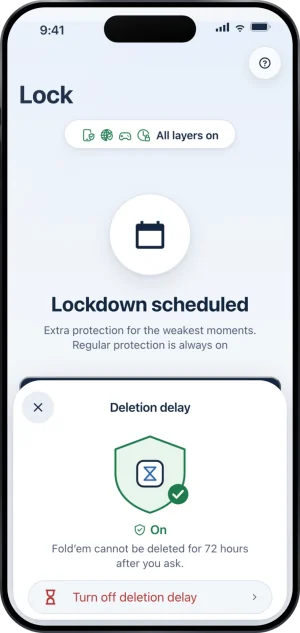
The Deletion delay sheet
-
And during Lockdown
A Lockdown run always blocks app deletion: in Advanced options, Block app deletion reads Always on during Lockdown. A run can only tighten the field, never own it. Whether or not your deletion delay is on, deletion is blocked for the length of a run, and at the run's end the phone goes back to your standing choice, never below it.
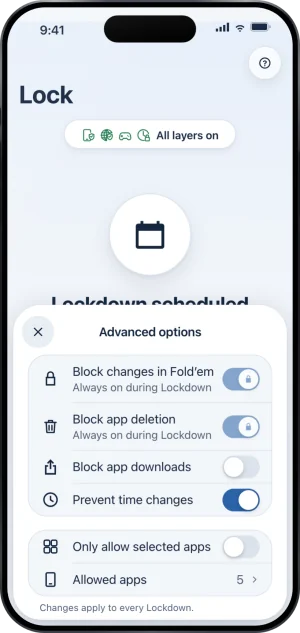
Advanced options, with app deletion blocked
On is instant, off is not
Turning it on is one tap. The restriction is applied on the phone straight away, through the same path that applies every other part of the block, and tightening is never held up by a bad connection.
Turning it off does nothing by itself. Turn off deletion delay opens a page headed Fold’em stays put for 72 hours, where Keep deletion delay is the filled button and the slide under it, Slide to start the wait, opens a 72 hour window instead, stamped by the server rather than counted by your phone. There is no reason to give. The restriction stays fully applied for the whole of it. The page is then headed with the moment, such as Can be deleted Thu 8:30 AM, and its filled button, Keep deletion delay, ends the window at any point while it runs. If someone holds your key, the page also says "This shows in their name's history." Only when the server grants the release does the phone apply the block again without the restriction. That window and what cancels it are covered in how to turn the deletion delay off.
While a Lockdown run holds, the door is shut: the page says "Changes wait until Lockdown ends." in place of Turn off deletion delay, because turning it off is a loosening and a run forces the lock on anyway.
Your choice is mirrored on the server, which is what makes a reinstall useless as a shortcut: a fresh install reads the mirror and comes back with the delay as it was, never weaker.
Who sees the wait
Nobody is sent a notification or an email when you start the wait. If your keyholder opens your status page on the Fold’em website, it lists when the wait started. In the app, your keyholder’s History of you names it: that you started the wait, and then how it ended, kept on or released. Your supporters do not see it. There is nothing for anyone to approve or refuse.
What this does not do
It is not proof that Fold’em cannot be removed from the phone. It is a Screen Time restriction, so it rides the same permission the app shield does: switch Screen Time off in iOS Settings and the restriction stops holding along with everything else Screen Time was carrying. That switch is also the loudest thing you can do in Fold’em, because the people in your circle see Protection off on your card.
It does not block anything. Blocking apps and sites is the job of the Apps and Sites layers; the deletion delay only stops icons being removed, so a phone with the delay on and nothing picked blocks nothing.
It reaches this iPhone only. It cannot stop an app being installed on a second phone, and it has no say over a computer.
Write to us and a person reads it. We answer within two working days, and we would rather hear the question twice than not at all.