

The full answer
You choose a subscription first, which blocks nothing; after that the hub asks for your account, the wall, the Screen Time passcode, a keyholder and supporters, the last three optional, and you can leave and come back to it as often as you like. The wall is where the blocking is chosen, one layer at a time, starting with Screen Time. Nothing on the phone is blocked until you slide to start protection at the end, and the protection it starts has no end date.
What happens before the hub
The first part of the funnel asks you what you want and what it has cost you, then asks for the commitment itself, which carries no end date to choose: protection runs until it is ended. After that comes the subscription. Paying blocks nothing. The purchase buys the subscription, with the trial if you switched it on; it does not apply a single shield, and the hub after it says so in its own words: protection starts at the end of setup.
The gap is what makes the act resumable: you can put the phone down halfway through setup without ending up with half a lock, and the last screen has something real to state back to you.
The hub is the map, and it holds your place
Every step starts from one screen of five numbered rows: your account, the wall, the Screen Time passcode, your keyholder and your supporters. The first two are required and the last three are optional, and each row carries its own state. The button at the foot takes you to the first row still open, and every row is a button too, so you can go back to one you already answered.
The act is written to the phone as you go. Close the app, take a call, come back tomorrow, and the hub is where you left it with the same rows answered.
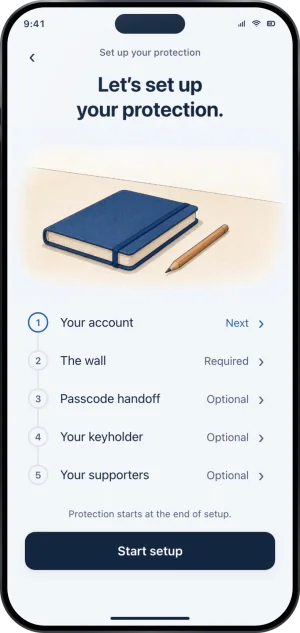
The hub, with five rows
The two rows it will not go without
Most of setup is leaveable. Two rows are not. You have to sign in with Apple, because an account with no identity is a lock anyone can walk away from and because the lock has to be able to come back on a new phone. And you have to walk the wall, because the wall is where each layer is raised or skipped, and Screen Time, its first layer, is the thing that actually holds the apps: Fold’em can only block what iOS lets it block.
The Screen Time step raises Apple's own permission dialog. Fold’em cannot answer it for you, cannot ask for the part of the permission that would reveal which apps you use, and does not ask for it.
The walk, in order
-
Your account
Sign in with Apple. The purchase happens before this, so the account is claimed after the charge rather than before it. From here on the lock belongs to the account and not to the app on this phone, which is what lets it come back after a reinstall.
-
Screen Time, and its passcode
The wall opens on Screen Time, because every layer after it leans on the permission. Right after the grant, the app asks whether someone you trust is with you, and walks the two of you through setting a Screen Time passcode that they keep. It cannot see whether a passcode was set, so it takes your answer. Not now leaves the passcode as a row on the hub until it is done or dismissed.
-
Gambling sites
This one asks iOS to add Fold’em’s DNS profile, then hands you to iOS Settings to turn it on, because no app can turn that on for you. Once iOS reports it enabled, gambling addresses stop resolving on the phone in every browser. Skipping it is an answer too, and the last screen says so in its own row.
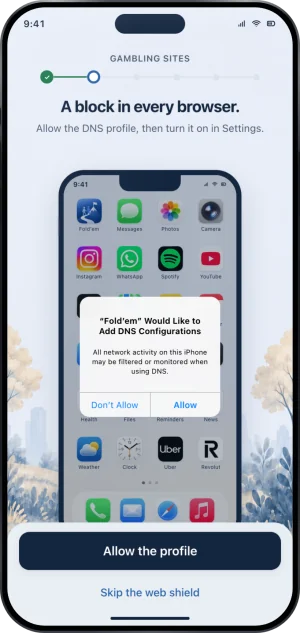
Gambling sites, with Apple's own dialog
-
The Games category
Casino and slot apps are filed under Games. Blocking the category catches those, installed now or later. Leave games open is an answer as well.
-
Gambling apps
Check this phone opens Apple's picker, where you search for each app by name, and the step then says how many you picked without ever learning which. A phone with nothing on it to pick counts as progress, not as a failure, and Set them up later is a real answer.
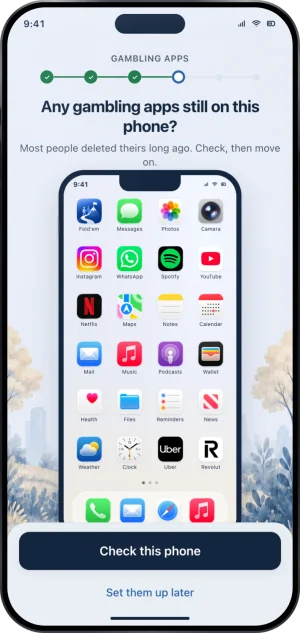
Gambling apps, checked through Apple's picker
-
The deletion delay
Optional, and off unless you turn it on. With it on, iOS refuses app deletion across the whole phone, Fold’em included, and turning it back off later starts a 72 hour wait. The step states that cost on the screen rather than in a footnote.
-
Lockdown
Here you choose the apps that stay open in a Lockdown run, or decide later. Choosing them turns on Only allow selected apps and Block app downloads; deciding later leaves both off. A run lasts anything from 30 minutes to 7 days, or comes on a schedule you set, and what Lockdown is covers the rest.
-
Your keyholder
Optional. Invite one person: they answer in the Fold’em app on their own phone, signed in to their own account, and you confirm it is them. Going without a keyholder is an explicit choice with its consequence stated: every request to end protection then waits 7 days, because there is nobody to decide it.
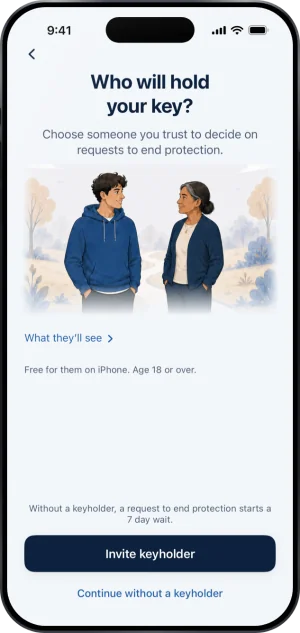
Naming a keyholder
-
Your supporters
Up to three people who stand with you. A supporter holds no key, is never asked about ending protection, and sees less than a keyholder does. Continuing without them for now is a real answer.
One beat before the end
After the supporters, one screen asks to allow notifications. Allow raises the real iOS prompt. Not now raises nothing at all, spends no prompt, and leaves it askable later from Settings. It is a beat and not a row: the hub still has five, and the slide never waits on it.
The slide is the moment anything is blocked
The last screen keeps the whole arrangement one tap away, under Review your protection, and how protection ends is written above the slide. A layer you skipped says so in its own row rather than being left out, so a thin setup cannot read as a complete one.
Sliding to start protection is what applies the shields. From that moment the layers you raised hold, and protection runs until it is ended. Your gambling free count is a separate thing: it counts from your last bet, the date you set beside your goal, not from this moment.
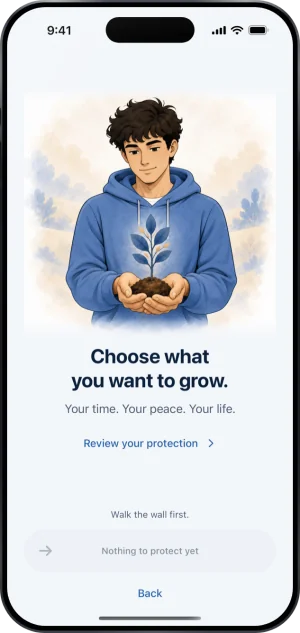
The last screen, with nothing to protect yet
What this does not do
Setup does not block anything before the slide, and there is no partial protection while you are part way through. It cannot grant Screen Time for you, cannot enable the DNS setting for you, and cannot pick an app on your behalf, because all three are permissions iOS gives to you and not to us. It cannot confirm that a passcode was handed over, either.
It also does not reach a second device. Everything here configures the one phone you are holding, and every layer it raises stops at that phone's edge.
Write to us and a person reads it. We answer within two working days, and we would rather hear the question twice than not at all.