

The full answer
It opens on a library of twelve recorded guides for before, during and after an urge, or on a breathing exercise if you chose that in Settings. Talk to someone reaches the people in your circle who have a phone number, the gambling helpline for your country, and Ask for support, which tells everyone in your circle at once. The Lockdown button at the top starts a run. Nothing on SOS can loosen protection, and I’m ready to leave closes it.
What the screen holds
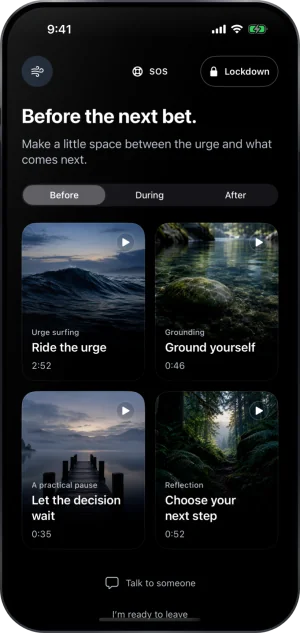
SOS is a full screen on a pure black canvas. It opens from the Need help right now? bar above the tab bar, from the SOS widget on your home screen, and from the block screen over a blocked app. It opens on the guide library, or on the breathing exercise if you chose that in Settings, under Preferences, then SOS.
The library holds twelve recorded guides, four for each of three moments: Before, During and After, picked at the top of the library. Each guide is a voice to follow, from under a minute to about three minutes long, and the voice keeps playing with the screen locked. The button at the top left swaps to the breathing exercise, ten slow breaths with a voice to follow, and back again. At the foot sit Talk to someone and I’m ready to leave, which closes the screen.
Talk to someone
Talk to someone opens a sheet titled Your people. Each person in your circle with a phone number saved has a row, and tapping one asks first, with Call, Text and Cancel, so nothing dials by itself. Gambling support opens the helpline for your country; where you can talk to someone covers it.
The last row, Ask for support, is there once someone in your circle has accepted. One tap sends it, with nothing in front of it, and it reaches your keyholder and every supporter at once, whatever their notification switches say. The row then reads Sent to, with their names, and they see Asked for support beside your name. If you finish a guide or the breathing within the hour, a second note tells them you made it through, unless they turned Milestones off. It can be sent once an hour.
Lockdown, at the top right
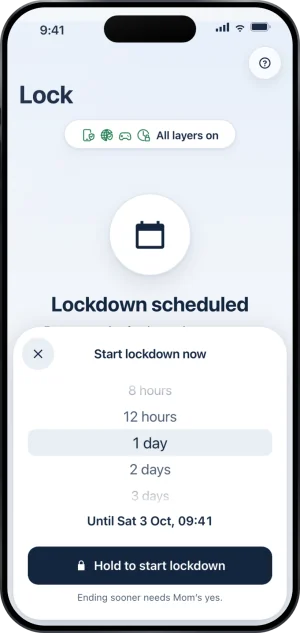
While protection is on, a Lockdown button sits at the top right. It opens the same sheet as Start lockdown now on the Lock tab: you choose how long, from 30 minutes to 7 days, and hold to start. A run holds your protection in place until it ends, and it can close every app but the ones you allowed, as your Advanced options on the Lock tab say. While a run holds, the button is filled and opens Extend lockdown instead, because from here a run can only get longer. Once a run starts or grows, SOS closes and you land on Today. Starting one tells nobody. Ending a run sooner is done from the Lock tab, with your keyholder’s yes or, without a keyholder, after a 3 hour wait; what Lockdown is covers it.
Opening it, and what is on it
-
Press SOS
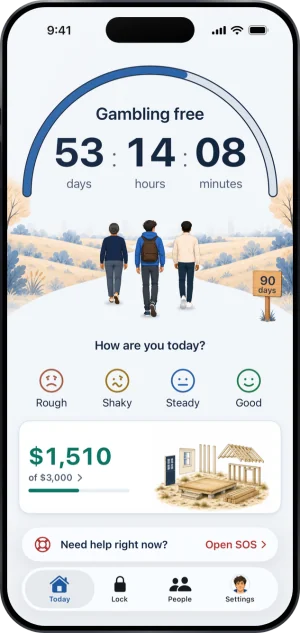
The Need help right now? bar sits above the tab bar at the top level of every tab, and one press of Open SOS opens the screen. The SOS widget and the block screen's escape open the same screen.
SOS, above the tab bar
-
Choose a moment, then a guide
Before, During or After, then tap a guide to start it. While it plays you have Back, mute, play and pause, and 15 seconds either way. When it ends, What would help you next? offers Stay a little longer, Talk to someone and I’m ready to leave.
The SOS screen
-
Talk to someone
Your people with a number, then Gambling support, then Ask for support, in that order.
-
Hold to start Lockdown
The sheet shows how long the run lasts, with 1 day chosen, and when it ends. Holding Hold to start lockdown starts it, and the line under it says how the run could end sooner.
The Lockdown sheet, before the hold
-
While a run holds
SOS keeps every other door. The Lockdown button is filled, and it opens Extend lockdown.
What this does not do
Nothing on SOS can loosen protection. Lockdown and its extension only tighten; nothing here ends your protection, ends a Lockdown run, opens an app you blocked or shortens a wait, and nothing on it is an input to ending protection. It does not dial for you: a call happens when you confirm it.
Write to us and a person reads it. We answer within two working days, and we would rather hear the question twice than not at all.
If you need someone now
Free, and not run by Fold’em.
- Call 1 800 697 3738National Problem Gambling Helpline, US. Call, text or chat.
- Call 1 866 531 2600ConnexOntario, Canada. For people in Ontario.Website for ConnexOntario
- Call 0800 1 37 27 00BZgA Check dein Spiel, GermanyWebsite for BZgA Check dein Spiel
- Call 1800 858 858Gambling Help Online, AustraliaWebsite for Gambling Help Online
- Call 0808 8020 133National Gambling Helpline, UKWebsite for the National Gambling Helpline
- Other countries
Gam-Anon is a community for people supporting someone who gambles.