

The full answer
Apple's Screen Time blocks the apps you picked, and an encrypted DNS resolver answers gambling addresses so the pages never load in any browser. Once protection has started there is no switch in the app that ends it: ending it takes a request and a wait of days. If someone holds your key, they answer it, and a yes starts a 48 hour wait; without a keyholder the request waits 7 days. The server decides when protection comes off and the phone applies what it is told.
Two layers block, and a third holds them on
The first layer is Apple's own. Fold’em asks Screen Time to shield the apps you picked in Apple's picker, so a blocked app does not open and Fold’em’s block screen appears instead. The apps are named by tokens the picker hands back, which is why setup asks you to search for each one by name: Fold’em blocks exactly the apps you chose and nothing else.
The second layer is site blocking. Fold’em publishes an encrypted DNS resolver at dns.foldem.app, and iOS is asked to use it for every request this phone makes. When an address is on its gambling list the resolver answers with nothing usable, so the page never loads, in Safari and in every other browser on the phone. The count it states for itself is 356,500 sites. Safari also carries a shorter list of ten named sportsbook and casino domains through Screen Time's own content filter, which is a separate mechanism with a separate look.
The third layer is not a blocker at all. It is your protection and, if you choose one, the person holding your key, and it is what stops the first two layers coming off on your own say so.
What stops you switching it off
Protection has no end date and no length to choose. It starts at the slide at the end of setup and runs until it is ended, and there is no control anywhere in the app that ends it on the spot.
Asking to end protection is a road rather than a button. You send a request. If someone holds your key, they can say no from their own app wherever they are. A keyholder cannot agree with a button. Agreement is meant to happen face to face: their Fold’em app shows an approval code and you scan it, standing with them, and the server refuses any agreement that does not arrive as that code. A 48 hour wait starts at that agreement, not when you asked, and a request your keyholder never answers closes after 7 days rather than opening anything. With no keyholder named there is nobody to decide, so the wait is 7 days from the request instead. Either road ends the same way: the request becomes ready, it is held for seven days, and if you never use it, it closes unused.
Every one of those decisions is made on Fold’em’s server. The phone learns what the server decided and applies the shields again, and an offline phone stays blocked. Three releases run on the phone itself, counted on its own clock: the optional Games layer's 72 hour wait, the end of a Lockdown run, and, with no keyholder, ending a run sooner once a 3 hour wait is over. Each one releases only what it covers, and none of them ends your protection.
Deleting Fold’em does not end protection. Sign in again on the same account and the lock comes back from the server exactly as it was. You can also turn on the optional deletion delay, which asks iOS to refuse app deletion on the whole phone while it is on; switching it back off starts its own 72 hour wait, and if someone holds your key, the wait shows in their history.
What you see while it holds
Today leads with your gambling free count, in days, hours and minutes, under an arc that fills toward the goal you chose. Under it, you and the people in your circle walk a path, drawn as your characters and seen from behind, toward a sign that names that goal in days. Then a daily check in, the money you kept, and the way into SOS. The layers that hold are on the Lock tab.
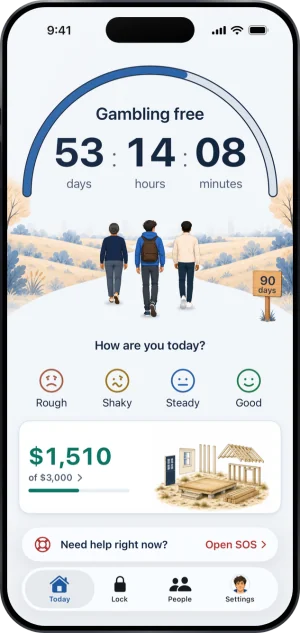
Today, at rest
What this does not do
Fold’em is a commitment device, not a treatment service, and nothing it says is medical advice. It watches nothing: your keyholder sees a short, fixed list of things and none of them is an app, a site or an amount of money. The only thing you type that reaches them is a note you add when you ask them to end a Lockdown sooner, and the money figure is worked out on the phone and never leaves it.
It also holds one phone. A second phone, a laptop, a betting shop and cash are all outside it, and no app on iOS can reach them. Anyone with the phone's passcode, time and intent can take a block that lives on one phone apart. What Fold’em adds is that, if someone holds your key, doing so is not quiet: the phone stops confirming protection, and their card for you shows it.
Write to us and a person reads it. We answer within two working days, and we would rather hear the question twice than not at all.