

The full answer
It is not an iPad app, a Mac app or an Android app, and the block it places holds on the one iPhone it was set up on. The phone also needs a passcode, because iOS hands Screen Time to no app without one, and an Apple Account, because setup signs you in with Apple and Apple takes the payment. Your keyholder and your supporters use the Fold’em app too, on their own iPhone and signed in to their own account, and a supporter account is free.
The floor, and why it sits at 26.5
The app is built for iPhone only. Every part of it, the app, the block screen and the widgets, declares the same device family, so there is no iPad build and no Mac build to install.
The minimum system version is iOS 26.5, and that floor is not arbitrary. iOS 26.5 added the one instruction that lets a block screen open the app that placed it, which is what makes the SOS button on the block screen work: you tap it on a sealed app and Fold’em opens, at SOS or with the call you chose for that button. On iOS 26.0 to 26.4 the only way to do that was to post a notification and hope you tapped it, which would have meant asking for a notification permission during setup for that single path. Raising the floor was the smaller cost, and the version was the current release when the decision was made.
What else the phone needs
- A device passcode. Screen Time is what holds the sealed apps, and iOS refuses to hand Screen Time to an app on a phone that has no passcode. There is no way around this from inside Fold’em; the setup step says so and sends you to Settings.
- An Apple Account. Signing in with Apple is one of the things setup will not let you past, and the subscription is sold and billed by Apple rather than by Fold’em.
- A network connection, at least some of the time. Your protection and your release are held on Fold’em’s server, and the phone applies what the server says rather than deciding for itself, so a phone that never reaches the network cannot be told that anything has changed. The shields themselves keep holding while it is offline.
Your keyholder and your supporters use the Fold’em app too, on their own iPhone, signed in to their own account, so their phone needs to meet the same iOS floor. Nobody can hold a key or support someone by email or through a web page. A supporter account is free: holding your key does not mean buying protection of their own.
Before you start
-
Check the iPhone and its version
Open iOS Settings, then General, then About, and read Software Version. If it is below 26.5, update before installing, because a phone under the floor cannot run the app at all.
-
Set a passcode if there is none
iOS Settings, then Face ID and Passcode. This requirement stops the Screen Time grant rather than the install, so it appears mid setup rather than at the App Store.
-
Have the Apple Account you use for purchases to hand
Setup asks you to sign in with Apple after the subscription is bought, as the first row of the setup hub, and that identity is what your protection is stored against. If you are returning to Fold’em, take Sign in on the first screen instead of starting fresh.
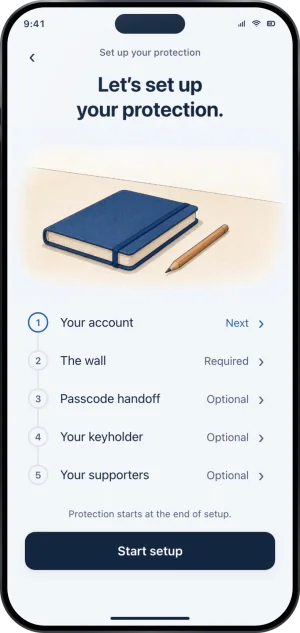
The setup hub, with the account first
What this does not do
Meeting the requirements does not widen what Fold’em reaches. It blocks on the one iPhone it is set up on, so a second phone, an iPad, a laptop, a shop and cash are all outside it, and no version of iOS changes that. There is no iPad or Mac version to install alongside it, and no Android app for a keyholder to be sent to. Fold’em also has no jailbreak requirement and no separate app to install: site blocking is a profile the app adds and you turn on in iOS Settings, and there is nothing to download from a web page.
Write to us and a person reads it. We answer within two working days, and we would rather hear the question twice than not at all.