

The full answer
Apple's Screen Time blocks the apps you picked, so a blocked app does not open; site blocking answers gambling addresses through an encrypted DNS profile, so those pages never load in any browser on the phone. Neither layer can be switched off from inside Fold’em while protection runs, because ending protection is decided on the server and the phone only applies what it is told. The block is held by the server and, if you choose one, the person holding your key, not by the phone.
The app layer
Fold’em asks Apple's Screen Time to shield a set of apps. The set comes from Apple's own picker, which hands back opaque tokens rather than names, so Fold’em blocks exactly the apps you selected and can never add one on your behalf. That is also why setup asks you to search for each app by name in Apple's picker, and Fold’em counts how many tokens came back without ever learning which app each one is.
No browser needs picking. Site blocking answers the phone's lookups for every browser on it, so Safari, Chrome, Firefox and Edge are all covered by the same layer.
Games is a layer of its own beside the apps. Blocking it asks Screen Time to shield every App Store game, including ones installed later, which catches a betting app filed under Games that no list could have named in advance.
The web layer, and three different outcomes
Three separate mechanisms can stop a gambling site, and each one looks different on screen. Knowing which one you are looking at is how you tell a working block from a broken one.
An address on the site list never loads. Site blocking is an encrypted DNS resolver Fold’em runs, and iOS is asked to use it for every request the phone makes. When a name matches, the resolver returns no usable address and the browser reports that the server could not be found. This is the layer that reaches every browser, and the count the app states for it is 356,500 sites.
A blocked site shows no Fold’em page. The resolver answers with the address for nowhere, so the browser reports that it cannot find the server; there is no wall for the web.
A website you added yourself shows Fold’em’s wall. Sites you pick are held by Screen Time as shielded web domains, and those are the ones that raise Fold’em’s own block screen with a line from the pack you chose.
What keeps both layers on
Nothing about either layer loosens on the phone's own decision. When you ask to end protection, the request goes to the server. If someone holds your key, they can say no from their own app wherever they are, and an agreement is a code: their Fold’em app shows it and you scan it, which is meant to happen in person. A request they deny is denied, and a request they never answer closes after 7 days rather than opening anything. With nobody named there is nobody to decide, so the request waits 7 days from the moment you sent it, and the layers hold either way.
After an agreement the server writes a 48 hour wait and holds it. When the wait ends the server marks the request ready and the phone still keeps every shield up until you end protection, so nothing opens by itself, and a ready request nobody uses is held for seven days and then closes. Every clock in a request to end protection runs on the server, which is why an offline phone stays blocked. The releases the phone runs on its own, the Games layer's 72 hour wait, the end of a Lockdown run and, with no keyholder, ending a run sooner after a 3 hour wait, never end your protection.
Where to check that both are holding
-
Open the Lock tab
Under the title, one pill shows four icons, one per layer, and turns red when Apps or Sites needs you. Tap it and Your protection opens: one tile per layer, Apps, Sites, Games and Deletion delay. A tile that needs you is red. Lockdown sits below it.
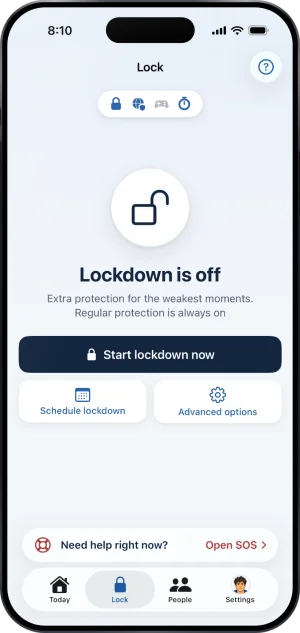
The Lock tab, every layer holding
-
Open Sites for the detail
When site blocking holds, the Sites page leads with 356,500 and the line gambling sites blocked in every browser and app. Under it sit the sites you added and Add a site. When it is off, the page says Site blocking is off, so gambling sites are open. and carries Set up; the Troubleshooting group has the scenario for each face.
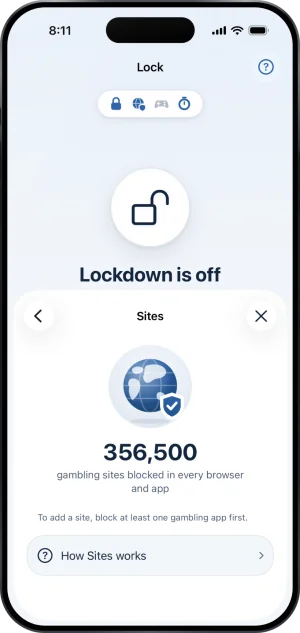
Sites, on
What this does not do
Neither layer reaches off this phone. A second phone, a laptop, a betting shop and cash are outside both of them, and no iOS app can block them. The app layer covers exactly the apps you picked plus the Games category if you blocked it, so a sportsbook filed under another App Store category and never added by hand is not covered.
Site blocking is a resolver and not a tunnel: no traffic is routed through Fold’em, and nothing you browse is sent anywhere. That also means another VPN answering the phone's lookups in front of it takes site blocking out of the path. The people in your circle are not told, because their card follows Screen Time and the app shield; your Lock tab and Today show it. The list site blocking answers from comes from public gambling lists, so a brand new domain can be missing until those lists catch up.
Write to us and a person reads it. We answer within two working days, and we would rather hear the question twice than not at all.