

The full answer
It shows where you are in setup, one short line and how far along you are, and nothing about your circle, your money or your blocks. It is an enhancement rather than a part of the lock: with Live Activities switched off for Fold’em, setup runs exactly the same, and the banner goes soon after setup is done.
What it shows
The banner carries the word Fold’em, the part of setup you are in, one short line and how far along you are, as a bar and a percentage. On a phone with a Dynamic Island the same facts appear there.
How far along is a proportion of the whole of setup rather than a count of steps left. What travels to the banner is that coarse position and one line, with no name, no email address and no token in it.
Why it can last longer than a sitting
The last part of setup is an act you can leave and come back to. Its rows are listed on a hub inside the app, and the banner is the same act seen from outside. When ten minutes pass without a step, its line changes to Come back to finish locking in.
When it starts, and when it stops
-
It holds your place
It appears with your first step past the opening screen, and every step you take after that updates the same banner in place rather than posting a second one.
-
It follows the hub
After you pay, setup becomes a hub you can return to at any time, with five rows: your account, the wall, the Screen Time passcode, your keyholder and your supporters. The banner tracks the same act, so the lock screen and the hub cannot disagree about where you are.
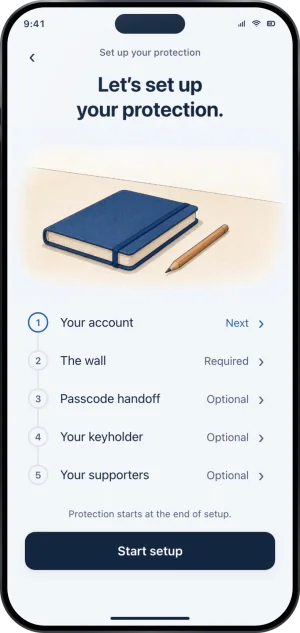
The hub the banner tracks
-
It ends when setup is done
When setup is finished the banner's line reads Locked in. Day one starts now. It stays for up to 15 minutes and then goes. If there turns out to be nothing to finish, because you signed in to an account that already holds protection, it is taken down at once.
What this does not do
It enforces nothing. It is not the block screen, it holds no shield, and no tap on it can skip a step or open an app that is sealed. It carries no date at all, no money figure, no keyholder name and nothing about your circle. It is an enhancement rather than a part of the lock: if Live Activities are switched off for Fold’em in iOS Settings, or the request fails, no banner appears and your setup is unaffected. It also goes by itself shortly after the seal, so there is nothing to dismiss afterwards.
Write to us and a person reads it. We answer within two working days, and we would rather hear the question twice than not at all.