

The full answer
This page is about the ones who do not. They see how you are doing and hear when it matters, and that is the whole role: no say in ending protection, no approval code in their app, nothing they are asked to decide. You can have up to three, they can be added at any point except while a request to end protection is open, a key is being handed over or an invitation is still waiting for an answer, and removed at any time, and the invite sheet names the difference in one line: they stand with you, never the key.
What the role is, and what it is not
Fold’em has exactly one keyholder and up to three other supporters. The keyholder is the person who answers if you ask to end protection. The others are there to know, and the invite sheet says so where you choose the role: Hold the key, "Ending protection needs their yes. One person." Stand with you, "They see how you are doing and hear when it matters. Never the key."
Everything else follows from that. A supporter gets no say in ending protection, cannot slow it down or speed it up, and is not asked anything. The approval code and the decision exist only in the app of the person who holds the key.
What a supporter sees
A supporter sees items 1 to 3 and 7 to 9 of what your keyholder sees; the rest is the keyholder’s, so a supporter never sees the ask itself; while a request is in its wait their row for you reads Can end it and when, and if protection ends it reads Protection ended.
Adding one
-
Share your code
The plus on People opens Invite a supporter: your QR code, your own code, and Share invite link through your own share sheet. With nobody holding your key yet, choose Stand with you first. However it travels, they open it in their app and say yes there, and nothing connects until you accept.
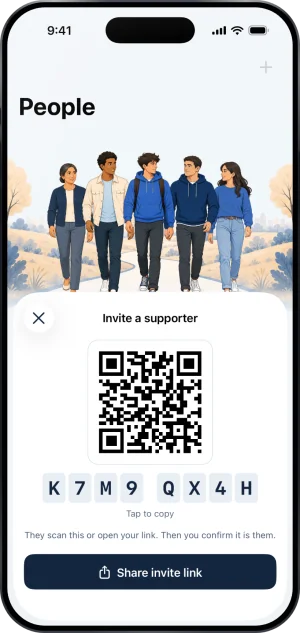
Inviting a supporter
-
Their yes, waiting for yours
When they say yes, their row comes first in Your circle, in red: Asked to support you. Tapping it opens their ask with Accept and Not now. An ask holds no place in your circle; whether a place is free is checked when you accept.
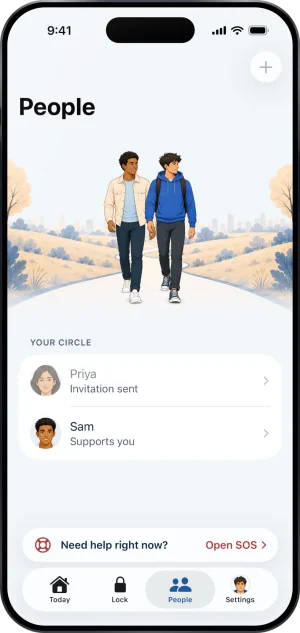
One still invited
The cap, and when the plus is off
Four places is the most, one keyholder and three supporters. With your keyholder in place and three supporters, the plus reads Your circle is full, and an ask that arrives anyway cannot be accepted: You already have three supporters. The plus is off in three other cases and says which: Not while a request to end protection is open, Not during a key handover, and An invitation is already pending while an ask waits for your answer.
When a supporter leaves
You can remove a supporter at any time: open them on People, tap Edit, then Remove supporter. It is instant, and from that moment they stop seeing your updates. A supporter can also step away themselves, in their own app, and that ends the connection and nothing else. Either way their place opens straight away.
What this does not do
A supporter cannot approve ending protection, cannot say no to it, and cannot cancel a wait that is running. What can reach your phone from them through Fold’em is a nudge from a fixed list or a payment reminder, and nothing else. Their leaving does not lengthen or shorten anything, because they carry none of the friction a keyholder does. They cannot see which apps or sites you blocked, anything you browse, any amount of money or anything you typed. And a supporter is not a keyholder in waiting: one person holds one place in your circle, and the key goes only to somebody who asks to hold it and whom you accept.
Write to us and a person reads it. We answer within two working days, and we would rather hear the question twice than not at all.